Windows 7 Forums Search
Welcome to Windows 7 Forums. Our forum is dedicated to helping you find solutions with any problems, errors or issues you are experiencing with Windows 7. The Windows 7 forum also covers news and updates and has an extensive Windows 7 tutorial section that covers a wide range of tips and tricks.


Windows 7 - "New Folder" Button in Explorer Toolbar

 
08-13-2009   #1


Windows 7 Ultimate


"New Folder" Button in Explorer Toolbar

Hello all,

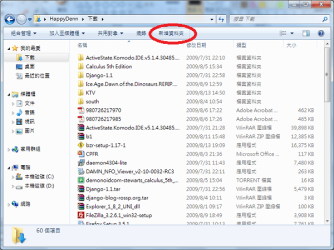
I'm new to the forum. Just installed Windows 7 Ultimate with Chinese MUI. Now here's the deal, recently but I'm not sure when, the "New Folder" button in Windows Explorer stopped working. In case I'm not clear with the description, I've included a picture of the button. Is there a way somehow to fix the button since I use it regularly? I think the button is just a link or something like that but not sure how to fix it.

Thanks for any help in advance.

Attached Thumbnails
"New Folder" Button in Explorer Toolbar-newfolder.png  

Last edited by HappyDenn; 08-13-2009 at 07:41 AM.. Reason: Change post title.
My System SpecsSystem Spec
08-13-2009   #2


Windows 7 Ultimate x64 SP1


Hello HappyDenn, and welcome to Seven Forums.

See if downloading and merging (double click) the Directory and Folder downloads at the link below to restore their default registry entries can fix this for you. You may need to restart the computer afterwards to apply.

Default File Type Associations - Restore

Hope this helps,
Shawn
My System SpecsSystem Spec
08-14-2009   #3


Windows 7 Ultimate


Hello Shawn,

Thank you for the reply. However I've found out that it was Bazaar that was causing the problem. After I uninstalled Bazaar everything's fine now. But I'll try to install Bazaar again and apply those 2 registry files and see what happens.
My System SpecsSystem Spec
.


08-15-2009   #4


Windows 7 Ultimate x64 SP1


How bazaar.

Thank you for posting back your findings and solution.
My System SpecsSystem Spec
08-16-2009   #5


Windows 7 Ultimate


Haha yea very bazaar indeed. Well after I installed Bazaar again (and loose the "New Folder" button functionality), the registry files didn't help. I guess it has something to do with their installer. I'm using the binaries now which don't cause the problem. For anyone who's having the same problem, check if you have Bazaar version control installed.

Thanks again, this is a helpful community!
My System SpecsSystem Spec
Reply

 "New Folder" Button in Explorer Toolbar problems?


Thread Tools


Similar Threads for: "New Folder" Button in Explorer Toolbar
Thread Forum
"Open Windows Explorer" on Start button is not working General Discussion
"New Folder" button in Windows 7 Pro (64) won't create a new folder??! General Discussion
Disabling more Aero animations and "X" button "glow" General Discussion
Disable "NEW FOLDER" link in explorer toolbar General Discussion
Start menu -> Shutdown Button - "shut down" and "sleep" Customization


All times are GMT -5. The time now is 02:02 AM.


Windows 7 Forums is an independent web site and has not been authorized,
sponsored, or otherwise approved by Microsoft Corporation.
"Windows 7" and related materials are trademarks of Microsoft Corp.
© Designer Media Ltd
  

1 2 3 4 5 6 7 8 9 10 11 12 13 14 15 16 17 18 19 20 21 22 23 24 25 26 27 28 29 30