| Windows 7: one machine attaches quickly to network, the other does not |
09 Jan 2012
|
| | |
one machine attaches quickly to network, the other does not I added a second machine to my home network, and do not know why they behave differently at boot up.
On machine A, after it gets to the desktop, the network icon show an internet connection in about one second. On machine B, after it gets to the desktop, the network icon has the yellow exclamation mark on it for about 10 seconds before it finally goes away and connects to the internet (startup folder is empty). They are both cable connected to the same DSL modem/router
Both machines are Windows 7 x64 ultimate, but B is a new build and I'm trying to get all the settings on B to be as fast as machine A, but am not sure what to try here. | My System Specs |
| OS Win7 ultimate CPU i5 750 running at 4.0Ghz (20x200mhz) Motherboard MSI P55-GD80 Memory 2 x 2GB G.Skill Ripjaws DDR2 2000 Graphics Card 2 x Sapphire 100255U Silent 4670 Monitor(s) Displays 1 x 37" Vizio 120HZ LCD, 3 x 20" Samsung 204B Screen Resolution 1 at 1280x768, 3 at 1280x960 Keyboard Adesson MCK-86 mini Mouse Belkin 5-button USB PSU SilverStone Nightjar ST45NF 450Watt Fanless Case no case, horizontal mount on custom platform Cooling Thermalright IFX-14, 2 x 140mm LED fans at 7v Hard Drives 1TB Seagate ST31000333AS Internet Speed 30mbs down Other Info Bose Companion 2 Series II PC speakers |
09 Jan 2012
|
| | Windows 7 Ultimate 64-bit SP1 3,650 posts New Jersey |
An exclamation mark is telling me something could be wrong with the card even though 10 seconds is fast. Did you do any troubleshooting in the properties of the network connection in device manager ? Give it a try, post back.
Do you leave your routers & switches on 24/7 or do you flip them on like I do only when you use your pcs ? | My System Specs | | Computer type PC/Desktop System Manufacturer/Model Number Custom Built by Me ! OS Windows 7 Ultimate 64-bit SP1 CPU Intel Core i5 3570k @ 4.2 GHz Motherboard MSI Z77A-G45 Memory 16GB Corsair Vengeance @ 1600 MHz 10-10-10-27 Graphics Card MSI GTX660 Twin Frozr3 2GB/OC Sound Card Realtek HD Monitor(s) Displays Dell 19" HP 23" Sony Bravia 40" Screen Resolution 1920 x 1080 Keyboard Fellowes KWD 855 Mouse Microsoft Wireless PSU Corsair HX750 80+Gold Case Corsair Vengeance Series C70 Gun Metal Black Cooling Cooler Master Hyper N520, Arctic Alumina Thermal Compound Hard Drives OCZ Vertex 4 119GB SSD
WD Black 500, Blue 500, Caviar SE 320 x2 Internet Speed Download 25.81 Mbps Upload 5.24 Mbps Antivirus MSE MBAM Browser Chromium, IE10 Other Info Boston BA745 2.1 Speaker System, Lightscribe Dual Layer DVD Burner |
09 Jan 2012
|
| | |
both machines have the same Realtek PCIe GBE Family Controller and both are running the same Realtek v7.48 driver. Their tcip setting are identical, and so are the settings within device manger > network adapter > properties. I just uninstalled and re-installed the driver to make sure that was not the issue.
This may have something to do with the 2WIRE router from at&t uverse, but its the only DSL router I have. Note that I am only talking about the internet connection here. The local network connection occurs instantly on both machines at boot up, but the internet connection is delayed on machine B. Its more like 20 seconds, than 10.
I almost never power down the router since it takes a good 5-10 minutes to reinitialize. I'll try it now though...... | My System Specs | | OS Win7 ultimate CPU i5 750 running at 4.0Ghz (20x200mhz) Motherboard MSI P55-GD80 Memory 2 x 2GB G.Skill Ripjaws DDR2 2000 Graphics Card 2 x Sapphire 100255U Silent 4670 Monitor(s) Displays 1 x 37" Vizio 120HZ LCD, 3 x 20" Samsung 204B Screen Resolution 1 at 1280x768, 3 at 1280x960 Keyboard Adesson MCK-86 mini Mouse Belkin 5-button USB PSU SilverStone Nightjar ST45NF 450Watt Fanless Case no case, horizontal mount on custom platform Cooling Thermalright IFX-14, 2 x 140mm LED fans at 7v Hard Drives 1TB Seagate ST31000333AS Internet Speed 30mbs down Other Info Bose Companion 2 Series II PC speakers |
09 Jan 2012
|
| | Windows 7 Ultimate SP1 (64 bit), Windows XP SP3, Linux Mint 14 MATE (64 bit) 1,849 posts Adelaide |
Identical? 
Quote: Originally Posted by johnhoh Their tcip setting are identical, and so are the settings within device manger > network adapter > properties. I just uninstalled and re-installed the driver to make sure that was not the issue. When you say identical, I hope you don't mean that they both have the same IP address.
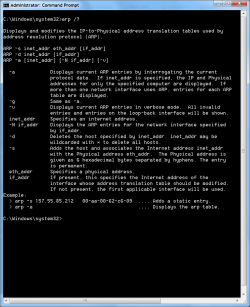
What happens if you execute the " arp -a -v" command in the " Command Prompt"? 
Last edited by lehnerus2000; 09 Jan 2012 at 09:38 PM..
Reason: Picture Added
| My System Specs | | System Manufacturer/Model Number n/a OS Windows 7 Ultimate SP1 (64 bit), Windows XP SP3, Linux Mint 14 MATE (64 bit) CPU AMD Phenom II x6 1055T, 2.8 GHz Motherboard ASRock 880GMH-LE/USB3 Memory 8GB DDR3 1333 G-Skill Ares F3-1333C9D-8GAO (4GB x 2) Graphics Card ATI Radeon HD6450 Sound Card Realtek? Monitor(s) Displays Samsung S23B350 Screen Resolution 1920x1080 Mouse Wired Optical Case Tower Hard Drives Western Digital 1 TB (SATA), Western Digital 1.5 TB (SATA), Western Digital 2 TB (SATA) Internet Speed DSL Other Info Ubuntu 10.04 (64 bit) replaced with Linux Mint 14 MATE (64 bit) - 2013-01-14
RAM & Graphics Card Upgraded - 2013-01-13
Monitor Upgraded - 2012-04-20
System Upgraded - 2011-05-21, 2010-07-14
HDD Upgraded - 2010-08-11, 2011-08-24 |
09 Jan 2012
|
| | Windows 7 Ultimate 64-bit SP1 3,650 posts New Jersey |
They can`t be identical, well they could but windows would tell you you have an ip address conflict and it wouldn`t get out til you changed it.
Make sure both your pcs are renewing their ip address everyday. Dynamic | My System Specs | | Computer type PC/Desktop System Manufacturer/Model Number Custom Built by Me ! OS Windows 7 Ultimate 64-bit SP1 CPU Intel Core i5 3570k @ 4.2 GHz Motherboard MSI Z77A-G45 Memory 16GB Corsair Vengeance @ 1600 MHz 10-10-10-27 Graphics Card MSI GTX660 Twin Frozr3 2GB/OC Sound Card Realtek HD Monitor(s) Displays Dell 19" HP 23" Sony Bravia 40" Screen Resolution 1920 x 1080 Keyboard Fellowes KWD 855 Mouse Microsoft Wireless PSU Corsair HX750 80+Gold Case Corsair Vengeance Series C70 Gun Metal Black Cooling Cooler Master Hyper N520, Arctic Alumina Thermal Compound Hard Drives OCZ Vertex 4 119GB SSD
WD Black 500, Blue 500, Caviar SE 320 x2 Internet Speed Download 25.81 Mbps Upload 5.24 Mbps Antivirus MSE MBAM Browser Chromium, IE10 Other Info Boston BA745 2.1 Speaker System, Lightscribe Dual Layer DVD Burner |
09 Jan 2012
|
| | |

Quote: Originally Posted by AddRAM They can`t be identical, well they could but windows would tell you you have an ip address conflict and it wouldn`t get out til you changed it.
Make sure both your pcs are renewing their ip address everyday. Dynamic yes they are different. Not to nitpick, but the settings are indeed identical in device manager though, because the ip address is not shown in device manager. (though resource details such as i/o range and memory range are different of course) | My System Specs | | OS Win7 ultimate CPU i5 750 running at 4.0Ghz (20x200mhz) Motherboard MSI P55-GD80 Memory 2 x 2GB G.Skill Ripjaws DDR2 2000 Graphics Card 2 x Sapphire 100255U Silent 4670 Monitor(s) Displays 1 x 37" Vizio 120HZ LCD, 3 x 20" Samsung 204B Screen Resolution 1 at 1280x768, 3 at 1280x960 Keyboard Adesson MCK-86 mini Mouse Belkin 5-button USB PSU SilverStone Nightjar ST45NF 450Watt Fanless Case no case, horizontal mount on custom platform Cooling Thermalright IFX-14, 2 x 140mm LED fans at 7v Hard Drives 1TB Seagate ST31000333AS Internet Speed 30mbs down Other Info Bose Companion 2 Series II PC speakers |
09 Jan 2012
|
| | Windows 7 Ultimate SP1 (64 bit), Windows XP SP3, Linux Mint 14 MATE (64 bit) 1,849 posts Adelaide |
Yes and No 
Quote: Originally Posted by AddRAM They can`t be identical, well they could but windows would tell you you have an ip address conflict and it wouldn`t get out til you changed it. Only if both machines are on, when you try to set it.
Does it make a difference, which order you attempt to connect to the Internet? | My System Specs | | System Manufacturer/Model Number n/a OS Windows 7 Ultimate SP1 (64 bit), Windows XP SP3, Linux Mint 14 MATE (64 bit) CPU AMD Phenom II x6 1055T, 2.8 GHz Motherboard ASRock 880GMH-LE/USB3 Memory 8GB DDR3 1333 G-Skill Ares F3-1333C9D-8GAO (4GB x 2) Graphics Card ATI Radeon HD6450 Sound Card Realtek? Monitor(s) Displays Samsung S23B350 Screen Resolution 1920x1080 Mouse Wired Optical Case Tower Hard Drives Western Digital 1 TB (SATA), Western Digital 1.5 TB (SATA), Western Digital 2 TB (SATA) Internet Speed DSL Other Info Ubuntu 10.04 (64 bit) replaced with Linux Mint 14 MATE (64 bit) - 2013-01-14
RAM & Graphics Card Upgraded - 2013-01-13
Monitor Upgraded - 2012-04-20
System Upgraded - 2011-05-21, 2010-07-14
HDD Upgraded - 2010-08-11, 2011-08-24 |
09 Jan 2012
|
| | |
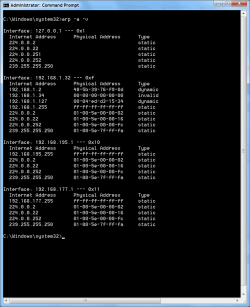
here are the arp -a -v results for each machine
192.168.1.64 is the ip address of my A machine. No idea what 192.168.1.69 is on machine A (something to do with homegroup?). Am curious as to what is 224.0.0.22 on machine B | My System Specs | | OS Win7 ultimate CPU i5 750 running at 4.0Ghz (20x200mhz) Motherboard MSI P55-GD80 Memory 2 x 2GB G.Skill Ripjaws DDR2 2000 Graphics Card 2 x Sapphire 100255U Silent 4670 Monitor(s) Displays 1 x 37" Vizio 120HZ LCD, 3 x 20" Samsung 204B Screen Resolution 1 at 1280x768, 3 at 1280x960 Keyboard Adesson MCK-86 mini Mouse Belkin 5-button USB PSU SilverStone Nightjar ST45NF 450Watt Fanless Case no case, horizontal mount on custom platform Cooling Thermalright IFX-14, 2 x 140mm LED fans at 7v Hard Drives 1TB Seagate ST31000333AS Internet Speed 30mbs down Other Info Bose Companion 2 Series II PC speakers |
09 Jan 2012
|
| | Windows 7 Ultimate 64-bit SP1 3,650 posts New Jersey |

Quote: Originally Posted by lehnerus2000 
Quote: Originally Posted by AddRAM They can`t be identical, well they could but windows would tell you you have an ip address conflict and it wouldn`t get out til you changed it. Only if both machines are on, when you try to set it. Well that`s what this is all about, yes ?
You have a .64 and .69 there so that`s right. Stupid ? but is all the cabling on pc B in good shape ?
Last edited by AddRAM; 09 Jan 2012 at 09:51 PM..
Reason: More info
| My System Specs | | Computer type PC/Desktop System Manufacturer/Model Number Custom Built by Me ! OS Windows 7 Ultimate 64-bit SP1 CPU Intel Core i5 3570k @ 4.2 GHz Motherboard MSI Z77A-G45 Memory 16GB Corsair Vengeance @ 1600 MHz 10-10-10-27 Graphics Card MSI GTX660 Twin Frozr3 2GB/OC Sound Card Realtek HD Monitor(s) Displays Dell 19" HP 23" Sony Bravia 40" Screen Resolution 1920 x 1080 Keyboard Fellowes KWD 855 Mouse Microsoft Wireless PSU Corsair HX750 80+Gold Case Corsair Vengeance Series C70 Gun Metal Black Cooling Cooler Master Hyper N520, Arctic Alumina Thermal Compound Hard Drives OCZ Vertex 4 119GB SSD
WD Black 500, Blue 500, Caviar SE 320 x2 Internet Speed Download 25.81 Mbps Upload 5.24 Mbps Antivirus MSE MBAM Browser Chromium, IE10 Other Info Boston BA745 2.1 Speaker System, Lightscribe Dual Layer DVD Burner |
09 Jan 2012
|
| | Windows 7 Ultimate SP1 (64 bit), Windows XP SP3, Linux Mint 14 MATE (64 bit) 1,849 posts Adelaide |

Quote: Originally Posted by AddRAM Well that`s what this is all about, yes ? Both machines don't have to be on when the setup is done (they could have been setup individually).
Last edited by lehnerus2000; 09 Jan 2012 at 09:57 PM..
Reason: Deleted Section
| My System Specs | | System Manufacturer/Model Number n/a OS Windows 7 Ultimate SP1 (64 bit), Windows XP SP3, Linux Mint 14 MATE (64 bit) CPU AMD Phenom II x6 1055T, 2.8 GHz Motherboard ASRock 880GMH-LE/USB3 Memory 8GB DDR3 1333 G-Skill Ares F3-1333C9D-8GAO (4GB x 2) Graphics Card ATI Radeon HD6450 Sound Card Realtek? Monitor(s) Displays Samsung S23B350 Screen Resolution 1920x1080 Mouse Wired Optical Case Tower Hard Drives Western Digital 1 TB (SATA), Western Digital 1.5 TB (SATA), Western Digital 2 TB (SATA) Internet Speed DSL Other Info Ubuntu 10.04 (64 bit) replaced with Linux Mint 14 MATE (64 bit) - 2013-01-14
RAM & Graphics Card Upgraded - 2013-01-13
Monitor Upgraded - 2012-04-20
System Upgraded - 2011-05-21, 2010-07-14
HDD Upgraded - 2010-08-11, 2011-08-24 one machine attaches quickly to network, the other does not problems? All times are GMT -5. The time now is 05:44 AM. | |