Windows 7 Forums


Windows 7: I do not want DL'ed photos to pop-up in a new window. How 2 change?

15 Jan 2012  
Fungud

Windows 7 Home Premium x64
22 posts
 
 
I do not want DL'ed photos to pop-up in a new window. How 2 change?

Simple enough, I hope.

When I download copyright free photos online, I 'save photo as'>> it shows where the photo is gonna go>> I hit the 'save' button>>>
it saves>>> Windows Photo Viewer POPS up and shows me what I just saved.

I don't want that last step.

Yet, see no way on WPV to stop automatic viewing of DL'ed photos.


Any help?

Thanks.
My System SpecsSystem Spec

15 Jan 2012  
lehnerus2000

Windows 7 Ultimate SP1 (64 bit), Windows XP SP3, Linux Mint 14 MATE (64 bit)
1,849 posts
Adelaide


How are you downloading the pictures?
  • IE9
  • FF9
  • Chrome
  • Other
Does it happen regardless of the "Save as" location?
My System SpecsSystem Spec
15 Jan 2012  
Fungud

Windows 7 Home Premium x64
22 posts


You know, I think you have a point.

I feel kinda stupid now I should have seen if the same thing happens with IE,
as I'm using Chrome and that seems to be the only one this happens with.

Thanks.

Guess I'll ask there, unless you have experience with Chrome and can offer a quick solution?
My System SpecsSystem Spec
.


15 Jan 2012  
lehnerus2000

Windows 7 Ultimate SP1 (64 bit), Windows XP SP3, Linux Mint 14 MATE (64 bit)
1,849 posts
Adelaide


Sorry.
I use FF.
My System SpecsSystem Spec
15 Jan 2012  
Fungud

Windows 7 Home Premium x64
22 posts


No problem, thanks for the advice.
My System SpecsSystem Spec
15 Jan 2012  
mickey megabyte

ultimate 64 sp1
8,636 posts


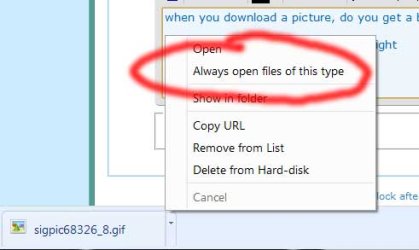
when you download a picture, do you get a bar at the bottom of the browser appear with details about the download?

if so, click on the little arrow to the right, and untick 'always open files of this type'

I do not want DL'ed photos to pop-up in a new window. How 2 change?-autoopen.jpg

my menu probably looks a bit different from yours as i use an odd version of chrome, but it's the same principle.
My System SpecsSystem Spec
Reply

 I do not want DL'ed photos to pop-up in a new window. How 2 change? problems?


Thread Tools


Similar help and support threads for: I do not want DL'ed photos to pop-up in a new window. How 2 change?
Thread Forum
Windows 7 - How do I change the order of my photos Music, Pictures & Video
Boot-up window change Customization
possible to change window General Discussion
You can't change the window colors? Customization
Change window background Customization


All times are GMT -5. The time now is 11:46 PM.


Windows 7 Forums is an independent web site and has not been authorized,
sponsored, or otherwise approved by Microsoft Corporation.
"Windows 7" and related materials are trademarks of Microsoft Corp.
© Designer Media Ltd