| Windows 7: Computer changed HD letter and will not Boot |
16 Jan 2012
|
| | |
Computer changed HD letter and will not Boot Hey All,
First of all, thank you for taking the time to read my nerve-racking conundrum, Im at witts end.
I was on my computer when I noticed that the file icons were not what I had picked. This was my first inclination that something was amiss. I opened a program I have used for years, File Type Manager, to fix it. Thats when things started getting screwey. Noton's "Sonar" didnt like the program and deleted it. Then I made the mistake of re-booting it, thinking I could just restore it from a previous point if it was too messed up.
Well, from then on I get the computer's splash screen and it goes strait to a black screen with a cursur in the upper left corner that does a whole bunch of nothing.
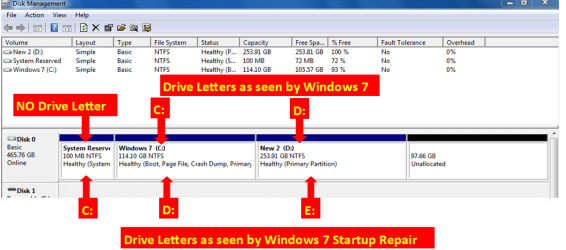
When I booted it off the Restore disk I see that it had my boot hard drive (I have only one) listed as D: instead of C:. Using the command prompt I was able to see that my hard drive appears to have all my data there, just under the wrong drive letter. The "C:" drive has nothing on it and is labeled as being SYSTEM RESERVED.
Now, I looked at it's BIOS and I cant assign a drive letter from there. I have tried to restore my computer from an earlier point from System Recovery Options. No change. It still looks at my Hard Drive as D:. It will not boot off the Hard Drive at all, so I cant even go into safe mode. I have seen similar problems to this elsewhere on the net, but have found no answers that would be applicable to my situation. I am dumbfounded and would appreciate any help or advice anybody is willing to give. I am about to loose it give my 'puter a terribly violent reprograming.
Thanks Alot,
Geneo713 | My System Specs |
| System Manufacturer/Model Number Acer OS Windows 7 64bit CPU w/Athlon II CPU Graphics Card Navidia Monitor(s) Displays Acer Hard Drives 1 TB |
16 Jan 2012
|
| | Windows 7 Ultimate X64 SP1 13,823 posts Mt. Crumpit/Whoville |
Likely your C: was renamed to D: because you booted from a DVD. The boot drive is, or should be, C:. Is that an ACER factory recover disk?
Oops! I forgot to say Welcome to Seven Forums!
EDIT: The C: is the boot partition Windows creates but it shouldn't have any drive lteer, but that may be from booting from the recover disk. Try booting to safe mode, repeatedly tapping F8 during reboot and choose Safe Mode with networking. Run a Norton full scan from there.
Antoher thing to try is the Startup Repair accessed in the same way as above. It may need 3 attempts to repair the boot partition. | My System Specs | | Computer type PC/Desktop System Manufacturer/Model Number Home Built Desktop By DataTech OS Windows 7 Ultimate X64 SP1 CPU Intel i5-2550K, Differing ~4.4-4.8GHz No built in GPU Motherboard ASUS P8Z68-V PRO/GEN3 Memory 16GB G.Skill Sniper 2133MHz 4x4GB Graphics Card ASUS ENGTX460 DirectCU/2DI/1GD5 GeForce GTX 460 Sound Card Onboard Realtek 5-1 Monitor(s) Displays Samsung P2570HD Screen Resolution 1920x1080 Keyboard Old, beat-up Dell USB From 10 yrs Ago Mouse Gigabyte m6900 wired PSU Corsair HX650W Case Inwin Dragon Rider Cooling Hyper 212 EVO w/two Noctua fans, push-pull, @1300 RPM Hard Drives Crucial M4 128GB for OS, 750GB Seagate MomentusXT for data, 500GB Seagate Constellation for storage Internet Speed 8-19 Mbs down, 3-4 Mbs up Comcast Cable Antivirus Norton Internet Security Browser IE 9, Opera when needed Other Info 4 case fans, LG BluRay-RE, ASUS DVD-RW, Mr. Fusion power generator with flux capacitor, 1.21 gigawatts. |
16 Jan 2012
|
| | Windows 7 Pro with SP1 32bit 1,162 posts Gurgaon, India |
I think the Drive letters can be changed using a Partition Manager Boot Disk. Have you tried doing that and renaming your original C drive as C and making it active? | My System Specs | | System Manufacturer/Model Number Custom Built OS Windows 7 Pro with SP1 32bit Motherboard Intel D845GVS1 X86-based PC Memory 2 gigs of RAM Graphics Card Intel(R) 82845G/GL/GE/PE/GV Graphics Controller Sound Card Realtek AC'97 Audio Monitor(s) Displays Samsung SyncMaster 931BF Black 19" LCD Monitor Screen Resolution 1280X960 Keyboard COMPAQ Standard PS/2 Keyboard Mouse iBall Laser Precise Speedster Hard Drives 1. SAMSUNG SP0822N ATA Device ~ 80 GigaBytes
2. Seagate FreeAgent Go USB Device ~ 500 GigaBytes Internet Speed 4 mb/sec |
17 Jan 2012
|
| | |
Thanks for the Welcome and the help. Been lurking here every once in a while when the stuff hits the fan, technichly speaking, with my 'puter. Usualy get the problem resolved from someone else's similar problem, but this one has me stumped. I can not get it into safe mode as it will not even try to boot from my hard drive. Ive tried mashing F8 during startup, and get no response. I used startup repair once I booted using recovery disks (not acer rec disks, they gave me nothing) and the startup repair said everything was fine and asked if I had added any new USB perifirals (which I had not). I just tried it a third time and still get "Startup Repair could not detect a problem"
The only way I can get it to boot at all its with the Boot Recovery disk and when I goto the Command prompt in system recovery options, it starts me out in
X:\windows\system32> (with X: labeled Boot)
I can goto D: and see what looks like all my HD data, and when I goto C: it very difenitly labels it as C: "C is SYSTEM RESERVED"
I am using a program called VMware, that makes a virtual XP OS and virtual partition when in use, but I dont think that this is the problem as it is not an accual partition. But I am not rulling anything out. Any Ideas?
Thanks Again,
Geneo713 
Quote: Originally Posted by Britton30
Likely your C: was renamed to D: because you booted from a DVD. The boot drive is, or should be, C:. Is that an ACER factory recover disk?
Oops! I forgot to say Welcome to Seven Forums!
EDIT: The C: is the boot partition Windows creates but it shouldn't have any drive lteer, but that may be from booting from the recover disk. Try booting to safe mode, repeatedly tapping F8 during reboot and choose Safe Mode with networking. Run a Norton full scan from there.
Antoher thing to try is the Startup Repair accessed in the same way as above. It may need 3 attempts to repair the boot partition. | My System Specs | | System Manufacturer/Model Number Acer OS Windows 7 64bit CPU w/Athlon II CPU Graphics Card Navidia Monitor(s) Displays Acer Hard Drives 1 TB |
17 Jan 2012
|
| | |
Thanks for the Help,
No I havent tried that, I do not have a partition manager boot disk. It is reading a drive called C: at the moment, would it refuse to name D: (my boot and only HD) C: as I already have a volume named that? Where could I get a partition manager boot disk? I am not familiar with them.
Geneo713 
Quote: Originally Posted by wanchoo I think the Drive letters can be changed using a Partition Manager Boot Disk. Have you tried doing that and renaming your original C drive as C and making it active? | My System Specs | | System Manufacturer/Model Number Acer OS Windows 7 64bit CPU w/Athlon II CPU Graphics Card Navidia Monitor(s) Displays Acer Hard Drives 1 TB |
17 Jan 2012
|
| | ME/XP/Vista/Win7 10,432 posts uk Hampshire |
Quote: The only way I can get it to boot at all its with the Boot Recovery disk and when I goto the Command prompt in system recovery options, it starts me out in
X:\windows\system32> (with X: labeled Boot)
I can goto D: and see what looks like all my HD data, and when I goto C: it very difenitly labels it as C: "C is SYSTEM RESERVED" The drive letters are OK.
I would Check the hard drive with the manufacturer's diagnostic tools. Hard Drive Diagnostics Tools and Utilities (Storage) - TACKtech Corp. HD Diagnostic | My System Specs | | |
17 Jan 2012
|
| | Windows 7 Pro with SP1 32bit 1,162 posts Gurgaon, India |
There seems to be no Active, Primary Drive. Try booting from System Reserved Drive if you can if booting from C fails.
There is an excellent shareware boot disk of Acronis Disk Director Suite and another free one of Partition Wizard that too is excellent. Both programs can be downloaded from the Net. 
Quote: Originally Posted by theog Quote: The only way I can get it to boot at all its with the Boot Recovery disk and when I goto the Command prompt in system recovery options, it starts me out in
X:\windows\system32> (with X: labeled Boot)
I can goto D: and see what looks like all my HD data, and when I goto C: it very difenitly labels it as C: "C is SYSTEM RESERVED" The drive letters are OK. Attachment 193602
I would Check the hard drive with the manufacturer's diagnostic tools. Hard Drive Diagnostics Tools and Utilities (Storage) - TACKtech Corp. HD Diagnostic | My System Specs | | System Manufacturer/Model Number Custom Built OS Windows 7 Pro with SP1 32bit Motherboard Intel D845GVS1 X86-based PC Memory 2 gigs of RAM Graphics Card Intel(R) 82845G/GL/GE/PE/GV Graphics Controller Sound Card Realtek AC'97 Audio Monitor(s) Displays Samsung SyncMaster 931BF Black 19" LCD Monitor Screen Resolution 1280X960 Keyboard COMPAQ Standard PS/2 Keyboard Mouse iBall Laser Precise Speedster Hard Drives 1. SAMSUNG SP0822N ATA Device ~ 80 GigaBytes
2. Seagate FreeAgent Go USB Device ~ 500 GigaBytes Internet Speed 4 mb/sec |
17 Jan 2012
|
| | |
Thanks for all the help guys, but I cant seem to get anywhere with this.
@Theog - I downloaded the diagnostic tools for my Western Digital HD, but I cant get any of them to work through the command prompt, nor are they bootable. I tried the Windows and DOS versions and neither woud work. I get "subsystem needed to support the image type is not present" from the Windows version.
@Wanchoo - I have C: drive listed as primary boot (& only HD) in BIOS and it will not boot from it, When I check it with command prompt, there is nothing there, but it is labeled as System Reserved. In the System Recovery Options screen after a Recovery Disk boot it has my OS listed as "Location-(D Primary Hard Drive" Is there a way to boot from it. I havent been able to do much with only the Recovery boot disk to boot from. I cant even use safe mode. It goes strait from the Acer splash screen to blank & blinking cursur.
So that I am up with what is happening, my only hard drive that I have, always used as c: and booted from has no data. It is listed as system reserved, and what I see in comand prompt as D drive, with all my data, but not being booted from is my C: drives data? And is supposed to be that way? Could it be trying to boot from C: and not finding anythng because it is looking at the c: drive with no data? | My System Specs | | System Manufacturer/Model Number Acer OS Windows 7 64bit CPU w/Athlon II CPU Graphics Card Navidia Monitor(s) Displays Acer Hard Drives 1 TB |
17 Jan 2012
|
| | ME/XP/Vista/Win7 10,432 posts uk Hampshire |
Quote: @Theog - I downloaded the diagnostic tools for my Western Digital HD, but I cant get any of them to work through the command prompt, nor are they bootable. I tried the Windows and DOS versions and neither woud work. I get "subsystem needed to support the image type is not present" from the Windows version. Download the bootable DOS ISO & burn to CD. | My System Specs | | |
17 Jan 2012
|
| | Windows 7 Pro with SP1 32bit 1,162 posts Gurgaon, India |
Please read the thread "Windows 7 Forums > Windows 7 help and support > Installation & Setup » BOOTMGR is Missing". The Thread Starter was unable to boot till he tried to boot from the System Reserved Partition. Did you try that?
And finally when all avenues seem closed then the last option remaining is to start all over again by deleting all the partitions and then repartitioning the HD and reinstalling Windows 7 from scratch. This never fails if all the hardware in the computer is functioning properly. 
Quote: Originally Posted by Geneo713 Thanks for all the help guys, but I cant seem to get anywhere with this.
@Wanchoo - I have C: drive listed as primary boot (& only HD) in BIOS and it will not boot from it, When I check it with command prompt, there is nothing there, but it is labeled as System Reserved. In the System Recovery Options screen after a Recovery Disk boot it has my OS listed as "Location-(D Primary Hard Drive" Is there a way to boot from it. I havent been able to do much with only the Recovery boot disk to boot from. I cant even use safe mode. It goes strait from the Acer splash screen to blank & blinking cursur.
So that I am up with what is happening, my only hard drive that I have, always used as c: and booted from has no data. It is listed as system reserved, and what I see in comand prompt as D drive, with all my data, but not being booted from is my C: drives data? And is supposed to be that way? Could it be trying to boot from C: and not finding anythng because it is looking at the c: drive with no data? | My System Specs | | System Manufacturer/Model Number Custom Built OS Windows 7 Pro with SP1 32bit Motherboard Intel D845GVS1 X86-based PC Memory 2 gigs of RAM Graphics Card Intel(R) 82845G/GL/GE/PE/GV Graphics Controller Sound Card Realtek AC'97 Audio Monitor(s) Displays Samsung SyncMaster 931BF Black 19" LCD Monitor Screen Resolution 1280X960 Keyboard COMPAQ Standard PS/2 Keyboard Mouse iBall Laser Precise Speedster Hard Drives 1. SAMSUNG SP0822N ATA Device ~ 80 GigaBytes
2. Seagate FreeAgent Go USB Device ~ 500 GigaBytes Internet Speed 4 mb/sec Computer changed HD letter and will not Boot problems? All times are GMT -5. The time now is 04:52 AM. | |