|
Welcome to Windows 7 Forums. Our forum is dedicated to helping you find solutions with any problems, errors or issues you are experiencing with Windows 7. The Windows 7 forum also covers news and updates and has an extensive Windows 7 tutorial section that covers a wide range of tips and tricks.
Windows 7 - mmc windows display problem |
01-17-2012
|
#1 | | |
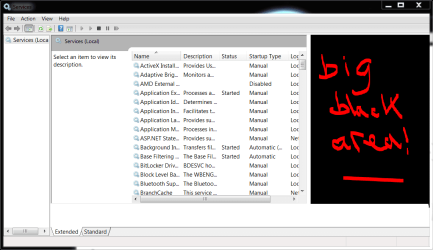
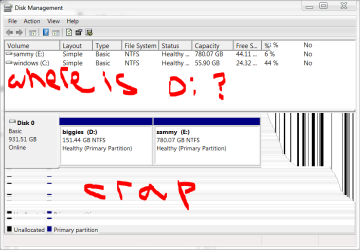
mmc windows display problem this is a problem i noticed since my latest build a few months ago - i keep meaning to post about it here, but just haven't got around to it yet.
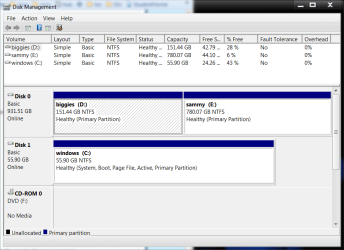
anyway, when i try to resize my MMC windows, such as services or disk management, they do not display properly.
sometimes the services window 'repairs' itself if i minimise then restore, but my disk mgmt window doesn't.
any one else have this problem, and/or know of a fix?
i've tried sfc, not sure what to do now...everything else seems to run fine - it's only these windows that are 'corrupted' if i try to resize them.
| My System Specs | | System Manufacturer/Model Number mickey megabyte 1234 OS ultimate 64 sp1 CPU i5 2500K 3.3@4.2GHz Motherboard MSI P67A-GD53 Memory 8 gigs GSkill Ripjaws 1600 Graphics Card amd hd6950 Sound Card creative x-fi gamer Monitor(s) Displays samsung 24" Screen Resolution 1920x1080 Keyboard saitek eclipse ii Mouse logitech g3 PSU antec 550 Case antec three hundred Cooling i'm a cooling fan Hard Drives ocz vertex 2e 60 gig, samsung f3 1tb, buffalo 2tb ext Internet Speed about 4 Mbps Other Info i love win7 |
01-17-2012
|
#2 | | Windows 7 Ultimate x64 SP1 |
Hello Mickey,
It looks like it may be some sort graphical issue possibly caused by corrupted video drivers. You might see if uninstalling your video drivers completely, then reinstalling them may help. | My System Specs | | System Manufacturer/Model Number Self built custom OS Windows 7 Ultimate x64 SP1 CPU Intel i7-980X 3.3 Ghz (3.48 Ghz OC'd) Motherboard ASUS P6X58D Premium Memory 12 GB (2GBx6) DDR3 PC3-16000 2000 MHz Kingston HyperX Graphics Card Sapphire HD5870 Eyefinity 6 2GB Sound Card Realtek HD Audio ALC889 Integrated Chip Monitor(s) Displays 3x 27" Asus VE278Q Screen Resolution 1920x1080 Keyboard Logitech Cordless Desktop MX 5500 Revolution Mouse Logitech Cordless Desktop MX 5500 Revolution PSU OCZ Series Gold OCZZ1000M 1000W Case Corsair Obsidian 800D Cooling Thermalright Ultra 120 Extreme Copper CPU heat sink w/120 MM Hard Drives 160GB OCZ RevoDrive X2
** 2 x 1TB Samsung HDD HD154UI SATA Internet Speed 50 Mb/s Download and 2 Mb/s Upload Other Info Microsoft LifeCam Cinema
** Lite-On iHBS212 12x BD Writer
** Samsung CLX-3175FW Printer
** Netgear WNDR3800 Router
** Motorola SBG6580 Cable Modem
** 2x APC Back-UPS XS 1500 |
01-17-2012
|
#3 | | |
thanks for the suggestion shawn, but it didn't work.
i've had three or four different drivers since noticing this problem a few months ago - it's most odd that the glitch only occur in these programs when i resize the windows and nowhere else.
i've tried sfc /scannow, uninstalling my custom uxthemes, uninstalling graphics drivers, installing all the optional windows updates...
it's not a serious problem, as i rarely alter my services any more and i have other software to mess with partitions, but it's troubling having a problem and not knowing how to solve it - especially as i have access to all the great minds here at sevenforums! | My System Specs | | System Manufacturer/Model Number mickey megabyte 1234 OS ultimate 64 sp1 CPU i5 2500K 3.3@4.2GHz Motherboard MSI P67A-GD53 Memory 8 gigs GSkill Ripjaws 1600 Graphics Card amd hd6950 Sound Card creative x-fi gamer Monitor(s) Displays samsung 24" Screen Resolution 1920x1080 Keyboard saitek eclipse ii Mouse logitech g3 PSU antec 550 Case antec three hundred Cooling i'm a cooling fan Hard Drives ocz vertex 2e 60 gig, samsung f3 1tb, buffalo 2tb ext Internet Speed about 4 Mbps Other Info i love win7 |
01-17-2012
|
#4 | | |
To me it looks like another case of corrupted windows files. Do you have a disc image to revert to ? | My System Specs | | |
01-17-2012
|
#5 | | |
thanks, but if i had corrupted windows files, wouldn't sfc /scannow have found them?
the problem started right after a clean install of a slipstreamed sp1 on a new machine. i don't really want to do a fresh reinstall just for this little problemette.
i was hoping somebody would know exactly waht the problem was and suggested a quick'n'easy fix.
dream on, mickey.... | My System Specs | | System Manufacturer/Model Number mickey megabyte 1234 OS ultimate 64 sp1 CPU i5 2500K 3.3@4.2GHz Motherboard MSI P67A-GD53 Memory 8 gigs GSkill Ripjaws 1600 Graphics Card amd hd6950 Sound Card creative x-fi gamer Monitor(s) Displays samsung 24" Screen Resolution 1920x1080 Keyboard saitek eclipse ii Mouse logitech g3 PSU antec 550 Case antec three hundred Cooling i'm a cooling fan Hard Drives ocz vertex 2e 60 gig, samsung f3 1tb, buffalo 2tb ext Internet Speed about 4 Mbps Other Info i love win7 |
01-17-2012
|
#6 | | |
I don't really want to do a fresh reinstall just for this little problemette.
Why not, it`s fun.
Maybe it`s something to do with the disc you used. | My System Specs | | |
01-17-2012
|
#7 | | Windows 7 Ultimate x64 SP1 |
Mickey,
Does it do this in any other user account to see if it may just be something wrong in your account? | My System Specs | | System Manufacturer/Model Number Self built custom OS Windows 7 Ultimate x64 SP1 CPU Intel i7-980X 3.3 Ghz (3.48 Ghz OC'd) Motherboard ASUS P6X58D Premium Memory 12 GB (2GBx6) DDR3 PC3-16000 2000 MHz Kingston HyperX Graphics Card Sapphire HD5870 Eyefinity 6 2GB Sound Card Realtek HD Audio ALC889 Integrated Chip Monitor(s) Displays 3x 27" Asus VE278Q Screen Resolution 1920x1080 Keyboard Logitech Cordless Desktop MX 5500 Revolution Mouse Logitech Cordless Desktop MX 5500 Revolution PSU OCZ Series Gold OCZZ1000M 1000W Case Corsair Obsidian 800D Cooling Thermalright Ultra 120 Extreme Copper CPU heat sink w/120 MM Hard Drives 160GB OCZ RevoDrive X2
** 2 x 1TB Samsung HDD HD154UI SATA Internet Speed 50 Mb/s Download and 2 Mb/s Upload Other Info Microsoft LifeCam Cinema
** Lite-On iHBS212 12x BD Writer
** Samsung CLX-3175FW Printer
** Netgear WNDR3800 Router
** Motorola SBG6580 Cable Modem
** 2x APC Back-UPS XS 1500 |
01-18-2012
|
#8 | | Windows 7 Ultimate SP1 (64 bit), Windows XP SP3, Ubuntu 10.04 |
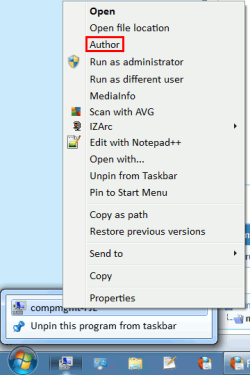
Author This doesn't solve your glitch, but it may be a work-around.
Have you tried the " Author" option (you can set views, starting location and window size).  I hate the way the "mmc" always starts so small, so I've "authored" mine. | My System Specs | | System Manufacturer/Model Number n/a OS Windows 7 Ultimate SP1 (64 bit), Windows XP SP3, Ubuntu 10.04 CPU AMD Phenom II x6 1055T, 2.8 GHz Motherboard ASRock 880GMH-LE/USB3 Memory 4 GB DDR3 1333 G-Skill Graphics Card NVIDIA GeForce 8500 GT Sound Card Realtek? Monitor(s) Displays Analog Silicon Graphics Screen Resolution 1600x1200 Mouse Wired Optical Case Tower Hard Drives Western Digital 1 TB (SATA), Western Digital 1.5 TB (SATA) Internet Speed DSL Other Info System Upgraded - 2011-05-21, 2010-07-14
HDD Upgraded - 2010-08-11 |
01-18-2012
|
#9 | | |
thanks shawn, the problem wasn't there with a new account. time to investigate a bit more...
helen, how do you do the authoring thing? if i can open the windows at a larger size, that could be a good workaround. i've searched here for 'author context', but no useful results. | My System Specs | | System Manufacturer/Model Number mickey megabyte 1234 OS ultimate 64 sp1 CPU i5 2500K 3.3@4.2GHz Motherboard MSI P67A-GD53 Memory 8 gigs GSkill Ripjaws 1600 Graphics Card amd hd6950 Sound Card creative x-fi gamer Monitor(s) Displays samsung 24" Screen Resolution 1920x1080 Keyboard saitek eclipse ii Mouse logitech g3 PSU antec 550 Case antec three hundred Cooling i'm a cooling fan Hard Drives ocz vertex 2e 60 gig, samsung f3 1tb, buffalo 2tb ext Internet Speed about 4 Mbps Other Info i love win7 |
01-18-2012
|
#10 | | Windows 7 Ultimate SP1 (64 bit), Windows XP SP3, Ubuntu 10.04 |
Helen? 
Quote: Originally Posted by mickey megabyte helen, how do you do the authoring thing? if i can open the windows at a larger size, that could be a good workaround. i've searched here for 'author context', but no useful results. Helen? 
Was that question for me?
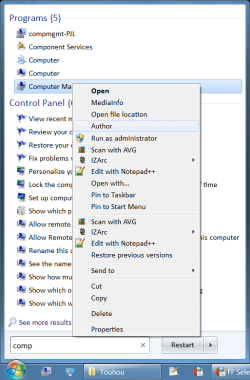
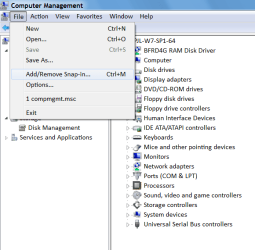
I use " Computer Management".
1 - Search for " Computer Management".
2 - Right click on the icon.
3 - Choose " Author".
4 - Load the modules that you want. 
5 - Configure them (e.g. columns, width, etc.).
6 - Resize the main window (e.g. maximize).
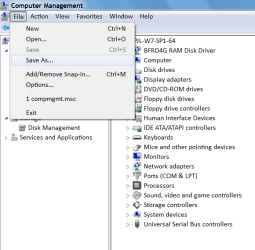
7 - Choose " Save As" from the " File" menu and enter a name. 
8 - Create a shortcut to your new " Computer Management" console (for easy access).
9 - Pin it to your " Start Menu" or " Taskbar" (see the first picture above. I have pinned it to position 1).
The procedure is basically the same for " mmc.exe".
There is no " Author" option for " mmc.exe".
Simply run it and configure it the way you want and then choose " Save As" and name it.
Last edited by lehnerus2000; 01-18-2012 at 08:12 AM..
Reason: Clarification
| My System Specs | | System Manufacturer/Model Number n/a OS Windows 7 Ultimate SP1 (64 bit), Windows XP SP3, Ubuntu 10.04 CPU AMD Phenom II x6 1055T, 2.8 GHz Motherboard ASRock 880GMH-LE/USB3 Memory 4 GB DDR3 1333 G-Skill Graphics Card NVIDIA GeForce 8500 GT Sound Card Realtek? Monitor(s) Displays Analog Silicon Graphics Screen Resolution 1600x1200 Mouse Wired Optical Case Tower Hard Drives Western Digital 1 TB (SATA), Western Digital 1.5 TB (SATA) Internet Speed DSL Other Info System Upgraded - 2011-05-21, 2010-07-14
HDD Upgraded - 2010-08-11 mmc windows display problem problems? All times are GMT -5. The time now is 02:03 AM. |  |