| Windows 7: Windows 7 will not goto sleep automatically - sometimes! |
18 Jan 2012
|
| | Windows 7 Home Premium 64-bit 52 posts |
Windows 7 will not goto sleep automatically - sometimes! For some reason one oif my Windows 7 systems will (sometimes) not go to sleep automatically (after the set delay time). It seems if I go in and change something it will work for awhile and then stop working for no apparent reason. The main issue is using WHS 2011 which wakes all the computers on the network in the middle of the night and does it's thing and then then the computers go back to sleep after the set delay untill needed in the morning.
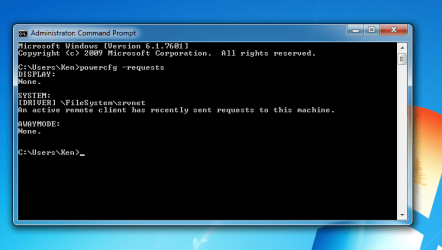
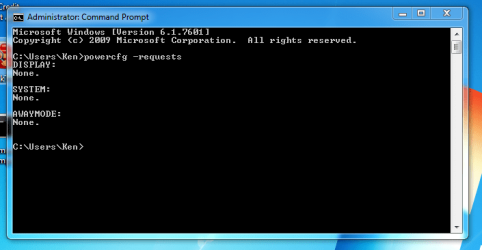
Every time I find this computer not sleeping I run powercfg -requests and every time there is a request - see attached screen capture. On the other hand every time is is working properly there are no open requests. I think this is the issue but I need help trying to figure out who has the request and what to do about it. | My System Specs |
| OS Windows 7 Home Premium 64-bit CPU 2600K Motherboard Asus P8Z68-V pro Memory 8 GB Corsair Vengence C8 Graphics Card MSI 560 TI Sound Card Intel on MB Monitor(s) Displays Samsung 2433 Screen Resolution 1920X1080 Keyboard Logitech Wireless Mouse Logitech Wireless PSU SeaSonic X850 Case Corsair 600T Cooling Corsair H60 Hard Drives 120 GB Mushkin Deluxe SATA III SSD
2 - WD 300 GB Raptors Internet Speed Cable |
23 Jan 2012
|
| | Windows 7 Home Premium 64-bit 52 posts |
After trying almost every solution posted on the various forums that solve the Windows 7 no-auto sleep issue (with zero success) I finally took a closer look at the power settings in the one Windows 7 machine that had no problems going back to sleep after the set delay period. The one thing that I noticed was the "Turn off hard disk after" was set to "Never". I changed the machine that was having all the auto sleep issues to "Never" and it now behaves like it should! Maybe this is just another solution for my particular machine and will not solve other people's auto sleep problems but it works for me! Since this thread seems to be inactive I probably won't get any feedback but I am curious to see if this works for anybody else. | My System Specs | | OS Windows 7 Home Premium 64-bit CPU 2600K Motherboard Asus P8Z68-V pro Memory 8 GB Corsair Vengence C8 Graphics Card MSI 560 TI Sound Card Intel on MB Monitor(s) Displays Samsung 2433 Screen Resolution 1920X1080 Keyboard Logitech Wireless Mouse Logitech Wireless PSU SeaSonic X850 Case Corsair 600T Cooling Corsair H60 Hard Drives 120 GB Mushkin Deluxe SATA III SSD
2 - WD 300 GB Raptors Internet Speed Cable |
23 Jan 2012
|
| | Microsoft Windows 7 Home Premium 64-bit 7601 Multiprocessor Free Service Pack 1 5,194 posts Hertfordshire |
Thanks for posting that. It will help others. | My System Specs | | Computer type PC/Desktop System Manufacturer/Model Number Hewlett-Packard/G62-107SA Notebook OS Microsoft Windows 7 Home Premium 64-bit 7601 Multiprocessor Free Service Pack 1 CPU Intel(R) Core(TM) i3 CPU M 330 @ 2.13GHz Motherboard Hewlett-Packard 1425 Memory 8 GB DDR3 Graphics Card Intel(R) HD Graphics Sound Card Realtek High Definition Audio Monitor(s) Displays Builtin Screen Resolution 1366 x 768 x 32 bits (4294967296 colors) @ 60 Hz Mouse Microsoft Bluetooth Notebook Mouse 5000 Hard Drives 250 GB SATA Hard Disk Drive 7200 rpm
2TB Seagate GoFlex USB 2 Drive
1TB Iomega Prestige USB 2 Drive
1.5TB Iomega Prestige USB 2 Drive (Samsung)
1TB Iomega NAS. Internet Speed 60 Mbs download 3 Mbs upload Antivirus Norton 360 Browser Chrome |
23 Jan 2012
|
| | Windows 7 Home Premium x64 34 posts |
Hello Ken,
And thanks for the self-Solved!
I think I may have done this on my machine during the Christmas break, when downloading purchases from Steam, as I wanted my computer to run all night for the full downloads. But for the life of me I cannot remember what else I changed apart from the normal Control Panel -> Power Management config. Where is the Hard Sleep option you mentioned located? Still in CP or in BIOS?
Thanks in advance... my memory's like a sieve and I cannot remember which other options I had tinkered with. | My System Specs | | OS Windows 7 Home Premium x64 CPU Intel i5-2500k Motherboard GA-P67A-UD4-B3 Memory G.Skill Ripjaws X: F3 12800CL7D-8GBXH Graphics Card GA GTX 560OC (1GB) Sound Card Asus Xonar Essence STX Monitor(s) Displays Sony Bravia Screen Resolution 1920*1080 Keyboard Mionix Zibal 60 Mouse SteelSeries Sensei PSU Corsair HX650W Case Corsair 500r Cooling Coolermaster Hyper 212 Plus Hard Drives Patriot Wildfire ATA (SSD ~ 128gb)
1TB HDD Other Info Audioengine 5+ White (Speakers)
----------
Side machines: Sony PS3
Amiga 4000/40
Amiga 1260
Amiga 600
Server machine: i7-950, Antec DF-30, (more specs to follow as I remember them...) |
23 Jan 2012
|
| | Windows 7 Ultimate SP1 (64 bit), Windows XP SP3, Linux Mint 14 MATE (64 bit) 1,848 posts Adelaide |
"Screenshots are your friends." 
Quote: Originally Posted by Katsumoto Thanks in advance... my memory's like a sieve and I cannot remember which other options I had tinkered with. I know what you mean. My solution:
"Screenshots are your friends." 
I have a "How to" folder and I put screenshots (and txt files for " Command Prompt" fixes) in it. | My System Specs | | System Manufacturer/Model Number n/a OS Windows 7 Ultimate SP1 (64 bit), Windows XP SP3, Linux Mint 14 MATE (64 bit) CPU AMD Phenom II x6 1055T, 2.8 GHz Motherboard ASRock 880GMH-LE/USB3 Memory 8GB DDR3 1333 G-Skill Ares F3-1333C9D-8GAO (4GB x 2) Graphics Card ATI Radeon HD6450 Sound Card Realtek? Monitor(s) Displays Samsung S23B350 Screen Resolution 1920x1080 Mouse Wired Optical Case Tower Hard Drives Western Digital 1 TB (SATA), Western Digital 1.5 TB (SATA), Western Digital 2 TB (SATA) Internet Speed DSL Other Info Ubuntu 10.04 (64 bit) replaced with Linux Mint 14 MATE (64 bit) - 2013-01-14
RAM & Graphics Card Upgraded - 2013-01-13
Monitor Upgraded - 2012-04-20
System Upgraded - 2011-05-21, 2010-07-14
HDD Upgraded - 2010-08-11, 2011-08-24 |
23 Jan 2012
|
| | Windows 7 Home Premium x64 34 posts |

Quote: Originally Posted by lehnerus2000 
Quote: Originally Posted by Katsumoto Thanks in advance... my memory's like a sieve and I cannot remember which other options I had tinkered with. I know what you mean. My solution:
"Screenshots are your friends." 
I have a "How to" folder and I put screenshots (and txt files for " Command Prompt" fixes) in it. haha, you're a champion! I've been mucking around with computers (mainly games) since the C64 and then Amigas, and then with PC's - I've NEVER thought of doing that, or even writing things down!
But what happens with BIOS settings? Mobile phone camera?
I know it's just the one setting that needs changing, but I just cannot remember which one it is! | My System Specs | | OS Windows 7 Home Premium x64 CPU Intel i5-2500k Motherboard GA-P67A-UD4-B3 Memory G.Skill Ripjaws X: F3 12800CL7D-8GBXH Graphics Card GA GTX 560OC (1GB) Sound Card Asus Xonar Essence STX Monitor(s) Displays Sony Bravia Screen Resolution 1920*1080 Keyboard Mionix Zibal 60 Mouse SteelSeries Sensei PSU Corsair HX650W Case Corsair 500r Cooling Coolermaster Hyper 212 Plus Hard Drives Patriot Wildfire ATA (SSD ~ 128gb)
1TB HDD Other Info Audioengine 5+ White (Speakers)
----------
Side machines: Sony PS3
Amiga 4000/40
Amiga 1260
Amiga 600
Server machine: i7-950, Antec DF-30, (more specs to follow as I remember them...) |
23 Jan 2012
|
| | Windows 7 Ultimate SP1 (64 bit), Windows XP SP3, Linux Mint 14 MATE (64 bit) 1,848 posts Adelaide |
I learnt that the hard way 
Quote: Originally Posted by Katsumoto 
Quote: Originally Posted by lehnerus2000 
Quote: Originally Posted by Katsumoto Thanks in advance... my memory's like a sieve and I cannot remember which other options I had tinkered with. I know what you mean. My solution:
"Screenshots are your friends." 
I have a "How to" folder and I put screenshots (and txt files for " Command Prompt" fixes) in it. haha, you're a champion! I've been mucking around with computers (mainly games) since the C64 and then Amigas, and then with PC's - I've NEVER thought of doing that, or even writing things down! Me too (~1984).
I learnt that the hard way. "What were those network settings again?"
When I was asked to do "Intro to PCs" training, I started taking screenshots to give to my students (including them in handouts I created).
I thought, "This could work for me too. I'll screenshot settings and problem solutions, so that I don't have to search the Internet for answers." 
Quote: Originally Posted by Katsumoto But what happens with BIOS settings? Mobile phone camera?
I know it's just the one setting that needs changing, but I just cannot remember which one it is! That's probably the only way, other than writing it down on a piece of paper and storing it with your Windows (and other software) discs.
I don't have a mobile phone (or digital camera) so I'm screwed (it's paper for me).
The "Rule of Thumb" when making changes to systems; "only change one thing at a time and observe the results."
If something goes wrong (or doesn't work) you only have to undo that operation. | My System Specs | | System Manufacturer/Model Number n/a OS Windows 7 Ultimate SP1 (64 bit), Windows XP SP3, Linux Mint 14 MATE (64 bit) CPU AMD Phenom II x6 1055T, 2.8 GHz Motherboard ASRock 880GMH-LE/USB3 Memory 8GB DDR3 1333 G-Skill Ares F3-1333C9D-8GAO (4GB x 2) Graphics Card ATI Radeon HD6450 Sound Card Realtek? Monitor(s) Displays Samsung S23B350 Screen Resolution 1920x1080 Mouse Wired Optical Case Tower Hard Drives Western Digital 1 TB (SATA), Western Digital 1.5 TB (SATA), Western Digital 2 TB (SATA) Internet Speed DSL Other Info Ubuntu 10.04 (64 bit) replaced with Linux Mint 14 MATE (64 bit) - 2013-01-14
RAM & Graphics Card Upgraded - 2013-01-13
Monitor Upgraded - 2012-04-20
System Upgraded - 2011-05-21, 2010-07-14
HDD Upgraded - 2010-08-11, 2011-08-24 |
24 Jan 2012
|
| | Microsoft Windows 7 Home Premium 64-bit 7601 Multiprocessor Free Service Pack 1 5,194 posts Hertfordshire |
Quote: The "Rule of Thumb" when making changes to systems; "only change one thing at a time and observe the results."
If something goes wrong (or doesn't work) you only have to undo that operation. Good advice. I wish I could stick with it. | My System Specs | | Computer type PC/Desktop System Manufacturer/Model Number Hewlett-Packard/G62-107SA Notebook OS Microsoft Windows 7 Home Premium 64-bit 7601 Multiprocessor Free Service Pack 1 CPU Intel(R) Core(TM) i3 CPU M 330 @ 2.13GHz Motherboard Hewlett-Packard 1425 Memory 8 GB DDR3 Graphics Card Intel(R) HD Graphics Sound Card Realtek High Definition Audio Monitor(s) Displays Builtin Screen Resolution 1366 x 768 x 32 bits (4294967296 colors) @ 60 Hz Mouse Microsoft Bluetooth Notebook Mouse 5000 Hard Drives 250 GB SATA Hard Disk Drive 7200 rpm
2TB Seagate GoFlex USB 2 Drive
1TB Iomega Prestige USB 2 Drive
1.5TB Iomega Prestige USB 2 Drive (Samsung)
1TB Iomega NAS. Internet Speed 60 Mbs download 3 Mbs upload Antivirus Norton 360 Browser Chrome |
24 Jan 2012
|
| | Windows 7 Ultimate SP1 (64 bit), Windows XP SP3, Linux Mint 14 MATE (64 bit) 1,848 posts Adelaide |
Me too 
Quote: Originally Posted by kado897 Quote: The "Rule of Thumb" when making changes to systems; "only change one thing at a time and observe the results."
If something goes wrong (or doesn't work) you only have to undo that operation. Good advice. I wish I could stick with it.  Me too. "Do as I say, not as I do." | My System Specs | | System Manufacturer/Model Number n/a OS Windows 7 Ultimate SP1 (64 bit), Windows XP SP3, Linux Mint 14 MATE (64 bit) CPU AMD Phenom II x6 1055T, 2.8 GHz Motherboard ASRock 880GMH-LE/USB3 Memory 8GB DDR3 1333 G-Skill Ares F3-1333C9D-8GAO (4GB x 2) Graphics Card ATI Radeon HD6450 Sound Card Realtek? Monitor(s) Displays Samsung S23B350 Screen Resolution 1920x1080 Mouse Wired Optical Case Tower Hard Drives Western Digital 1 TB (SATA), Western Digital 1.5 TB (SATA), Western Digital 2 TB (SATA) Internet Speed DSL Other Info Ubuntu 10.04 (64 bit) replaced with Linux Mint 14 MATE (64 bit) - 2013-01-14
RAM & Graphics Card Upgraded - 2013-01-13
Monitor Upgraded - 2012-04-20
System Upgraded - 2011-05-21, 2010-07-14
HDD Upgraded - 2010-08-11, 2011-08-24 |
24 Jan 2012
|
| | Windows 7 Home Premium 64-bit 52 posts |
I don't know what MB you have but the two vendors I use are Gigabyte and ASUS and both of them have default BIOS settings of "S3". That is the mode that shuts everything down but keeps memory energized for want of a better word. I don't know why you would want anything other than S3 since S1 mode leaves almost everything running and does little to reduce power consumption. The only change I made to make S3 work properly on my P8Z68-V Pro MB was the Power setting. See attached. | My System Specs | | OS Windows 7 Home Premium 64-bit CPU 2600K Motherboard Asus P8Z68-V pro Memory 8 GB Corsair Vengence C8 Graphics Card MSI 560 TI Sound Card Intel on MB Monitor(s) Displays Samsung 2433 Screen Resolution 1920X1080 Keyboard Logitech Wireless Mouse Logitech Wireless PSU SeaSonic X850 Case Corsair 600T Cooling Corsair H60 Hard Drives 120 GB Mushkin Deluxe SATA III SSD
2 - WD 300 GB Raptors Internet Speed Cable Windows 7 will not goto sleep automatically - sometimes! problems? All times are GMT -5. The time now is 03:04 PM. | |