Windows 7 Forums


Windows 7: No thumbnails on desktop for PDF's and Docx

15 Aug 2009  
charlieo

7 rtm
35 posts
 
 
No thumbnails on desktop for PDF's and Docx

Using Windows 7 RTM Ultimate x64, (2) Nvidia 250 GTS SLI. I always dump PDF's and docs on my desktop. I use the large icons. At first the thumbnails worked perfectly for PDF's and Docs, as they did in Vista..... nice large thumbnails of the PDF's and documents. Initially they didn't show up... but after a couple of reboots... they were there. After two days, they are all gone again. Oddly, my JPG's still show their thumbnails.

I have absolutely no idea what changed. I have tried all the settings I can find and they seem to be correct (especially since my JPG's display). Yes, I have added programs and tweaked a few things, but nothing that should have affected the thumbnails. I am using the latest Nvidia driver (190.56). I have a couple other Windows 7 machines and they also seem to afflicted with the issue.

Any suggestions would be appreciated! I need my thumbnails back

Charlie

My System SpecsSystem Spec

15 Aug 2009  
noyb

XP MCE .... XP Pro 64 .... W7 U x64
1,054 posts


Why ???

I’ve noticed that the Thumbnails of pdf’s have been changing as Adobe updates reader…
or I get different versions of Windows 7.

But it makes no sense to me to show a Thumbnail of a pdf or a doc file in place of an Icon on the desktop.

If you have a Thumbnail of the contents of a pdf or a doc file for an Icon on the Desktop
How can you tell it’s not an Image file ??

I’m not sure, but I think adobe is trying to fix a problem that Vista > Windows 7 shouldn’t be having in the first place.
My System SpecsSystem Spec
15 Aug 2009  
charlieo

7 rtm
35 posts


I am not sure I understand what you are asking.

If it is in fact just an Adobe issue, then that doesn't explain why the docx and doc files don't display the thumbnails. As I said, all JPGs display thumbnails perfectly.

All PDF and Word thumbnails have a small overlay in the lower right corner that identifies them as PDF, Word, etc. (at least they did) "Try it, you'll like it" as they say.

Do I believe this is a Windows issue? YES. I am looking for some corroberation.... that is all.
My System SpecsSystem Spec
.


15 Aug 2009  
noyb

XP MCE .... XP Pro 64 .... W7 U x64
1,054 posts


It seems to me that M$ has forgot there's a difference in the purpose for ..
(and the display of) .. Icons and Thumbnails.
If they think Thumbnails are good Icons .. Why don't they show Thumbnails for all image file types ??

They should have at least given us the choice to display Icons or Thumbnails on the Desktop.

Not being able to see Icons on my desktop is the biggest reason why I can't work in Vista or Windows 7.
I can't see what I have or want to work with .. easily

My newest Windows 7 install .. The pdf's have been changed back to an Icon.
and doc or docx seem to be undecided at this point.
My System SpecsSystem Spec
15 Aug 2009  
Barman58

Windows 7 Ultimate x64 + x86 + Windows 8 x64
12,082 posts
Newport, South Wales, UK


I have found this to be a little hit & miss with the last few variations (OS/Reader/Office)

I know there are issues with Reader and PDF thumbnails when you install other adobe products such as photoshop and there is a lot of discussion on workarounds on the adobe site

The only thing I find that helps is to clear the thumbnail cache regularly, give it a try and see if it helps
My System SpecsSystem Spec
15 Aug 2009  
charlieo

7 rtm
35 posts


I assume the cache can be cleared by changing color depth and logging off and back on or deleating the iconcache file? What do you suggest for doing this?

I am pleased to hear that it is NOT only my installations of RTM!!!
My System SpecsSystem Spec
15 Aug 2009  
SquonkSC

Win7 Build 7600 x86
2,115 posts
Netherlands


I think it's a brilliant option.

Just takes a second, to find the right file, instead of reading the filenames.

And still working with latest reader on rtm.
Also on the desktop.

You can never mistake it for a picture file since the adobe reader logo is in the lower right corner.

Attachment 23232

Last edited by SquonkSC; 18 Aug 2009 at 08:12 PM..
My System SpecsSystem Spec
15 Aug 2009  
charlieo

7 rtm
35 posts


Ok... So what am I doing wrong? I am so jealous!! I want my thumbnails for PDFs back!!

Any ideas?
My System SpecsSystem Spec
15 Aug 2009  
noyb

XP MCE .... XP Pro 64 .... W7 U x64
1,054 posts


Try an older version of Adobe reader maybe ??
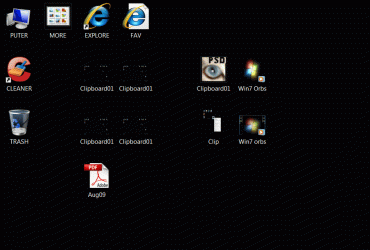
Now where did my animated gif file go ???
No thumbnails on desktop for PDF's and Docx-clip.gif
My System SpecsSystem Spec
15 Aug 2009  
tw33k

Windows 7 Ultimate (x64) SP1
3,260 posts


Quote   Quote: Originally Posted by charlieo View Post
Ok... So what am I doing wrong? I am so jealous!! I want my thumbnails for PDFs back!!

Any ideas?
I'm trying to replicate your problem but without success...I have Acrobat Pro 8 installed on the RTM and have no problems seeing the thumbnails
My System SpecsSystem Spec
Reply

 No thumbnails on desktop for PDF's and Docx problems?


Thread Tools


Similar help and support threads for: No thumbnails on desktop for PDF's and Docx
Thread Forum
hidden file of docx file created with ~$name of file.docx file Microsoft Office
Desktop Thumbnails Images problem General Discussion
Desktop icon thumbnails continuously rearranging BSOD Help and Support
Docx Microsoft Office
No .docx or .doc thumbnails Microsoft Office


All times are GMT -5. The time now is 01:37 AM.


Windows 7 Forums is an independent web site and has not been authorized,
sponsored, or otherwise approved by Microsoft Corporation.
"Windows 7" and related materials are trademarks of Microsoft Corp.
© Designer Media Ltd