
Hello, I thought perhaps some people with more experience in this matter might be able to assist me in the following matter.
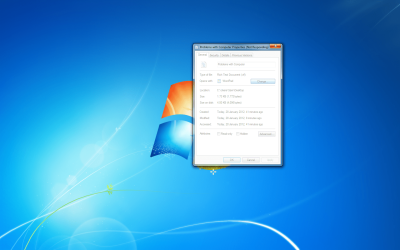
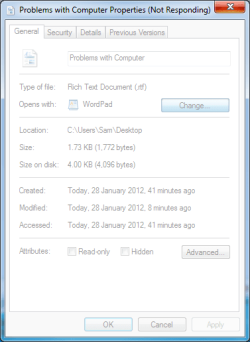
When I pressed change to change what to open a file with, so I could use notepad, the properties windows completely froze, it wouldn't respond. As I tried to close it, I restarted explorer.exe, but the frozen properties was still there. When I tried to restart from the menu, it would just hang at that point, and I had to manually restart from the restart button, instead. Before that, when I clicked to open the file with option... it would not pop up. Additionally, when I open up the start menu after having had to close or restart exolorer.exe , I could not even open things on the right menu like my computer, or even Control Panel, for that matter.
I even tried system restore, but all that did afterward was load to nothing but a blank screen. Even restarting, it did the same thing, so I had no choice but to completely delete the whole partition where Windows 7 was installed and install Windows 7 again. After all that time spent installing Windows 7, checked if the issue would arise again. It didn't. Some time later, when updates after Windows Service Pack 1 were installed (had to power cycle as it stopped at 30% at stage 4 for the Service Pack 1 Update, and even had to power cycle again when Windows Update had stopped at another percentage), the same problem had occured again. I was thinking it was some Windows update that might or might not have caused the issue, but which one, I am not certain which it could be.
I have done a SFC /scannow, but everything showed it was clean. Even an Error check, from before I decided to reinstall Windows 7 had done nothing, either. I have even done a virus scan using Avast, and it has come out clean, so it can't be infections of any kind, all things considered. Even CCleaner wasn't able to fix the issues, despite fixing any registry errors that occured.
Computer update also stopped at 30%, it was still loading, but would not go beyond that, leaving me to have to restart the computer, a third time during updates.
This issue has begun to wear at my patience, and I would like to see what the issue might happen to be, that could possibly be causing the issues.
List of the things I have done to try and fix it.
Fully Deleted and remade Partition for drive C.
Reinstalled Windows 7
SFC /scannow
Virus Scan
Error Check on Drive C
CCleaner
I might have done all that I can, but any help would be appreciated, and I do apologize if this might be in the wrong section.
When I pressed change to change what to open a file with, so I could use notepad, the properties windows completely froze, it wouldn't respond. As I tried to close it, I restarted explorer.exe, but the frozen properties was still there. When I tried to restart from the menu, it would just hang at that point, and I had to manually restart from the restart button, instead. Before that, when I clicked to open the file with option... it would not pop up. Additionally, when I open up the start menu after having had to close or restart exolorer.exe , I could not even open things on the right menu like my computer, or even Control Panel, for that matter.
I even tried system restore, but all that did afterward was load to nothing but a blank screen. Even restarting, it did the same thing, so I had no choice but to completely delete the whole partition where Windows 7 was installed and install Windows 7 again. After all that time spent installing Windows 7, checked if the issue would arise again. It didn't. Some time later, when updates after Windows Service Pack 1 were installed (had to power cycle as it stopped at 30% at stage 4 for the Service Pack 1 Update, and even had to power cycle again when Windows Update had stopped at another percentage), the same problem had occured again. I was thinking it was some Windows update that might or might not have caused the issue, but which one, I am not certain which it could be.
I have done a SFC /scannow, but everything showed it was clean. Even an Error check, from before I decided to reinstall Windows 7 had done nothing, either. I have even done a virus scan using Avast, and it has come out clean, so it can't be infections of any kind, all things considered. Even CCleaner wasn't able to fix the issues, despite fixing any registry errors that occured.
Computer update also stopped at 30%, it was still loading, but would not go beyond that, leaving me to have to restart the computer, a third time during updates.
This issue has begun to wear at my patience, and I would like to see what the issue might happen to be, that could possibly be causing the issues.
List of the things I have done to try and fix it.
Fully Deleted and remade Partition for drive C.
Reinstalled Windows 7
SFC /scannow
Virus Scan
Error Check on Drive C
CCleaner
I might have done all that I can, but any help would be appreciated, and I do apologize if this might be in the wrong section.
Attachments
My Computer
At a glance
Windows 7 Home Home Premium 32bit (PC) / Linu...Intel Core 2 DUO CPU E8400(PC)4GB of RAM(PC) / 1GB of RAM(Ubuntu)NVIDIA GTS 450(PC)
- OS
- Windows 7 Home Home Premium 32bit (PC) / Linux Ubuntu 11.10 (Netbook)
- CPU
- Intel Core 2 DUO CPU E8400(PC)
- Memory
- 4GB of RAM(PC) / 1GB of RAM(Ubuntu)
- Graphics Card(s)
- NVIDIA GTS 450(PC)
- Screen Resolution
- 1680 x 1050(PC) / 1024x600(Netbook)


