| | Welcome to Windows 7 Forums. Our forum is dedicated to helping you find solutions with any problems, errors or issues you are experiencing with Windows 7. The Windows 7 forum also covers news and updates and has an extensive Windows 7 tutorial section that covers a wide range of tips and tricks. | Windows 7 - Issues with Windows 7
|
3 Weeks Ago
|
#1 | | Windows 7 Home Home Premium 32bit (PC) / Linux Ubuntu 11.10 (Netbook) |
Issues with Windows 7 Hello, I thought perhaps some people with more experience in this matter might be able to assist me in the following matter.
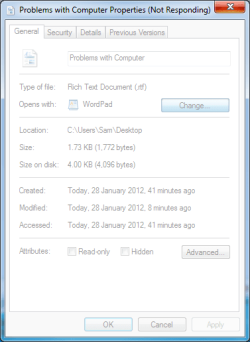
When I pressed change to change what to open a file with, so I could use notepad, the properties windows completely froze, it wouldn't respond. As I tried to close it, I restarted explorer.exe, but the frozen properties was still there. When I tried to restart from the menu, it would just hang at that point, and I had to manually restart from the restart button, instead. Before that, when I clicked to open the file with option... it would not pop up. Additionally, when I open up the start menu after having had to close or restart exolorer.exe , I could not even open things on the right menu like my computer, or even Control Panel, for that matter.
I even tried system restore, but all that did afterward was load to nothing but a blank screen. Even restarting, it did the same thing, so I had no choice but to completely delete the whole partition where Windows 7 was installed and install Windows 7 again. After all that time spent installing Windows 7, checked if the issue would arise again. It didn't. Some time later, when updates after Windows Service Pack 1 were installed (had to power cycle as it stopped at 30% at stage 4 for the Service Pack 1 Update, and even had to power cycle again when Windows Update had stopped at another percentage), the same problem had occured again. I was thinking it was some Windows update that might or might not have caused the issue, but which one, I am not certain which it could be.
I have done a SFC /scannow, but everything showed it was clean. Even an Error check, from before I decided to reinstall Windows 7 had done nothing, either. I have even done a virus scan using Avast, and it has come out clean, so it can't be infections of any kind, all things considered. Even CCleaner wasn't able to fix the issues, despite fixing any registry errors that occured.
Computer update also stopped at 30%, it was still loading, but would not go beyond that, leaving me to have to restart the computer, a third time during updates.
This issue has begun to wear at my patience, and I would like to see what the issue might happen to be, that could possibly be causing the issues.
List of the things I have done to try and fix it.
Fully Deleted and remade Partition for drive C.
Reinstalled Windows 7
SFC /scannow
Virus Scan
Error Check on Drive C
CCleaner
I might have done all that I can, but any help would be appreciated, and I do apologize if this might be in the wrong section.
| My System Specs | | OS Windows 7 Home Home Premium 32bit (PC) / Linux Ubuntu 11.10 (Netbook) CPU Intel Core 2 DUO CPU E8400(PC) Memory 4GB of RAM(PC) / 1GB of RAM(Ubuntu) Graphics Card NVIDIA GTS 450(PC) Screen Resolution 1680 x 1050(PC) / 1024x600(Netbook) |
3 Weeks Ago
|
#2 | | Microsoft Windows 7 Home Premium 64-bit 7601 Multiprocessor Free Service Pack 1 |
It could be a problem with your RAM. Try this tutorial. RAM - Test with Memtest86+ | My System Specs | | System Manufacturer/Model Number Hewlett-Packard/G62-107SA Notebook OS Microsoft Windows 7 Home Premium 64-bit 7601 Multiprocessor Free Service Pack 1 CPU Intel(R) Core(TM) i3 CPU M 330 @ 2.13GHz Motherboard Hewlett-Packard 1425 Memory 8 GB DDR3 Graphics Card Intel(R) HD Graphics Sound Card Realtek High Definition Audio Monitor(s) Displays Builtin Screen Resolution 1366 x 768 x 32 bits (4294967296 colors) @ 60 Hz Mouse Microsoft Bluetooth Notebook Mouse 5000 Hard Drives 250 GB SATA Hard Disk Drive 7200 rpm
2TB Seagate GoFlex USB 2 Drive
1TB Iomega Prestige USB 2 Drive
1.5TB Iomega Prestige USB 2 Drive (Samsung)
1TB Iomega NAS. Internet Speed 10mbs |
3 Weeks Ago
|
#3 | | Windows 7 Ultimate x64 SP1, Linux Mint 12 x64 |
Hi,
Do you know which Windows Update it is having problems with? Do you know whether Service pack 1 has installed. I'll ask Niemeiro, our update guru, to visit this thread when he gets a chance.
Regards,
Golden | My System Specs | | System Manufacturer/Model Number Golden Mk. I.3 OS Windows 7 Ultimate x64 SP1, Linux Mint 12 x64 CPU Intel i7 860 @ 2.80 GHz Motherboard Gigabyte P55A-UD3R Rev.1. Award BIOS F13 Memory 16GB Corsair Vengance DDR3 @ 661 MHz Dual Channel (9-9-9-24) Graphics Card EVGA NVidia GTX 560 1024MB Sound Card Realtek Integrated Monitor(s) Displays Dual Samsung SyncMaster 2494HS Screen Resolution 1920*1080 and 1920*1080 Keyboard Logitech G110 Mouse Logitech MX518 PSU Thermaltake ToughPower QFan 750W Case Thermaltake Element S VK60001W2Z Cooling Corsair H60 Water Cooling, 2*230mm and 2*80mm case fans Hard Drives 1*OCZ Vertex 2 60GB SSD;
2*Samsung F3 SpinPoint 1TB in RAID0;
2*Samsung F1 SpinPoint 1TB in RAID1;
1*Western Digital WD10EARS 1TB Internet Speed Not fast enough!!! |
3 Weeks Ago
|
#4 | | Windows 7 Home Home Premium 32bit (PC) / Linux Ubuntu 11.10 (Netbook) |

Quote: Originally Posted by Golden Hi,
Do you know which Windows Update it is having problems with? Do you know whether Service pack 1 has installed. I'll ask Niemeiro, our update guru, to visit this thread when he gets a chance.
Regards,
Golden It gave me the message saying it had installed successfully. After the next batch of updates was when the problem started, so I might need to check after the Memtest is finished, to figure out which of the updates might be the cause of the issue. | My System Specs | | OS Windows 7 Home Home Premium 32bit (PC) / Linux Ubuntu 11.10 (Netbook) CPU Intel Core 2 DUO CPU E8400(PC) Memory 4GB of RAM(PC) / 1GB of RAM(Ubuntu) Graphics Card NVIDIA GTS 450(PC) Screen Resolution 1680 x 1050(PC) / 1024x600(Netbook) |
3 Weeks Ago
|
#5 | | |
Follow these steps to get a perfect reinstall, after wiping the HD with Diskpart Clean command to clear the boot sector of any corruption: Reinstalling Windows 7
In the future when you get a hang, rightclick on the task bar to open Task Manager, order Processes under CPU by clicking on its tab to see if it is being jammed, then rightclick on Process to determine the Service responsible. You can also close the hung Application easier from Task manager.
Then work through these troubleshooting steps using the logs, System Resources, hardware tests, etc. to gather clues and regain full performance. | My System Specs | | |
3 Weeks Ago
|
#6 | | Windows 7 Home Home Premium 32bit (PC) / Linux Ubuntu 11.10 (Netbook) |
Okay, so far, what I did was the Memtest, which showed no errors, at all after seven passes. Right now, reinstalled Windows 7, so I can start fresh and see what might come up that could gradually start causing the issue to arise again. I also did try the Diskpart to clean the HD, but says it couldn't because it was being used, so I went with the DVD installation method, instead.
After the first patch of installations, and restarting without a hitch, I opened up the event viewer, and came across one error at 7:33am, Event ID 7023.
The General Tab saying "The Windows Modules Installer service terminated with the following error: %%16405"
Last edited by Toraurn; 3 Weeks Ago at 03:40 PM..
| My System Specs | | OS Windows 7 Home Home Premium 32bit (PC) / Linux Ubuntu 11.10 (Netbook) CPU Intel Core 2 DUO CPU E8400(PC) Memory 4GB of RAM(PC) / 1GB of RAM(Ubuntu) Graphics Card NVIDIA GTS 450(PC) Screen Resolution 1680 x 1050(PC) / 1024x600(Netbook) |
3 Weeks Ago
|
#7 | | |
Do you have any other applications installed? | My System Specs | | System Manufacturer/Model Number Dell Inspiron e1705 OS Windows 7 Ultimate x86 CPU Core 2 Duo T7200 Memory 4GB PC2 5300 Graphics Card ATI Mobility Radeon X1400 Screen Resolution 1920x1200 Hard Drives 250GB 7200RPM WD |
3 Weeks Ago
|
#8 | | Windows 7 Home Home Premium 32bit (PC) / Linux Ubuntu 11.10 (Netbook) |
All I have installed are Nvidia Graphics Driver 275.33, and NVIDIA update 1.3.5 as displayed in the Programs and Features, as well as the batch Windows Updates and Security Updates that installed.
And three optional updates, KB2607576, KB976422, and the driver update for Realtek RTL8168C(P)/8111C(P) Family PCI-E Gigabit Ethernet NIC (NDIS 6.20).
Installed Security Essentials, which I had to restart, which in turn also ended up installing six updates I held off on. But I am doing a full scan with it right now to see if anything might occur. Restarting went without problems.
Also in the event viewer, I got an error message from Kernel-EventTracing saying Session "" Failed to start with the following error: 0xC0000043, and in the Event data, ErrorCode 3221225539.
Last edited by Toraurn; 3 Weeks Ago at 04:53 PM..
| My System Specs | | OS Windows 7 Home Home Premium 32bit (PC) / Linux Ubuntu 11.10 (Netbook) CPU Intel Core 2 DUO CPU E8400(PC) Memory 4GB of RAM(PC) / 1GB of RAM(Ubuntu) Graphics Card NVIDIA GTS 450(PC) Screen Resolution 1680 x 1050(PC) / 1024x600(Netbook) |
3 Weeks Ago
|
#9 | | |
How is performance?
Have you gotten driver updates via optional Updates? Are there missing drivers in Dev Mgr?
As given in the steps for a perfect reinstall, install your Programs slowly over time to watch how they affect performance - and keep freeloaders out of Startup. | My System Specs | | |
3 Weeks Ago
|
#10 | | Windows 7 Home Home Premium 32bit (PC) / Linux Ubuntu 11.10 (Netbook) |

Quote: Originally Posted by gregrocker How is performance?
Have you gotten driver updates via optional Updates? Are there missing drivers in Dev Mgr?
As given in the steps for a perfect reinstall, install your Programs slowly over time to watch how they affect performance - and keep freeloaders out of Startup. Performance so far is good. Only Driver update so far was for motherboard, which I mentioned earlier.
Only missing driver it would appear would be for the display interface for my G19 keyboard, according to Device manager.
Finished the scan using Microsoft Security Essentials, also checked Startup and saw the Microsoft Security Client in Startup, and hiding all services in the Services tab, the NVIDIA Display Driver Service and the NVIDIA Update Service, both of which are running.
Did a scan with MalwareBytes, and all came clean. It seems everything is all clean for the most part.
Installed Updates for Windows 7 KB971033, KB982018, KB 2505438, KB2529073, KB2506928, and KB 2492386, and Security Updates KB2585542, and KB 2532531. Computer restarted without any problem, and turned back on, and fully configured. A USB Composite Device was suddenly found, also on my computer.
Checked if any problems would occur, by right clicking an empty text file, and going to Open with, then right clicking and going to properties to click change what program to open with. So far, so good.
Checked Event Viewer, and so far, only seven events, two of which are warnings : Event ID 2 from 8:45am, and Event ID 7023, from 7:33am.
Last edited by Toraurn; 3 Weeks Ago at 06:42 PM..
Reason: More documentation added.
| My System Specs | | OS Windows 7 Home Home Premium 32bit (PC) / Linux Ubuntu 11.10 (Netbook) CPU Intel Core 2 DUO CPU E8400(PC) Memory 4GB of RAM(PC) / 1GB of RAM(Ubuntu) Graphics Card NVIDIA GTS 450(PC) Screen Resolution 1680 x 1050(PC) / 1024x600(Netbook) Issues with Windows 7 problems? All times are GMT -5. The time now is 03:39 PM. |  |