| Windows 7: Wavy lines across screen, (usually grey-ish colours) on new setup. |
29 Jan 2012
|
#1 | | |
Wavy lines across screen, (usually grey-ish colours) on new setup. Hi all,
I recently bought a new setup for myself specs;
Version: Windows 7 Ultimate x64
CPU: AMD FX Bulldozer 8120 x8 3.10GHz
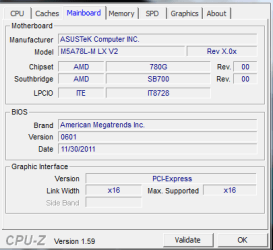
MOBO: Asus M5A78L-MLX V2
VGA: nVidia GeForce GTX 275
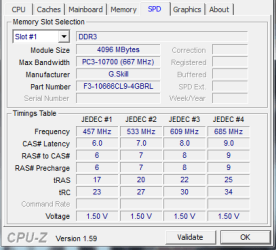
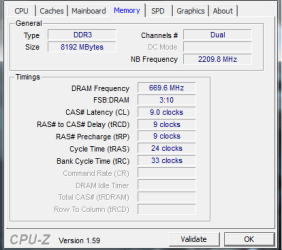
RAM: Ripjaws G.Skill 8GB
PSU: Powercool 750W
HDD: Samsung HD753LJ 750GB
Monitor: Acer X223W
And once I formatted a new version of Windows 7 onto it I noticed wavy lines running across the screen, now these are quite faint and only appear on grey/darker backgrounds and are otherwise unnoticable on other colours.
I have tried several things and nothing seems to be working, this is what I have tried;
Changing monitor
Changing VGA cable (twice)
Reformatting
Changing power supply
Changing graphics card
Tried setting monitor at 60 refresh rate
Updating drivers for monitor and VGA
After running out of options I emailed the place I bought my MOBO, RAM and CPU from (Aria.co.uk) and they said to run Memtest on my RAM, I did and I returned 3 errors within 3-4 hours so I emailed them giving them the error and they said to return the RAM which I did.
In the end after them testing it twice they said there was no fault on the RAM,(They tested it once at 2 hours and once at 19 hours). So I was sent the RAM back and after putting it in again and reformatting I'm still having the problem of wavy lines.
I think it's impossible to get a screenshot of it so I can't really show it but does anyone have any idea what it could possibly be?
They only thing I can't test and change is the MOBO and CPU because I have no other compatable pieces lying around.
Cheers | My System Specs |
| OS Windows 7 Ultimate x64 |
30 Jan 2012
|
#2 | | |
No one has any idea? Aria today said it may be a graphics problem but a change of montior and graphics card both still showed the same error.
I understand its a hard one to solve but anything I can try would help. | My System Specs | | OS Windows 7 Ultimate x64 |
30 Jan 2012
|
#3 | | Windows 7 Ultimate SP1 (x64) South Australia |
Hi,
When you received the RAM back again, did you redo the test in MemTest86+?
Regards,
Golden | My System Specs | | Computer type PC/Desktop System Manufacturer/Model Number Golden Mk. I.3 OS Windows 7 Ultimate SP1 (x64) CPU Intel i7 860 @ 2.80 GHz Motherboard Gigabyte P55A-UD3R Rev.1. Award BIOS F13 Memory 16GB Corsair Vengance DDR3 @ 661 MHz Dual Channel (9-9-9-24) Graphics Card EVGA NVidia GTX 560 1024MB Sound Card Realtek Integrated Monitor(s) Displays Dual Samsung SyncMaster 2494HS Screen Resolution 1920*1080 and 1920*1080 Keyboard Logitech G110 Mouse Logitech MX518 PSU Thermaltake ToughPower QFan 750W Case Thermaltake Element S VK60001W2Z Cooling Corsair H60 Water Cooling, 2*230mm and 2*80mm case fans Hard Drives 1*OCZ Vertex 2 60GB SSD;
2*Samsung F3 SpinPoint 1TB in RAID0;
3*Samsung F1 SpinPoint 1TB in RAID5;
1*Western Digital 500GB External USB 3.0
1*Seagate 500GB External USB 2.0 Internet Speed Not fast enough!!! Antivirus MSE and Malwarebytes Pro Browser Chrome Version 25 Other Info Laptop: ASUS X54C, Intel Core i3-2330M @ 2.0Ghz, 4GB RAM, Intel HD on-board graphics, Windows 7 Professional SP1 (x64), LinuxMint 14 (x64), PepperMint 3 (x86) |
30 Jan 2012
|
#4 | | |
Well I can try but really didn't seem a point since Aria didn't fix anything and today also said it could just be bios settings that are giving back the error, am not too experienced with the bios to really want to test anything but I have updated the bios and still no change.
I'll give Memtest another shot though soon. | My System Specs | | OS Windows 7 Ultimate x64 |
30 Jan 2012
|
#5 | | Windows 7 Ultimate SP1 (x64) South Australia |
Hi,
The reason I ask is that they sent it back to you, but they could not replicate your RAM test failure - correct?
Therefore, I conclude there is something about your system that isn't interacting with your RAM properly (possibly a slot on your motherboard).....whether thats the cause of the graphics glitch, I'm not entirely sure yet.
However, lets get the RAM issue out the way since you did have errors with that. Run MemTest86+ : we recommend a minimum of 7 passes (typicaly an overnight job), or until you get errors.
Post back here when its done and we can take it from there.
Regards,
Golden | My System Specs | | Computer type PC/Desktop System Manufacturer/Model Number Golden Mk. I.3 OS Windows 7 Ultimate SP1 (x64) CPU Intel i7 860 @ 2.80 GHz Motherboard Gigabyte P55A-UD3R Rev.1. Award BIOS F13 Memory 16GB Corsair Vengance DDR3 @ 661 MHz Dual Channel (9-9-9-24) Graphics Card EVGA NVidia GTX 560 1024MB Sound Card Realtek Integrated Monitor(s) Displays Dual Samsung SyncMaster 2494HS Screen Resolution 1920*1080 and 1920*1080 Keyboard Logitech G110 Mouse Logitech MX518 PSU Thermaltake ToughPower QFan 750W Case Thermaltake Element S VK60001W2Z Cooling Corsair H60 Water Cooling, 2*230mm and 2*80mm case fans Hard Drives 1*OCZ Vertex 2 60GB SSD;
2*Samsung F3 SpinPoint 1TB in RAID0;
3*Samsung F1 SpinPoint 1TB in RAID5;
1*Western Digital 500GB External USB 3.0
1*Seagate 500GB External USB 2.0 Internet Speed Not fast enough!!! Antivirus MSE and Malwarebytes Pro Browser Chrome Version 25 Other Info Laptop: ASUS X54C, Intel Core i3-2330M @ 2.0Ghz, 4GB RAM, Intel HD on-board graphics, Windows 7 Professional SP1 (x64), LinuxMint 14 (x64), PepperMint 3 (x86) |
30 Jan 2012
|
#6 | | Windows 7 Ultimate X64 SP1 Mt. Crumpit/Whoville |
Test individual sticks in different slots too to eliminate a bad board. Any error, you can stop the test and move to the next stick/slot. Most RAM has a lifetime guarantee from the manufacturer. | My System Specs | | Computer type PC/Desktop System Manufacturer/Model Number Home Built Desktop By DataTech OS Windows 7 Ultimate X64 SP1 CPU Intel i5-2550K, Differing ~4.4-4.8GHz No built in GPU Motherboard ASUS P8Z68-V PRO/GEN3 Memory 16GB G.Skill Sniper 2133MHz 4x4GB Graphics Card ASUS ENGTX460 DirectCU/2DI/1GD5 GeForce GTX 460 Sound Card Onboard Realtek 5-1 Monitor(s) Displays Samsung P2570HD Screen Resolution 1920x1080 Keyboard Old, beat-up Dell USB From 10 yrs Ago Mouse Gigabyte m6900 wired PSU Corsair HX650W Case Inwin Dragon Rider Cooling Hyper 212 EVO w/two Noctua fans, push-pull, @1300 RPM Hard Drives Crucial M4 128GB for OS, 750GB Seagate MomentusXT for data, 500GB Seagate Constellation for storage Internet Speed 8-19 Mbs down, 3-4 Mbs up Comcast Cable Antivirus Norton Internet Security Browser IE 9, Opera when needed Other Info 4 case fans, LG BluRay-RE, ASUS DVD-RW, Mr. Fusion power generator with flux capacitor, 1.21 gigawatts. |
30 Jan 2012
|
#7 | | |
Okay
So is it worth running 7 passes with both and see if I get errors, then 3ish passes with single ram plugged in, in different slots? | My System Specs | | OS Windows 7 Ultimate x64 |
30 Jan 2012
|
#8 | | Windows 7 Ultimate SP1 (x64) South Australia |
Hi,
If it passes all 7, then the RAM and slots are fine. If it fails before 7 passes, then we can start with each stick and each slot.
Regards,
Golden | My System Specs | | Computer type PC/Desktop System Manufacturer/Model Number Golden Mk. I.3 OS Windows 7 Ultimate SP1 (x64) CPU Intel i7 860 @ 2.80 GHz Motherboard Gigabyte P55A-UD3R Rev.1. Award BIOS F13 Memory 16GB Corsair Vengance DDR3 @ 661 MHz Dual Channel (9-9-9-24) Graphics Card EVGA NVidia GTX 560 1024MB Sound Card Realtek Integrated Monitor(s) Displays Dual Samsung SyncMaster 2494HS Screen Resolution 1920*1080 and 1920*1080 Keyboard Logitech G110 Mouse Logitech MX518 PSU Thermaltake ToughPower QFan 750W Case Thermaltake Element S VK60001W2Z Cooling Corsair H60 Water Cooling, 2*230mm and 2*80mm case fans Hard Drives 1*OCZ Vertex 2 60GB SSD;
2*Samsung F3 SpinPoint 1TB in RAID0;
3*Samsung F1 SpinPoint 1TB in RAID5;
1*Western Digital 500GB External USB 3.0
1*Seagate 500GB External USB 2.0 Internet Speed Not fast enough!!! Antivirus MSE and Malwarebytes Pro Browser Chrome Version 25 Other Info Laptop: ASUS X54C, Intel Core i3-2330M @ 2.0Ghz, 4GB RAM, Intel HD on-board graphics, Windows 7 Professional SP1 (x64), LinuxMint 14 (x64), PepperMint 3 (x86) |
30 Jan 2012
|
#9 | | |
Okay will do, which version of memtest should I download/run before I think I used the binary boot just wondering if the ISO one or something is better.
Also by passes do you mean the amount of versions of Memtest running at once? Memtest86+ - Advanced Memory Diagnostic Tool | My System Specs | | OS Windows 7 Ultimate x64 |
30 Jan 2012
|
#10 | | Windows 7 Ultimate SP1 (x64) South Australia |
Hi,
Choose the pre-compiled .zip ISO (2nd on the list) and burn it to a bootable USB using this: Universal USB Installer – Easy as 1 2 3 | USB Pen Drive Linux
Boot from the USB, and run it overnight. By passes I mean 7 tests - you will see them run across the screen as they are run.
Regards,
Golden | My System Specs | | Computer type PC/Desktop System Manufacturer/Model Number Golden Mk. I.3 OS Windows 7 Ultimate SP1 (x64) CPU Intel i7 860 @ 2.80 GHz Motherboard Gigabyte P55A-UD3R Rev.1. Award BIOS F13 Memory 16GB Corsair Vengance DDR3 @ 661 MHz Dual Channel (9-9-9-24) Graphics Card EVGA NVidia GTX 560 1024MB Sound Card Realtek Integrated Monitor(s) Displays Dual Samsung SyncMaster 2494HS Screen Resolution 1920*1080 and 1920*1080 Keyboard Logitech G110 Mouse Logitech MX518 PSU Thermaltake ToughPower QFan 750W Case Thermaltake Element S VK60001W2Z Cooling Corsair H60 Water Cooling, 2*230mm and 2*80mm case fans Hard Drives 1*OCZ Vertex 2 60GB SSD;
2*Samsung F3 SpinPoint 1TB in RAID0;
3*Samsung F1 SpinPoint 1TB in RAID5;
1*Western Digital 500GB External USB 3.0
1*Seagate 500GB External USB 2.0 Internet Speed Not fast enough!!! Antivirus MSE and Malwarebytes Pro Browser Chrome Version 25 Other Info Laptop: ASUS X54C, Intel Core i3-2330M @ 2.0Ghz, 4GB RAM, Intel HD on-board graphics, Windows 7 Professional SP1 (x64), LinuxMint 14 (x64), PepperMint 3 (x86) Wavy lines across screen, (usually grey-ish colours) on new setup. problems? All times are GMT -5. The time now is 01:26 PM. | |