Windows 7 Forums Search
Welcome to Windows 7 Forums. Our forum is dedicated to helping you find solutions with any problems, errors or issues you are experiencing with Windows 7. The Windows 7 forum also covers news and updates and has an extensive Windows 7 tutorial section that covers a wide range of tips and tricks.


Windows 7 - Reinstalled windows 7, drivers dont work and can't connect to internet

 
01-31-2012   #1


Windows Vista Home Premium 64bit


Reinstalled windows 7, drivers dont work and can't connect to internet

I reinstalled Windows 7 last night and when it booted back up the screen resolution has changed, I have several drivers that aren't working and I can't connect to the internet. Any thoughts?

My System SpecsSystem Spec
01-31-2012   #2


Windows 7 Ultimate AMD64


Reinstalled how? Clean install, factory restore?
My System SpecsSystem Spec
01-31-2012   #3


Windows Vista Home Premium 64bit


Clean install with the DVD
My System SpecsSystem Spec
.


01-31-2012   #4


Windows 7 Ultimate AMD64


OK, sounds like you have some hardware that needs drivers installed. You'll have to download them from the manufacturers web site's support section for your PC. Something you probably should have done before you did your clean install. Now you will have to download them on another PC and use a USB thumbdrive or other media to transfer and install them on your PC. I'd install the drivers for your network card first, then once you have a working Internet connection you can download the rest directly to your problem PC. Device Manager should show you what's not working and requires drivers.
My System SpecsSystem Spec
01-31-2012   #5


Windows 7 Ultimate SP1 64-Bit


Is your computer self-built or bought from a computer manufacturer?

If it is the latter, go to their support site where you can download all the drivers you need.

As alphanumeric says, have a look in device manager for anything that has a yellow question mark against it, which indicates a driver is needed.
My System SpecsSystem Spec
01-31-2012   #6


Windows Vista Home Premium 64bit


I'm at dell's website right now, how do i know which drivers i need?
My System SpecsSystem Spec
01-31-2012   #7


Windows Vista Home Premium 64bit


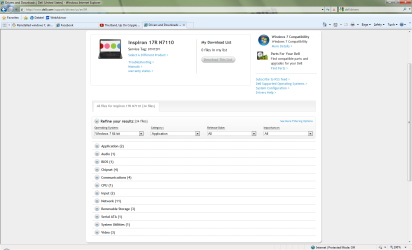
The "Network Controller" has a yellow question mark next to it but on the dell site there are 11 different drivers listed under "Network". How do I know which is right?
My System SpecsSystem Spec
01-31-2012   #8


Windows 7 SP1, Home Premium, 64-bit


Do you have a Dell ID number unique to your particular PC? I forget what they call it. Service tag??

If you use that number, it should lead you to stuff that is compatible with your specific PC.

Or post a screen shot of what you are seeing at Dell web site.
My System SpecsSystem Spec
01-31-2012   #9


Windows Vista Home Premium 64bit


I think I found the network one that I need but the other ones are "Etherent Controller", "Network Controller", "PCI Simple Communucations Controller", "SM Bus Controller", and "Universal Serial Bus (USB) Controller". I don't anything for these on the Dell website. Thanks for your help!
My System SpecsSystem Spec
01-31-2012   #10


Windows 7 Ultimate AMD64


Yes the "Service Tag Number" is what you want. It should be listed on a sticker on the PC somewhere. It's also listed in the BIOS. Input that number in the correct spot on the dell support site and it will lead you to downloads for you specific model dell.
My System SpecsSystem Spec
Reply

 Reinstalled windows 7, drivers dont work and can't connect to internet problems?


Thread Tools


Similar Threads for: Reinstalled windows 7, drivers dont work and can't connect to internet
Thread Forum
graphics card crashing, drivers installed and reinstalled windows same Crashes and Debugging
I can connect to the internet but it won't work Network & Sharing
Solved my touch screen dont work .... bad drivers Drivers
avast internet security dont work with acer aspire 5935 System Security
Just reinstalled Windows 7 without graphics drivers? Graphic Cards


All times are GMT -5. The time now is 02:13 AM.


Windows 7 Forums is an independent web site and has not been authorized,
sponsored, or otherwise approved by Microsoft Corporation.
"Windows 7" and related materials are trademarks of Microsoft Corp.
İ Designer Media Ltd
  

1 2 3 4 5 6 7 8 9 10 11 12 13 14 15 16 17 18 19 20 21 22 23 24 25 26 27 28 29 30