Windows 7 Forums Search
Welcome to Windows 7 Forums. Our forum is dedicated to helping you find solutions with any problems, errors or issues you are experiencing with Windows 7. The Windows 7 forum also covers news and updates and has an extensive Windows 7 tutorial section that covers a wide range of tips and tricks.


Windows 7 - User Shell Folder redirection only creates destkop, nothing else.

 
02-03-2012   #1


win7 enterprise 64


User Shell Folder redirection only creates destkop, nothing else.

Hi Guys,

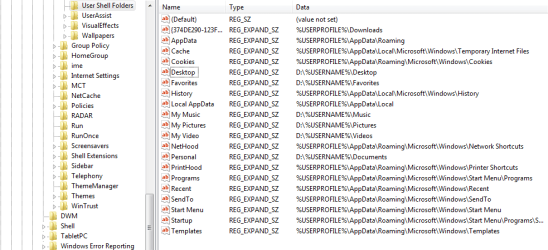
I've modified the user shell folder locations to where all new users should have a user folder created on a d partion, with respective data folders like my docs, music, pictures, etc. It seems like my registry edits are correct, and i get no errors, but when i create a new user and login, the only user folder that is created on the d partion is the desktop, no other folders. Any idea why this may be occuring? I'm including screenshot of part of registry I edited for feedback.

Attached Thumbnails
User Shell Folder redirection only creates destkop, nothing else.-user-shell.png  
My System SpecsSystem Spec
02-03-2012   #2


Windows 7 Ultimate x64 SP1


Hello M5online,

You just didn't do it correctly. Please change those registry values back to their default settings like in the screenshot below first. Afterwards, see if OPTION TWO towards the bottom of the tutorial below will work for you when you create a new user account afterwards instead.

User Profile - Change Default Location


Hope this helps,
Shawn
My System SpecsSystem Spec
02-03-2012   #3


win7 enterprise 64


Hi Shawn,

Thanks for the quick reply! If following step 2 were so easy for what I'm trying to do :-). I'd like the user profiles to still live on C:\. All I want to live on the D:\ are user data files like docs, pics, music, and downloads. I want all the other profile info to still live on C:\. I thought I had it pegged with the registry edits I listed above, but when a new user logs in, all that's created on D is the Desktop, and everything else defaults back to C. Hope that sheds a little more light on my issue.

Thanks!
My System SpecsSystem Spec
.


02-03-2012   #4


Windows 7 Ultimate x64 SP1


The tutorial below can help show you how to properly change just those user folder locations. However, it will only change them for the specific current user and not for all new users. Only what I posted above will work with all new users.
User Folders - Change Default Location
My System SpecsSystem Spec
02-03-2012   #5


win7 enterprise 64


That's what I pretty much gathered through my testing, I was just hoping there was something I was missing (but I guess I'm not :-\ )

Thanks!!
My System SpecsSystem Spec
02-03-2012   #6


Windows 7 Ultimate x64 SP1


You're welcome. Please let us know how it goes if you decide to do it.
My System SpecsSystem Spec
02-10-2012   #7


win7 enterprise 64


OK, so here is what I did to remedy the issue.

I applied the user shell registry changes to administrator, i then copied the administrator profile and made it the default profile. I made sure to copy the default profile with the permissions set to 'everyone' to a temp profile. I deleted the default profile, and renamed the temp profile as default.

Logged back in as administrator, created new user, logged in as new user, viola, works like a charm!

Thanks again for the assistance!
My System SpecsSystem Spec
02-10-2012   #8


Windows 7 Ultimate x64 SP1


You're most welcome. Thank you for posting back with your results and solution.
My System SpecsSystem Spec
Reply

 User Shell Folder redirection only creates destkop, nothing else. problems?


Thread Tools


Similar Threads for: User Shell Folder redirection only creates destkop, nothing else.
Thread Forum
Folder Redirection. Network & Sharing
my documents redirection for every new user General Discussion
Folder redirection Network & Sharing
Folder Redirection Problem General Discussion
User Account Control Data Redirection News


All times are GMT -5. The time now is 02:21 AM.


Windows 7 Forums is an independent web site and has not been authorized,
sponsored, or otherwise approved by Microsoft Corporation.
"Windows 7" and related materials are trademarks of Microsoft Corp.
© Designer Media Ltd
  

1 2 3 4 5 6 7 8 9 10 11 12 13 14 15 16 17 18 19 20 21 22 23 24 25 26 27 28 29 30