Windows 7 Forums


Windows 7: Group or user names have changed

04 Feb 2012   #1
bru

Win 7 Home Premium x64
A suburb of Chicago
 
 
Group or user names have changed

What exactly does this mean? It appears under properties-->security for certain programs. It certainly wasn't like this before. I've seen discussion about the unknown user account but why does my "Administrator" user have the red X and now I have "Administrators". In control panel-->user accounts there is just the admin account and a guest account.

Attached Thumbnails
Group or user names have changed-users.jpg  
My System SpecsSystem Spec

04 Feb 2012   #2

64-bit Windows 7 Ultimate SP1 & Windows 8 Enterprise
Texas


Hello Bru,

It may be nothing to worry about.

Have you ever previously accessed them with a user account that has now been either deleted, from another computer, or from another installed OS on the same computer, etc....?
My System SpecsSystem Spec
05 Feb 2012   #3
bru

Win 7 Home Premium x64
A suburb of Chicago


Quote   Quote: Originally Posted by Brink View Post
Hello Bru,

It may be nothing to worry about.

Have you ever previously accessed them with a user account that has now been either deleted, from another computer, or from another installed OS on the same computer, etc....?
Definitely not from another computer or OS. I recall starting to create a new user account and/or activating the guest account but never finishing. This is what is under security for OS (C). Not sure I'm really worried but it just seems odd. Whty did "administrator" become "administrators"?
Attached Thumbnails
Group or user names have changed-users.jpg  
My System SpecsSystem Spec
.


05 Feb 2012   #4

Windows 7 Ult X64
Melbourne, Australia


Normally Administrator is a user and Administrators is a group
My System SpecsSystem Spec
05 Feb 2012   #5

64-bit Windows 7 Ultimate SP1 & Windows 8 Enterprise
Texas


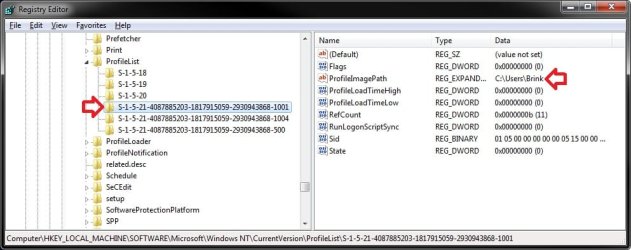
If you really wanted to dig into more, you could look at the registry location below for the long numbered SID key for that unknown user to see if it may help ID what it is from.

HKEY_LOCAL_MACHINE\SOFTWARE\Microsoft\Windows NT\CurrentVersion\ProfileList

Group or user names have changed-1.jpg

In addition, you could also "Edit" the list of users and groups in the Security tab to "Remove" the unknown user from it.
My System SpecsSystem Spec
05 Feb 2012   #6
bru

Win 7 Home Premium x64
A suburb of Chicago


Thanks. That would take care of the unknown user but as far as the "administrators" is concerned I have no idea how it would have changed from a user to a group.

Any way to change it back to a user?
My System SpecsSystem Spec
05 Feb 2012   #7

64-bit Windows 7 Ultimate SP1 & Windows 8 Enterprise
Texas


Bru,

This is normal. You're just misunderstanding what a user and group is. That's all.

In Windows, you have users that are members of groups. For example, your administrator account is a "user" that is a member of the "administrators" and "users" groups. A standard user account would be a "user" that is a member of only the "users" group instead.

If you like, the tutorial below can help show you the differences and give more details on users and groups.

User Accounts - Add or Remove from Groups
My System SpecsSystem Spec
05 Feb 2012   #8
bru

Win 7 Home Premium x64
A suburb of Chicago


I misunderstand a lot when it comes to computer .

I guess I don't understand (ha ha) how the "administrator" got a red X and the "administrators" appeared. I'm sure previously there was only administrator. As mentioned only user account is me/administrator. If it doesn't effect anything it's no problem but computers seem to do things for reasons so I was wondering why/how it happened and also why it doesn't seem to be on every program.
My System SpecsSystem Spec
05 Feb 2012   #9

64-bit Windows 7 Ultimate SP1 & Windows 8 Enterprise
Texas


No problem.

Administrator is the name of the built-in Administrator account that is a "user" that is a member of the "administrators" and "users" groups.
My System SpecsSystem Spec
Reply

 Group or user names have changed problems?


Thread Tools


Similar help and support threads for: Group or user names have changed
Thread Forum
Names of folders and files suddenly changed color General Discussion
Group Policy - Apply to a Specific User or Group Tutorials
Disk check utility changed file names, now I got problems. BSOD Help and Support
service names changed? General Discussion


All times are GMT -5. The time now is 06:33 PM.


Seven Forums Android App Seven Forums IOS App Follow us on Facebook

Windows 7 Forums is an independent web site and has not been authorized,
sponsored, or otherwise approved by Microsoft Corporation.
"Windows 7" and related materials are trademarks of Microsoft Corp.
© Designer Media Ltd
  

1 2 3 4 5 6 7 8 9 10 11 12 13 14 15 16 17 18 19 20 21 22 23 24 25 26 27 28 29 30 31 32