| Windows 7: Diskpart showing different free space to Computer Management. |
04 Feb 2012
|
#1 | | Windows 7 Professional x64 Nottingham, England |
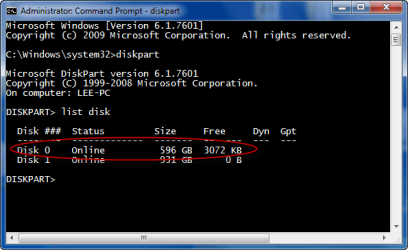
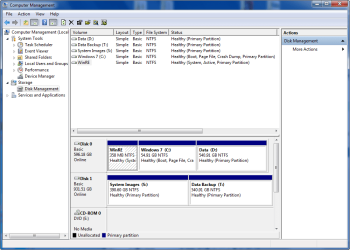
Diskpart showing different free space to Computer Management. Hello everyone, just wondered if anyone knows anything on this?
When I list my disk partitions in diskpart it shows I have around 3mb Unallocated space but when I view my disks in compmgr it shows I have no unallocated space.  Enclosed a couple of screenshots.
Haven't noticed any problems with pc or files.
Is it anything to be concerned about? | My System Specs |
| System Manufacturer/Model Number Dell Dimension 9200 (XPS 410) OS Windows 7 Professional x64 CPU Intel Core 2 Quad Q6600 2.4Ghz Motherboard Intel P965 Express Chipset - Dell Inc. 0CT017 Memory 4GB - HYMP512U64CP8-Y5 Graphics Card nVidia GeForce 8600GTS Monitor(s) Displays DELL 22" E228WFP Screen Resolution 1680x1050 Keyboard Logitech Cordless Desktop MX3000 Mouse Logitech Laser Mouse MX3000 Hard Drives 2x Western Digital WD3200AAKS
Intel Raid 0
Seagate Expansion 1TB - External Other Info Phoenix ROM BIOS PLUS Version 1.10 2.5.3 - Dell Inc.
Broadcom 802.11g Wireless Network Adapter
Sony Optiarc DVD RW AD-7241S
Lite-On BD-RE iHBS112
TEAC CA-200 19-in-1 Media Card Reader
HP Photosmart 8450 Printer |
04 Feb 2012
|
#2 | | Systems 1 and 2: Windows 7 Enterprise x64, Win 8 Developer University of Kentucky |
They both report 596GB. Absolutely nothing to worry about. | My System Specs | | System Manufacturer/Model Number Dell and Custom OS Systems 1 and 2: Windows 7 Enterprise x64, Win 8 Developer CPU System 1: i7 2600@3.4GHz, System 2: AMD FX-4100 Zambezi 3.6G Motherboard System 1:Dell 06NWYK System 2: ASUS M5A97 AM3+ Memory System 1: 8GB System 2: 8GB Graphics Card System 1: ATI FirePro V4800 System 2: Radeon HD 6850 Sound Card System 1: onboard System 2: onboard Monitor(s) Displays System1: Viewsonic HDMI 24" Screen Resolution System 1: 1920x1080 System 2: 1920x1080 Case System 1: Dell System 2: Cooler Master Hard Drives System 1: Mirrored .5B drives System 2: Seagate Barracuda ST1000DM003 1TB 7200 RPM 64MB Cache SATA 6.0Gb/s Internet Speed 10 MBPS |
04 Feb 2012
|
#3 | | Windows 7 Professional x64 Nottingham, England |
OK thanks for that Lemur.
What does the free part actually mean then? Is that different to unallocated? | My System Specs | | System Manufacturer/Model Number Dell Dimension 9200 (XPS 410) OS Windows 7 Professional x64 CPU Intel Core 2 Quad Q6600 2.4Ghz Motherboard Intel P965 Express Chipset - Dell Inc. 0CT017 Memory 4GB - HYMP512U64CP8-Y5 Graphics Card nVidia GeForce 8600GTS Monitor(s) Displays DELL 22" E228WFP Screen Resolution 1680x1050 Keyboard Logitech Cordless Desktop MX3000 Mouse Logitech Laser Mouse MX3000 Hard Drives 2x Western Digital WD3200AAKS
Intel Raid 0
Seagate Expansion 1TB - External Other Info Phoenix ROM BIOS PLUS Version 1.10 2.5.3 - Dell Inc.
Broadcom 802.11g Wireless Network Adapter
Sony Optiarc DVD RW AD-7241S
Lite-On BD-RE iHBS112
TEAC CA-200 19-in-1 Media Card Reader
HP Photosmart 8450 Printer |
05 Feb 2012
|
#4 | | Windows 7 Ultimate X64 SP1 Mt. Crumpit/Whoville |
Unallocated is non-formatted and has no partition characteristics, ie, Primary, Simple, etc. In diskpart if an area of the disk has no files, it is 'free'. In Disk Management it will show differently, unallocated, simple, primary etc.
If you enlarge you Disk Management window the free space might show up, it's very small in comparison. | My System Specs | | Computer type PC/Desktop System Manufacturer/Model Number Home Built Desktop By DataTech OS Windows 7 Ultimate X64 SP1 CPU Intel i5-2550K, Differing ~4.4-4.8GHz No built in GPU Motherboard ASUS P8Z68-V PRO/GEN3 Memory 16GB G.Skill Sniper 2133MHz 4x4GB Graphics Card ASUS ENGTX460 DirectCU/2DI/1GD5 GeForce GTX 460 Sound Card Onboard Realtek 5-1 Monitor(s) Displays Samsung P2570HD Screen Resolution 1920x1080 Keyboard Old, beat-up Dell USB From 10 yrs Ago Mouse Gigabyte m6900 wired PSU Corsair HX650W Case Inwin Dragon Rider Cooling Hyper 212 EVO w/two Noctua fans, push-pull, @1300 RPM Hard Drives Crucial M4 128GB for OS, 750GB Seagate MomentusXT for data, 500GB Seagate Constellation for storage Internet Speed 8-19 Mbs down, 3-4 Mbs up Comcast Cable Antivirus Norton Internet Security Browser IE 9, Opera when needed Other Info 4 case fans, LG BluRay-RE, ASUS DVD-RW, Mr. Fusion power generator with flux capacitor, 1.21 gigawatts. |
05 Feb 2012
|
#5 | | Windows 7 Professional x64 Nottingham, England |
Ah great thanks for that. I've tried enlarging but still can't see any. I also use paragon hard disk manager and that doesn't report any free space.
I have changed my partition sizes slightly when I extended my System Reserved partition to 350mb. | My System Specs | | System Manufacturer/Model Number Dell Dimension 9200 (XPS 410) OS Windows 7 Professional x64 CPU Intel Core 2 Quad Q6600 2.4Ghz Motherboard Intel P965 Express Chipset - Dell Inc. 0CT017 Memory 4GB - HYMP512U64CP8-Y5 Graphics Card nVidia GeForce 8600GTS Monitor(s) Displays DELL 22" E228WFP Screen Resolution 1680x1050 Keyboard Logitech Cordless Desktop MX3000 Mouse Logitech Laser Mouse MX3000 Hard Drives 2x Western Digital WD3200AAKS
Intel Raid 0
Seagate Expansion 1TB - External Other Info Phoenix ROM BIOS PLUS Version 1.10 2.5.3 - Dell Inc.
Broadcom 802.11g Wireless Network Adapter
Sony Optiarc DVD RW AD-7241S
Lite-On BD-RE iHBS112
TEAC CA-200 19-in-1 Media Card Reader
HP Photosmart 8450 Printer |
05 Feb 2012
|
#6 | | Windows 7 Ultimate X64 SP1 Mt. Crumpit/Whoville |
You're welcome. 
I've been left with tiny areas of unallocated space after partitioning operations too and never could get rid of them, but cause no harm. | My System Specs | | Computer type PC/Desktop System Manufacturer/Model Number Home Built Desktop By DataTech OS Windows 7 Ultimate X64 SP1 CPU Intel i5-2550K, Differing ~4.4-4.8GHz No built in GPU Motherboard ASUS P8Z68-V PRO/GEN3 Memory 16GB G.Skill Sniper 2133MHz 4x4GB Graphics Card ASUS ENGTX460 DirectCU/2DI/1GD5 GeForce GTX 460 Sound Card Onboard Realtek 5-1 Monitor(s) Displays Samsung P2570HD Screen Resolution 1920x1080 Keyboard Old, beat-up Dell USB From 10 yrs Ago Mouse Gigabyte m6900 wired PSU Corsair HX650W Case Inwin Dragon Rider Cooling Hyper 212 EVO w/two Noctua fans, push-pull, @1300 RPM Hard Drives Crucial M4 128GB for OS, 750GB Seagate MomentusXT for data, 500GB Seagate Constellation for storage Internet Speed 8-19 Mbs down, 3-4 Mbs up Comcast Cable Antivirus Norton Internet Security Browser IE 9, Opera when needed Other Info 4 case fans, LG BluRay-RE, ASUS DVD-RW, Mr. Fusion power generator with flux capacitor, 1.21 gigawatts. |
05 Feb 2012
|
#7 | | Windows 7 Professional x64 Nottingham, England |
Great, thanks again for your help Britton30!  | My System Specs | | System Manufacturer/Model Number Dell Dimension 9200 (XPS 410) OS Windows 7 Professional x64 CPU Intel Core 2 Quad Q6600 2.4Ghz Motherboard Intel P965 Express Chipset - Dell Inc. 0CT017 Memory 4GB - HYMP512U64CP8-Y5 Graphics Card nVidia GeForce 8600GTS Monitor(s) Displays DELL 22" E228WFP Screen Resolution 1680x1050 Keyboard Logitech Cordless Desktop MX3000 Mouse Logitech Laser Mouse MX3000 Hard Drives 2x Western Digital WD3200AAKS
Intel Raid 0
Seagate Expansion 1TB - External Other Info Phoenix ROM BIOS PLUS Version 1.10 2.5.3 - Dell Inc.
Broadcom 802.11g Wireless Network Adapter
Sony Optiarc DVD RW AD-7241S
Lite-On BD-RE iHBS112
TEAC CA-200 19-in-1 Media Card Reader
HP Photosmart 8450 Printer Diskpart showing different free space to Computer Management. problems? All times are GMT -5. The time now is 06:41 PM. | |