| Windows 7: Laptop boots to blank screen and cursor. Help. |
08 Feb 2012
|
| | Windows 7 Home Premium 64bit 4 posts |
Laptop boots to blank screen and cursor. Help. Hello, my laptop won't boot correctly. Everything loads but instead of the home login screen showing up, I get a blank screen with a cursor. I tried booting in safe mode and restoring but I still get a blank screen. Tried booting a recovery cd, but still get the blank screen. This happened right when I was watching a video, the computer just went black and restarted itself to a blank screen. Anyone have any advice? Thanks. | My System Specs |
| OS Windows 7 Home Premium 64bit |
08 Feb 2012
|
| | Systems 1 and 2: Windows 7 Enterprise x64, Win 8 Developer 3,230 posts University of Kentucky |
See if you can boot to a safe mode command prompt. Then run
sfc /scannow
Let us know how that goes.
If nothing unusual, then create a bootable puppy linux cd. Puppy live-CD
See if that runs without problem. Trying to determine if this is a hardware or operating system/ driver problem.
By the way, are your notebook vents clear and fan running? | My System Specs | | System Manufacturer/Model Number Dell and Custom OS Systems 1 and 2: Windows 7 Enterprise x64, Win 8 Developer CPU System 1: i7 2600@3.4GHz, System 2: AMD FX-4100 Zambezi 3.6G Motherboard System 1:Dell 06NWYK System 2: ASUS M5A97 AM3+ Memory System 1: 8GB System 2: 8GB Graphics Card System 1: ATI FirePro V4800 System 2: Radeon HD 6850 Sound Card System 1: onboard System 2: onboard Monitor(s) Displays System1: Viewsonic HDMI 24" Screen Resolution System 1: 1920x1080 System 2: 1920x1080 Case System 1: Dell System 2: Cooler Master Hard Drives System 1: Mirrored .5B drives System 2: Seagate Barracuda ST1000DM003 1TB 7200 RPM 64MB Cache SATA 6.0Gb/s Internet Speed 10 MBPS |
08 Feb 2012
|
| | Windows 7 Professional 64 Bit Service Pack 1 162 posts Arizona, USA |
Can you get to your boot menu or bios? usually this is done during the loading screen where the manufacturer of your laptop's logo comes on the screen.
usually an F2, F10, F12 or Delete key will get you there during this screen. | My System Specs | | System Manufacturer/Model Number Custom Build OS Windows 7 Professional 64 Bit Service Pack 1 CPU Intel i7-2600K OC to 3.8Ghz Motherboard Asus TUF Sabertooth P67 Memory Corsair Vengence 16GB (X4 4GB) Graphics Card X2 EVGA GTX570 SLI Sound Card Creative Soundblaster X-FI TI Monitor(s) Displays Dual HP 2311 LED Displays Screen Resolution 1920X1080 single / 3840X1080 desktop Keyboard Razer Black Widow Mechanical Mouse Razer Mamba PSU Kingwin Mach 1 1000w Modular 80+ Bronze Case AZZA solano 1000 Cooling Zalmen 700 LED CPU, X2 240mm case fans , X3 120mm case fans Hard Drives Crucial Force 3 SSD 120GB 6Gb/s ( OS Drive )
WD Caviar Black 2 TB 6 Gb/s (Data drive) Internet Speed 26.7 mb/s Down / 7.39 Up |
08 Feb 2012
|
| | Windows 7 Home Premium 64bit 4 posts |

Quote: Originally Posted by Lemur See if you can boot to a safe mode command prompt. Then run
sfc /scannow
Let us know how that goes.
If nothing unusual, then create a bootable puppy linux cd. Puppy live-CD
By the way, are your notebook vents clear and fan running? When I boot in safe mode, I still get the blank screen. Is the command prompt suppose to show up? I don't think its a vent issue since my laptop is recently new. I'll try the puppy cd when I get home later tonight. 
Quote: Originally Posted by Gromit1710 Can you get to your boot menu or bios? usually this is done during the loading screen where the manufacturer of your laptop's logo comes on the screen.
usually an F2, F10, F12 or Delete key will get you there during this screen. Yes, I can get to the boot menu and bios menu.
I tried repairing, safe mode, and restore to last point, but I still get a blank screen. | My System Specs | | OS Windows 7 Home Premium 64bit |
08 Feb 2012
|
| | Systems 1 and 2: Windows 7 Enterprise x64, Win 8 Developer 3,230 posts University of Kentucky |
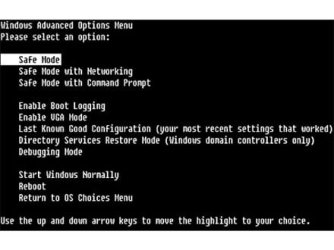
No, when you hit F8, you have the options listed below in attachment. You want to select "safe mode with command prompt". Were you able to try that successfully? | My System Specs | | System Manufacturer/Model Number Dell and Custom OS Systems 1 and 2: Windows 7 Enterprise x64, Win 8 Developer CPU System 1: i7 2600@3.4GHz, System 2: AMD FX-4100 Zambezi 3.6G Motherboard System 1:Dell 06NWYK System 2: ASUS M5A97 AM3+ Memory System 1: 8GB System 2: 8GB Graphics Card System 1: ATI FirePro V4800 System 2: Radeon HD 6850 Sound Card System 1: onboard System 2: onboard Monitor(s) Displays System1: Viewsonic HDMI 24" Screen Resolution System 1: 1920x1080 System 2: 1920x1080 Case System 1: Dell System 2: Cooler Master Hard Drives System 1: Mirrored .5B drives System 2: Seagate Barracuda ST1000DM003 1TB 7200 RPM 64MB Cache SATA 6.0Gb/s Internet Speed 10 MBPS |
08 Feb 2012
|
| | Windows 7 Professional 64 Bit Service Pack 1 162 posts Arizona, USA |

Quote: Originally Posted by Lemur No, when you hit F8, you have the options listed below in attachment. You want to select "safe mode with command prompt". Were you able to try that successfully? Lemur, you're going the same place I am. | My System Specs | | System Manufacturer/Model Number Custom Build OS Windows 7 Professional 64 Bit Service Pack 1 CPU Intel i7-2600K OC to 3.8Ghz Motherboard Asus TUF Sabertooth P67 Memory Corsair Vengence 16GB (X4 4GB) Graphics Card X2 EVGA GTX570 SLI Sound Card Creative Soundblaster X-FI TI Monitor(s) Displays Dual HP 2311 LED Displays Screen Resolution 1920X1080 single / 3840X1080 desktop Keyboard Razer Black Widow Mechanical Mouse Razer Mamba PSU Kingwin Mach 1 1000w Modular 80+ Bronze Case AZZA solano 1000 Cooling Zalmen 700 LED CPU, X2 240mm case fans , X3 120mm case fans Hard Drives Crucial Force 3 SSD 120GB 6Gb/s ( OS Drive )
WD Caviar Black 2 TB 6 Gb/s (Data drive) Internet Speed 26.7 mb/s Down / 7.39 Up |
08 Feb 2012
|
| | Systems 1 and 2: Windows 7 Enterprise x64, Win 8 Developer 3,230 posts University of Kentucky |

Quote: Originally Posted by Gromit1710 
Quote: Originally Posted by Lemur No, when you hit F8, you have the options listed below in attachment. You want to select "safe mode with command prompt". Were you able to try that successfully? Lemur, you're going the same place I am. True. But when I asked about entering the sfc command at safe mode prompt, the OP just mentioned going to safe mode. Wanted to verify... | My System Specs | | System Manufacturer/Model Number Dell and Custom OS Systems 1 and 2: Windows 7 Enterprise x64, Win 8 Developer CPU System 1: i7 2600@3.4GHz, System 2: AMD FX-4100 Zambezi 3.6G Motherboard System 1:Dell 06NWYK System 2: ASUS M5A97 AM3+ Memory System 1: 8GB System 2: 8GB Graphics Card System 1: ATI FirePro V4800 System 2: Radeon HD 6850 Sound Card System 1: onboard System 2: onboard Monitor(s) Displays System1: Viewsonic HDMI 24" Screen Resolution System 1: 1920x1080 System 2: 1920x1080 Case System 1: Dell System 2: Cooler Master Hard Drives System 1: Mirrored .5B drives System 2: Seagate Barracuda ST1000DM003 1TB 7200 RPM 64MB Cache SATA 6.0Gb/s Internet Speed 10 MBPS |
08 Feb 2012
|
| | Windows 7 Professional 64 Bit Service Pack 1 162 posts Arizona, USA |

Quote: Originally Posted by Lemur 
Quote: Originally Posted by Gromit1710 
Quote: Originally Posted by Lemur No, when you hit F8, you have the options listed below in attachment. You want to select "safe mode with command prompt". Were you able to try that successfully? Lemur, you're going the same place I am. True. But when I asked about entering the sfc command at safe mode prompt, the OP just mentioned going to safe mode. Wanted to verify... Totally. I'm acknowledging that you're faster than I am on this one | My System Specs | | System Manufacturer/Model Number Custom Build OS Windows 7 Professional 64 Bit Service Pack 1 CPU Intel i7-2600K OC to 3.8Ghz Motherboard Asus TUF Sabertooth P67 Memory Corsair Vengence 16GB (X4 4GB) Graphics Card X2 EVGA GTX570 SLI Sound Card Creative Soundblaster X-FI TI Monitor(s) Displays Dual HP 2311 LED Displays Screen Resolution 1920X1080 single / 3840X1080 desktop Keyboard Razer Black Widow Mechanical Mouse Razer Mamba PSU Kingwin Mach 1 1000w Modular 80+ Bronze Case AZZA solano 1000 Cooling Zalmen 700 LED CPU, X2 240mm case fans , X3 120mm case fans Hard Drives Crucial Force 3 SSD 120GB 6Gb/s ( OS Drive )
WD Caviar Black 2 TB 6 Gb/s (Data drive) Internet Speed 26.7 mb/s Down / 7.39 Up |
10 Feb 2012
|
| | Windows 7 Home Premium 64bit 4 posts |
Hi, so I removed the hard drive from my laptop and booted the computer with my recovery cd and it actually worked. No blank screen, the dvd I booted actually showed up. Does this mean my hard drive or some file on it is corrupt? Do you think replacing the laptop hard drive will fix the issue? | My System Specs | | OS Windows 7 Home Premium 64bit |
10 Feb 2012
|
| | Systems 1 and 2: Windows 7 Enterprise x64, Win 8 Developer 3,230 posts University of Kentucky |

Quote: Originally Posted by Den90 Hi, so I removed the hard drive from my laptop and booted the computer with my recovery cd and it actually worked. No blank screen, the dvd I booted actually showed up. Does this mean my hard drive or some file on it is corrupt? Do you think replacing the laptop hard drive will fix the issue?
I would probably reformat the drive, and run a chkdsk on it. There are also several hard drive diagnostic utilities out there, some specifically made for the hard drive. What hard drive do you have?
Hitachi fitness test: Downloads
Spinrite: GRC*|*Hard drive data recovery software**
Hiren's boot cd: Hiren's BootCD 15.1 - All in one Bootable CD » www.hiren.info
Seatools: | Seagate
Western Digital: WD Support / Downloads / SATA & SAS / WD Caviar Blue / SE / SE16 (SATA II) | My System Specs | | System Manufacturer/Model Number Dell and Custom OS Systems 1 and 2: Windows 7 Enterprise x64, Win 8 Developer CPU System 1: i7 2600@3.4GHz, System 2: AMD FX-4100 Zambezi 3.6G Motherboard System 1:Dell 06NWYK System 2: ASUS M5A97 AM3+ Memory System 1: 8GB System 2: 8GB Graphics Card System 1: ATI FirePro V4800 System 2: Radeon HD 6850 Sound Card System 1: onboard System 2: onboard Monitor(s) Displays System1: Viewsonic HDMI 24" Screen Resolution System 1: 1920x1080 System 2: 1920x1080 Case System 1: Dell System 2: Cooler Master Hard Drives System 1: Mirrored .5B drives System 2: Seagate Barracuda ST1000DM003 1TB 7200 RPM 64MB Cache SATA 6.0Gb/s Internet Speed 10 MBPS Laptop boots to blank screen and cursor. Help. problems? All times are GMT -5. The time now is 08:38 PM. | |