Windows 7 Forums Search
Welcome to Windows 7 Forums. Our forum is dedicated to helping you find solutions with any problems, errors or issues you are experiencing with Windows 7. The Windows 7 forum also covers news and updates and has an extensive Windows 7 tutorial section that covers a wide range of tips and tricks.


Windows 7 - System Reserved drive Inaccessible.

 
02-11-2012   #1


Windows 7 Professional x64


System Reserved drive Inaccessible.

Hi all, just wondered if anyone could help me with this?

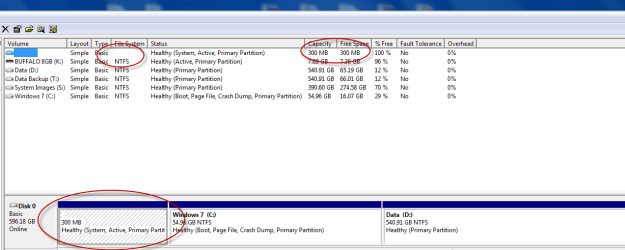
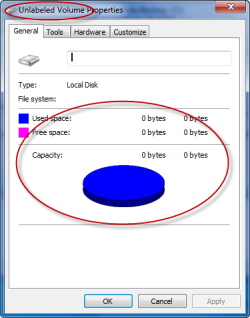
I have a 300mb System Reserved partition. Today when I went into disk management I noticed the partition has disappeared. When I click on it and click properties it says it's an unlabelled volume. It was showing up fine a few days ago.


Now the disk shows up ok in other programs like easeus partition master and paragon hard disk manager just not windows disk management. Tried to do a chkdsk on it and it says it can't access the drive.

Now if I assign it a drive letter it works ok again. Then if I remove the drive letter and reboot my pc it's inaccessible again. Windows still boots though.

Enclosed a couple of screenshots. Wondered if anyone can help me with this please?


System Reserved drive Inaccessible.-capture-03.png

System Reserved drive Inaccessible.-capture-04.png

My System SpecsSystem Spec
02-11-2012   #2


Windows 7 Pro with SP1 32bit


The hard disk image appears quite OK to me. The System Reserved Drive is usually without a Drive Letter and inaccessible. Why do you want to access it?
My System SpecsSystem Spec
02-11-2012   #3


Windows 7 Professional x64


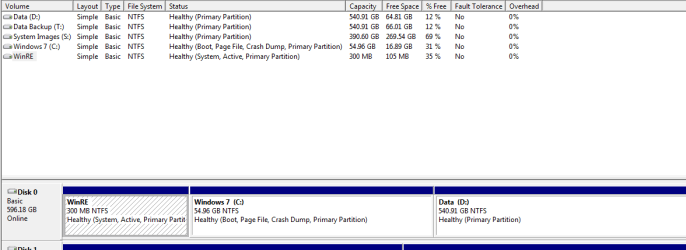
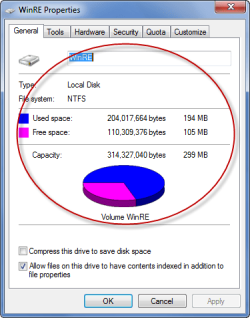
This is how it looked before even when not assigned a drive letter:

System Reserved drive Inaccessible.-capture-01.png

System Reserved drive Inaccessible.-capture-02.png

As you can see, it showing the correct free space and label. And was accessible. Now it just isn't accessible and reports that there is no free or used space, it doesn't even show the NTFS file system.

This is how it looks now:

System Reserved drive Inaccessible.-capture-03.png

System Reserved drive Inaccessible.-capture-04.png
My System SpecsSystem Spec
.


02-11-2012   #4
whs


Vista and Windows7, sometimes Ubuntu and Fedora


You should really not muck around with the System reserved partition. Next you know, you will not be able to boot any more.

I suggest you move the bootmgr to C:\. Then you can play around with it - even delete it.
My System SpecsSystem Spec
02-11-2012   #5


Windows 7 Professional x64


I haven't really done anything to it though. Other than extending it to get over system image backup problems. But I did that about a year ago and never had a problem til two days ago.

I'd rather keep it to be honest as I prefer to be able to boot into the Windows recovery tools without having to keep going through my DVD's.
My System SpecsSystem Spec
03-03-2012   #6


Windows 7 Professional x64


Anyone got anymore thoughts on this issue? The drive is ok as long as it's assigned a drive letter. As soon as I remove the drive letter and reboot the drive is inaccessible again.
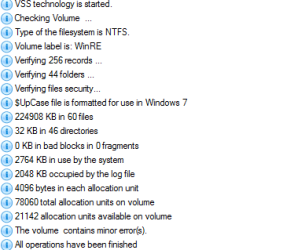
I did a check with Paragon Hard disk Manager and it says it has minor errors. Chkdsk finds no issues though.

System Reserved drive Inaccessible.-capture-01.png
My System SpecsSystem Spec
03-03-2012   #7
whs


Vista and Windows7, sometimes Ubuntu and Fedora


Have a look whether this little tut can be of any help: Partitions - View Hidden Partitions
My System SpecsSystem Spec
03-03-2012   #8


You'd still be able to boot the Repair Console on F8 Advanced Boot Tools menu if you move the System boot files to C. WinRE is onboard C.

What I would do is use the best partition manager for Windows 7, free Partition Wizard bootable CD, to check the File System on each partition. Errors may be causing the anomaly. If not then unless it presents performance problems I would leave it alone unless you want to move the System boot files to C, perhaps even reclaim the HD space into C.
My System SpecsSystem Spec
03-03-2012   #9


Windows 7 Professional x64


Hi Greg, I'm considering moving boot to C: then deleting system reserved and moving c drive to the left. The only thing I'm concerned about is if I move it to the left and then my C: drive becomes inaccessible?
I noticed this started happening a little while after I extended my system reserved partition. Maybe that screwed things up?

Could it be a MBR problem or anything to do with partitions not being aligned properly?
I use a RAID 0 configuration and I've heard that it can cause issues if the partitions aren't aligned correctly.
My System SpecsSystem Spec
03-03-2012   #10


Since you need the PW CD to do the changeover anyway, try Checking the File System first as that may solve it.

If not, rightclick on C to Mark Active, click OK. Then click on the HD # to highlight HD, from Disk tab select Rebuild MBR, Apply both steps. This may preclude the need to run Startup Repairs.

If Windows 7 wont' boot at restart, then boot into Windows 7 DVD Repair console or Repair CD to run Startup Repair - Run 3 Separate Times.

Once Windows 7 starts and holds the System Active flags, boot back into PW CD to delete SysReserved and Resize Windows 7 partition into its space.
My System SpecsSystem Spec
Reply

 System Reserved drive Inaccessible. problems?


Thread Tools


Similar Threads for: System Reserved drive Inaccessible.
Thread Forum
Solved Question about System Reserved Drive Installation & Setup
Solved System reserved partition (system, active) on Slave drive General Discussion
Solved hard drive is now system reserved. Hardware & Devices
system reserved partition on second drive General Discussion


All times are GMT -5. The time now is 02:41 AM.


Windows 7 Forums is an independent web site and has not been authorized,
sponsored, or otherwise approved by Microsoft Corporation.
"Windows 7" and related materials are trademarks of Microsoft Corp.
© Designer Media Ltd
  

1 2 3 4 5 6 7 8 9 10 11 12 13 14 15 16 17 18 19 20 21 22 23 24 25 26 27 28 29 30