Windows 7 Forums


Windows 7: When I close lid, laptop goes to sleep even though I've fixed Power Op

12 Feb 2012   #1

64 win7
 
 
When I close lid, laptop goes to sleep even though I've fixed Power Op

Hi,

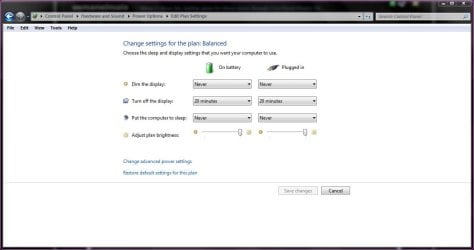
These are the settings in the power options (Picture), and I set it to never sleep. However it still goes to sleep after a few minutes of me closing the lid. Help please?


Windows 7, 64bit OS, HP pavilion.
My System SpecsSystem Spec

12 Feb 2012   #2

Windows 7 Home Premium x64 SP1
England


Hello osmanelmais

What are your sleep settings under that plan
When I close lid, laptop goes to sleep even though I've fixed Power Op-capture.jpg
My System SpecsSystem Spec
12 Feb 2012   #3

Windows 8 Pro
India


Go to control panel-Hardware and Sound-Power options.On the left side panel is "Choose what closing the lid does".Under the option when i close the lid,select do nothing in both battery and plugged in.
Attached Thumbnails
When I close lid, laptop goes to sleep even though I've fixed Power Op-capture.jpg  
My System SpecsSystem Spec
.


12 Feb 2012   #4

64 win7


thanks guys, it's hopefully fixed now
My System SpecsSystem Spec
12 Feb 2012   #5

Windows 7 Home Premium x64 SP1
England


Good news
My System SpecsSystem Spec
12 Feb 2012   #6

Windows 8 Pro
India


You are welcome osman
My System SpecsSystem Spec
Reply

 When I close lid, laptop goes to sleep even though I've fixed Power Op problems?


Thread Tools


Similar help and support threads for: When I close lid, laptop goes to sleep even though I've fixed Power Op
Thread Forum
BSOD when laptop recovers from sleep or lid close BAD_POOL_CALLER BSOD Help and Support
Solved Noisy OCZ ZT750 Power Supply Fan - fixed Hardware & Devices
Sleep Issues Fixed!! Network & Sharing
Solved Laptop Won't Come Out of Sleep W/O Power Button Drivers
power button just puts laptop to sleep General Discussion


All times are GMT -5. The time now is 03:57 PM.


Seven Forums Android App Seven Forums IOS App Follow us on Facebook

Windows 7 Forums is an independent web site and has not been authorized,
sponsored, or otherwise approved by Microsoft Corporation.
"Windows 7" and related materials are trademarks of Microsoft Corp.
© Designer Media Ltd
  

1 2 3 4 5 6 7 8 9 10 11 12 13 14 15 16 17 18 19 20 21 22 23 24 25 26 27 28 29 30 31 32