Windows 7 Forums


Windows 7: My D drive says it's full and contains files I can't see

12 Feb 2012   #1

windows 7 home premium 64bit
 
 
My D drive says it's full and contains files I can't see

Hi

I recently wiped my computer and installed windows 7 (home premium 64 bit). Almost all the work I do is directly onto an external drive and very little is saved onto the internal hard drive.

Suddenly last week a message said it could not perform its weekly back up as their was insufficient disc space. My D drive shows 230GB is used with only a few GB free.

I have found one file in a Windows Image Backup file on that drive which accounts for 50 GB but all the other files on the drive are under 100 KB.

Does anyone have any ideas?

Chantal

My System SpecsSystem Spec

12 Feb 2012   #2

Windows 7 Ultimate SP1 (x64)
South Australia


Hi Chantal,

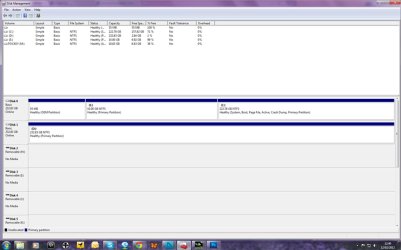
Can you please post a screen capture image of your maximised Disk Management screen?

Click the Start Orb, and in the search box, type disk management. Click on Create and format hard disk partitions. You should see the image similar to that shown below.

Regards,
Golden
Attached Thumbnails
My D drive says it's full and contains files I can't see-capture.jpg  

Last edited by Golden; 12 Feb 2012 at 07:40 AM.. Reason: add example screencapture to make it easier
My System SpecsSystem Spec
12 Feb 2012   #3

windows 7 home premium 64bit


Thanks for such a quick reply. Here you go. I hope this helps

Chantal

My D drive says it's full and contains files I can't see-disk-management-1.jpg
My System SpecsSystem Spec
.


12 Feb 2012   #4

Windows 7 Ultimate SP1 (x64)
South Australia


Hi,

OK. In Windows Explorer, do the following:

1. Click Tools, then Folder options.
2. Click the View tab
3. Make sure the option Show hidden files, folder and drives is checked, as shown below.
4. Click Apply, then click OK.
5. Close Explorer, and then re-open it.

Now browse your D: and check to see if you find any large files.

Regards,
Golden
Attached Thumbnails
My D drive says it's full and contains files I can't see-capture.jpg  
My System SpecsSystem Spec
12 Feb 2012   #5

windows 7 home premium 64bit


Hi

I already did this. There are 26 files, all 1 gb or under, plus the Windows Image Backup file which contains one 61 GB file and a few much smaller ones.
My System SpecsSystem Spec
12 Feb 2012   #6

Windows 7 Ultimate SP1 (x64)
South Australia


Hi,

OK. Lets try something different. Can you please download and install WinDirStat. Run it and see if it can help point to the large (invisible?) file/s.

WinDirStat - Permalinks to downloads and other content

Regards,
Golden
Attached Thumbnails
My D drive says it's full and contains files I can't see-capture.jpg  
My System SpecsSystem Spec
12 Feb 2012   #7

Windows 7 Ultimate SP1 (64 bit), Windows XP SP3, Linux Mint 14 MATE (64 bit)
Adelaide


How many backup files does Windows "Backup and Restore" show on that disc?
My System SpecsSystem Spec
12 Feb 2012   #8

windows 7 home premium 64bit


Ok. Have done and this is what it shows. Is it holding onto to previous back-ups and is that what is taking up the the space?

My D drive says it's full and contains files I can't see-windirstat-1.jpg
My System SpecsSystem Spec
12 Feb 2012   #9

Windows 7 Ultimate SP1 (x64)
South Australia


Hi,

Yes, but also I see the .ZIP files hold the greatest proportion of space. What are those? Are they related to the backups?

Regards,
Golden
My System SpecsSystem Spec
12 Feb 2012   #10

windows 7 home premium 64bit


Yes, it looks like all the backup files in the Chantal PC section are made up of zip files
My System SpecsSystem Spec
Reply

 My D drive says it's full and contains files I can't see problems?


Thread Tools


Similar help and support threads for: My D drive says it's full and contains files I can't see
Thread Forum
Where are the files? My C drive looks to be full yet all of my librari General Discussion
Temp Internet files folder is 118GB full, but no files??? Browsers & Mail
Recovery d drive storing program files (86) and is almost full. Backup and Restore
Solved desk top full of files - help General Discussion
how do i see full name of files? General Discussion


All times are GMT -5. The time now is 12:25 AM.


Seven Forums Android App Seven Forums IOS App Follow us on Facebook

Windows 7 Forums is an independent web site and has not been authorized,
sponsored, or otherwise approved by Microsoft Corporation.
"Windows 7" and related materials are trademarks of Microsoft Corp.
© Designer Media Ltd
  

1 2 3 4 5 6 7 8 9 10 11 12 13 14 15 16 17 18 19 20 21 22 23 24 25 26 27 28 29 30 31 32