|
Welcome to Windows 7 Forums. Our forum is dedicated to helping you find solutions with any problems, errors or issues you are experiencing with Windows 7. The Windows 7 forum also covers news and updates and has an extensive Windows 7 tutorial section that covers a wide range of tips and tricks.
Windows 7 - Old computer name won't go away, how to change? |
02-12-2012
|
#1 | | |
Old computer name won't go away, how to change? When I first ran Win 7 I used the name OWNER somewhere, or at least that was the default name that came up and I didn't change it. Now it's embedded everywhere in the Registry and I'd like to change it without doing a re-install. The user folder was originally named "Owner", I have changed that.
Searching the Registry the name "OWNER-PC" comes up all over the place. I have changed the name of the computer, and my user folder name, but the old name "Owner", "OWNER-PC", "Owner-PC", etc. comes up all over the Registry. Is there a key value that all subsequent key values get this value from?
Can I just do a search and replace? I'd create a system restore point and system backup via Windows Home Server before editing the Registry to this extent beforehand.
Cross posted here http://social.technet.microsoft.com/...d-358a29adb5b2
TIA | My System Specs | | OS Windows 7 Ultimate x64 |
02-12-2012
|
#2 | | Windows 7 Ultimate x64 SP1 |
Why do you need to change it? You can change the login name, if you want to see a different name - but I would just leave the folders/registry entries/etc alone. | My System Specs | | System Manufacturer/Model Number Dell XPS 15 L502x OS Windows 7 Ultimate x64 SP1 CPU Core i7-2670QM Memory 8GB DDR3 PC3-10600 Graphics Card Intel HD Graphics 3000 + GeForce GT 540M Screen Resolution 1920x1080 Hard Drives 1TB 5400RPM Seagate |
02-12-2012
|
#3 | | Systems 1 and 2: Windows 7 Enterprise x64, Win 8 Developer |
Agreed - don't touch the registries. You can rename your computer, create a new user if you wish, and - as kegobeer indicated - create a new login. You could also delete a user no longer being used. | My System Specs | | System Manufacturer/Model Number Dell and Custom OS Systems 1 and 2: Windows 7 Enterprise x64, Win 8 Developer CPU System 1: i7 2600@3.4GHz, System 2: AMD FX-4100 Zambezi 3.6G Motherboard System 1:Dell 06NWYK System 2: ASUS M5A97 AM3+ Memory System 1: 8GB System 2: 8GB Graphics Card System 1: ATI FirePro V4800 System 2: Radeon HD 6850 Sound Card System 1: onboard System 2: onboard Monitor(s) Displays System1: Viewsonic HDMI 24" Screen Resolution System 1: 1920x1080 System 2: 1920x1080 Case System 1: Dell System 2: Cooler Master Hard Drives System 1: Mirrored .5B drives System 2: Seagate Barracuda ST1000DM003 1TB 7200 RPM 64MB Cache SATA 6.0Gb/s Internet Speed 10 MBPS |
02-12-2012
|
#4 | | |
@kegobeer, The login name has always been correct. Example, login name is "bob", but the user folder name was "Owner". The name "Owner" was the default name when I first opened Windows 7, and I didn't change it at that time. At that time I also chose "bob" for my login, not "Owner". The computer name was "Owner-PC", I've changed that today also. I just changed the user folder name today, that's fine. But the old name "Owner" keeps coming up as programs are looking for files/data etc. in the old "c:\users\owner" folder that doesn't exist anymore. The name "owner" is all over the Registry as it relates to my user name, which isn't "owner" anymore. That's why I would like to change it. | My System Specs | | OS Windows 7 Ultimate x64 |
02-12-2012
|
#5 | | Windows 7 Ultimate x64 SP1 |
Hello montejw, and welcome to Seven Forums.
Due to the reasons in the blue NOTE box at the top of this tutorial, the only true way to remove the old name of the user account is to create a new administrator account, then delete the old user account while logged in the new one.
Be sure to backup anything that you do not want to lose from the old account first though. For example, shortcuts, Start Menu shortcuts, files inside the user folders, etc....
Hope this helps,
Shawn | My System Specs | | System Manufacturer/Model Number Self built custom OS Windows 7 Ultimate x64 SP1 CPU Intel i7-980X 3.3 Ghz (3.48 Ghz OC'd) Motherboard ASUS P6X58D Premium Memory 12 GB (2GBx6) DDR3 PC3-16000 2000 MHz Kingston HyperX Graphics Card Sapphire HD5870 Eyefinity 6 2GB Sound Card Realtek HD Audio ALC889 Integrated Chip Monitor(s) Displays 3x 27" Asus VE278Q Screen Resolution 1920x1080 Keyboard Logitech Cordless Desktop MX 5500 Revolution Mouse Logitech Cordless Desktop MX 5500 Revolution PSU OCZ Series Gold OCZZ1000M 1000W Case Corsair Obsidian 800D Cooling Thermalright Ultra 120 Extreme Copper CPU heat sink w/120 MM Hard Drives 160GB OCZ RevoDrive X2
** 2 x 1TB Samsung HDD HD154UI SATA Internet Speed 50 Mb/s Download and 2 Mb/s Upload Other Info Microsoft LifeCam Cinema
** Lite-On iHBS212 12x BD Writer
** Samsung CLX-3175FW Printer
** Netgear WNDR3800 Router
** Motorola SBG6580 Cable Modem
** 2x APC Back-UPS XS 1500 |
02-12-2012
|
#6 | | |

Quote: Originally Posted by Lemur Agreed - don't touch the registries. You can rename your computer, create a new user if you wish, and - as kegobeer indicated - create a new login. You could also delete a user no longer being used. My login name has always been okay, my user name (isn't that the same as the login name?) has always been okay. The user folder name was what I wanted to change, and did so today. The computer name was also changed, and I think the computer name and user folder name were the same, or at least related somehow, as the user folder was "Owner" and the computer name was "OWNER-PC". The name "Owner" and "OWNER-PC" are all over in the registry.
I installed a new program today and it has subsequently grabbed and used the name "Owner" in at least one of it's key values in the registry. I can't have this old value keep coming up, that's why I want to change it.
Changing Registry values isn't a big deal, done it before. I'm looking for help on where this value originates from so I can change it and not have it come up again. | My System Specs | | OS Windows 7 Ultimate x64 |
02-12-2012
|
#7 | | |

Quote: Originally Posted by Brink Hello montejw, and welcome to Seven Forums.
Due to the reasons in the blue NOTE box at the top of this tutorial, the only true way to remove the old name of the user account is to create a new administrator account, then delete the old user account while logged in the new one.
Be sure to backup anything that you do not want to lose from the old account first though. For example, shortcuts, Start Menu shortcuts, files inside the user folders, etc....
Hope this helps,
Shawn Shawn,
Thanks. I've never had problems with my user name, only the user folder name. I followed your tutorial and changed the user folder name. I don't need to delete the user, as the user name has always been okay. | My System Specs | | OS Windows 7 Ultimate x64 System Manufacturer/Model Number compaq sr5410f case OS Windows 7 Pro 64 SP1 CPU AMD X2 4450E @ 2.3 ghz Motherboard Biostar MCP6P M2+ Memory 4.0 g Graphics Card Nvidia GeForce 9600 GT , 512mb Sound Card onboard Monitor(s) Displays auria eq2367 Screen Resolution 1920 x 1080 Keyboard logitech wave cordless Mouse logitech LX8 cordless laser mouse PSU 250 watts Case compaq Cooling couple fans Hard Drives 1 tb Hitachi HDT721010SLA scsi, 500 gb external Internet Speed comcast hi speed 19 dn 8 up Other Info Laptop specs: HP g7-1365dx /
CPU: AMD A6-3420M APU with Radeon(tm) HD Graphics /
RAM: Crucial 8Gb (2x4Gb) /
SSD: Crucial M4-CT128M4SSD2 ATA Device/ FW 000F /
GFX: AMD Radeon HD 6520G /
OS: Microsoft Windows 7 Professional 64-bit 7601 Multiprocessor Free Service Pack 1 |
02-12-2012
|
#9 | | Windows 7 Ultimate x64 SP1 |

Quote: Originally Posted by montejw360 
Quote: Originally Posted by Brink Hello montejw, and welcome to Seven Forums.
Due to the reasons in the blue NOTE box at the top of this tutorial, the only true way to remove the old name of the user account is to create a new administrator account, then delete the old user account while logged in the new one.
Be sure to backup anything that you do not want to lose from the old account first though. For example, shortcuts, Start Menu shortcuts, files inside the user folders, etc....
Hope this helps,
Shawn Shawn,
Thanks. I've never had problems with my user name, only the user folder name. I followed your tutorial and changed the user folder name. I don't need to delete the user, as the user name has always been okay. As in the blue NOTE box at the top of that tutorial ( please read to help clarify this better), even though you changed the user profile folder name (user name), both the old and new user name will always be tied to the user account (user profile). This is why you will still see the old name "OWNER" and "OWNER-PC" referenced in the registry and security settings. | My System Specs | | System Manufacturer/Model Number Self built custom OS Windows 7 Ultimate x64 SP1 CPU Intel i7-980X 3.3 Ghz (3.48 Ghz OC'd) Motherboard ASUS P6X58D Premium Memory 12 GB (2GBx6) DDR3 PC3-16000 2000 MHz Kingston HyperX Graphics Card Sapphire HD5870 Eyefinity 6 2GB Sound Card Realtek HD Audio ALC889 Integrated Chip Monitor(s) Displays 3x 27" Asus VE278Q Screen Resolution 1920x1080 Keyboard Logitech Cordless Desktop MX 5500 Revolution Mouse Logitech Cordless Desktop MX 5500 Revolution PSU OCZ Series Gold OCZZ1000M 1000W Case Corsair Obsidian 800D Cooling Thermalright Ultra 120 Extreme Copper CPU heat sink w/120 MM Hard Drives 160GB OCZ RevoDrive X2
** 2 x 1TB Samsung HDD HD154UI SATA Internet Speed 50 Mb/s Download and 2 Mb/s Upload Other Info Microsoft LifeCam Cinema
** Lite-On iHBS212 12x BD Writer
** Samsung CLX-3175FW Printer
** Netgear WNDR3800 Router
** Motorola SBG6580 Cable Modem
** 2x APC Back-UPS XS 1500 |
02-12-2012
|
#10 | | |

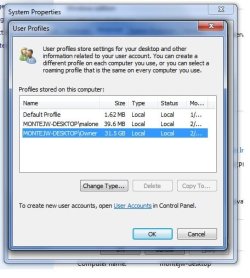
Quote: Originally Posted by derekimo Already did that. The old name "Owner" still comes up, for example here, in the User Profiles list. | My System Specs | | OS Windows 7 Ultimate x64 Old computer name won't go away, how to change? problems? All times are GMT -5. The time now is 02:45 AM. |  |