| Windows 7: Powerdesk retired for me: too many incompatiblilities with Win7 + tip |
12 Feb 2012
|
| | Windows 7 x64/sp1 13 posts |
Powerdesk retired for me: too many incompatiblilities with Win7 + tip I have for many years used Powerdesk 5 (a freebie) after first purchasing v3.x many years ago. I became extremely attached to it for various reasons, but primarily because it had an accessible feature that allowed one to copy the complete path of a file. I couldn't give that up.
To make a long story short, various efforts to get the latest and the previous version to work in a stable manner with Windows 7 have failed.
But there is good news! I discovered that Windows Explorer has a 'hidden' feature that allows one to copy the complete path, albeit with unnecessary double-quotes around it - but still, by pressing shift before right-clicking and there in the middle of the menu is " Copy as path" !!!
HTH
Barry | My System Specs |
| |
12 Feb 2012
|
| | Windows 7 Pro X64 3,616 posts Space Coast of Florida |
I have all the paid for versions of Power5desk up to 8.0 and have also stopped using it. The main reason being it's just too slow. It has a lot of nice features but I don't find any I need on Win 7 any more.
The one thing I did use was it's Sync capability to occasionally keep two folders on two different computers in sync. I now do that automatically with a program called MirrorFolder, so .... bye bye PowerDesk.
The Copy as path is un-needed. When you are at the location you want in Windows Explorer, click on the Bread-crumbs (Address) bar. C:\ > Program Files (x86) > Carbonite > Carbonite Backup
becomes
C:\Program Files (x86)\Carbonite\Carbonite Backup. Right click and Copy! | My System Specs | | System Manufacturer/Model Number Dell Precision 370 OS Windows 7 Pro X64 CPU Intel Pentium 4 Dual LP 3.4Ghz Memory 4GB DDR PC2-5200 ECC Graphics Card NVIDIA Quadro FX 3400/4400 Sound Card SoundMAX Integrated Digital Audio Monitor(s) Displays HP 22" w2207 LCD Screen Resolution 1680 x 1050 Hard Drives 300GB Maxtor 6L300RD PATA
128GB Kingston SV200S3128G SSD (boot)
1.5TB Seagate ST3150041AS SATA Internet Speed Cable via Road Runner 2MB Upload, 20MB Download |
12 Feb 2012
|
| | Windows 7 Ultimate SP1 (64 bit), Windows XP SP3, Linux Mint 14 MATE (64 bit) 1,848 posts Adelaide |
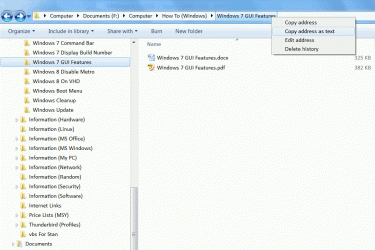
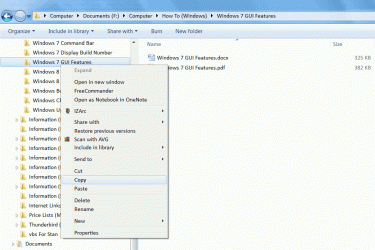
Right Click the Breadcrumb Bar You can also just right click on the " Breadcrumb Bar" (" Address Bar") and choose " Copy address as text", to copy the path to the " Clipboard". Click on thumbnail for animation.  " Copy address" performs the same function as selecting the named folder in the " Navigation Pane" and copying it. Click on thumbnail for animation.  | My System Specs | | System Manufacturer/Model Number n/a OS Windows 7 Ultimate SP1 (64 bit), Windows XP SP3, Linux Mint 14 MATE (64 bit) CPU AMD Phenom II x6 1055T, 2.8 GHz Motherboard ASRock 880GMH-LE/USB3 Memory 8GB DDR3 1333 G-Skill Ares F3-1333C9D-8GAO (4GB x 2) Graphics Card ATI Radeon HD6450 Sound Card Realtek? Monitor(s) Displays Samsung S23B350 Screen Resolution 1920x1080 Mouse Wired Optical Case Tower Hard Drives Western Digital 1 TB (SATA), Western Digital 1.5 TB (SATA), Western Digital 2 TB (SATA) Internet Speed DSL Other Info Ubuntu 10.04 (64 bit) replaced with Linux Mint 14 MATE (64 bit) - 2013-01-14
RAM & Graphics Card Upgraded - 2013-01-13
Monitor Upgraded - 2012-04-20
System Upgraded - 2011-05-21, 2010-07-14
HDD Upgraded - 2010-08-11, 2011-08-24 |
12 Feb 2012
|
| | Windows 7 x64/sp1 13 posts |
Rich, PJL
Thanks! That's even better: no quotes!
Barry | My System Specs | | |
12 Feb 2012
|
| | Windows 7 Ultimate SP1 (64 bit), Windows XP SP3, Linux Mint 14 MATE (64 bit) 1,848 posts Adelaide |
No problems 
Quote: Originally Posted by IfItsX Rich, PJL
Thanks! That's even better: no quotes!
Barry No problems.
I hope that trick is helpful. | My System Specs | | System Manufacturer/Model Number n/a OS Windows 7 Ultimate SP1 (64 bit), Windows XP SP3, Linux Mint 14 MATE (64 bit) CPU AMD Phenom II x6 1055T, 2.8 GHz Motherboard ASRock 880GMH-LE/USB3 Memory 8GB DDR3 1333 G-Skill Ares F3-1333C9D-8GAO (4GB x 2) Graphics Card ATI Radeon HD6450 Sound Card Realtek? Monitor(s) Displays Samsung S23B350 Screen Resolution 1920x1080 Mouse Wired Optical Case Tower Hard Drives Western Digital 1 TB (SATA), Western Digital 1.5 TB (SATA), Western Digital 2 TB (SATA) Internet Speed DSL Other Info Ubuntu 10.04 (64 bit) replaced with Linux Mint 14 MATE (64 bit) - 2013-01-14
RAM & Graphics Card Upgraded - 2013-01-13
Monitor Upgraded - 2012-04-20
System Upgraded - 2011-05-21, 2010-07-14
HDD Upgraded - 2010-08-11, 2011-08-24 |
12 Feb 2012
|
| | |
I had been a LONG TIME user of PowerDesk. When I first started using Win 7 I bought the newest version, 8. had nothing but problems with it. Used the forum of at CafeCity, actually an arm of Avenquest, to log my displeasure with the program and nothing was ever resolved. They, Avenquest, actually came out with a NEWER, yeah right, version, 8.5, that was just as bad as V8.
I still use the Sync and File Finder programs as they are actually stand alone EXE files but I have uninstalled the main PD program.
I now use Explorer++ and Win Explorer. But I miss using Powerdesk. | My System Specs | | |
13 Feb 2012
|
| | Windows 7 x64/sp1 13 posts |
edwar, I commiserate with you about PD, and about the lack of useful help on CafeCity. The guy that usually responds there from AvantQuest took me around many pointless email exchanges. Oy! Rest in peace, PD. I'll have to consider my purchase price as a funeral expense.
Now, inspired by the replies to this post about my #1 favorite feature on PD which was the copy path, I have discovered that there is also a keyboard shortcut for that in Win Explorer: Alt+D: Select the address bar. Found it here: Keyboard shortcuts
Also, edwar, thanks for the suggestion about Explorer++: Explorer++ - A small and fast file manager for Windows
They even have 64-bit versions. I'll have to cruise the blog and forums some day to see how people feel about it.
Barry | My System Specs | | Powerdesk retired for me: too many incompatiblilities with Win7 + tip problems? All times are GMT -5. The time now is 12:59 PM. | |