Windows 7 Forums Search
Welcome to Windows 7 Forums. Our forum is dedicated to helping you find solutions with any problems, errors or issues you are experiencing with Windows 7. The Windows 7 forum also covers news and updates and has an extensive Windows 7 tutorial section that covers a wide range of tips and tricks.


Windows 7 - Remove "labels" from drive types in "Computer" window?


08-18-2009   #1


Windows 7 Professional (final) x64


Remove "labels" from drive types in "Computer" window?

Hi there,

I didn't really know how to google for this (although I did), so I didn't find anything proper and like to ask you: How do I remove the "labels" from drive types in "Computer" window? What I mean:


These labels above the different drives are really annoying, as I'm accustomed at one item after another and somehow one could change it to that view in every OS every since (XP, Vista), but now it doesn't seem to work? (I tried all the context menu items )

Any ideas? Thanks for your help in advance, much appreciated!

Kind regards

My System SpecsSystem Spec
08-18-2009   #2


ultimate 64 sp1


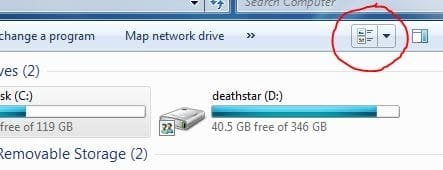
you can change the view a bit by using the button highlighted below - i don't know if you can remove the labels though...
Attached Thumbnails
Remove "labels" from drive types in "Computer" window?-drives.jpg  
My System SpecsSystem Spec
08-19-2009   #3


Windows 7 Home Premium x64


You can remove the labels, such as "2 GB USB," by right-clicking on the device and rename or go into properties and edit the field at the top.

Edit: Sorry, didn't understand it on first read. For that, right-click in an open area, go into Group By, then (none). That should work.
My System SpecsSystem Spec
.


08-19-2009   #4


Windows 7 Professional (final) x64


Hi saiarcot895,

ah yes, thanks very much! Group by none, how could I miss it.
My System SpecsSystem Spec
08-19-2009   #5


Windows 7 Professional (final) x64


Problems with the windows position...

Another question I do have is how to "maximize" / "minimize" windows in Windows 7? For example here in Evernote I can't maximize the window and as it (as a lot of programs ) do somehow (why??) not properly recognize, that I put the Taskbar at the top, I can't change the position of the window!
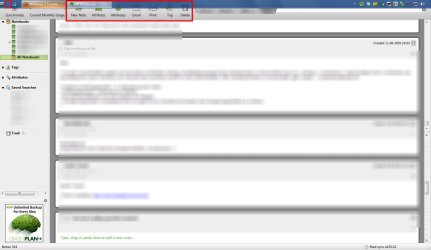
Or which are the keyboard shortcuts I could work around this with?

Also another question would be why the single icons which I put into the (fixed) taskbar are having this "gap" between each other now in Windows 7, which they hadn't in Vista and XP? I find that a waste of space and would like to deactivate this kind of behaviour.

Thanks for your help in advance!
Attached Thumbnails
Remove "labels" from drive types in "Computer" window?-win7_problems.jpg  
My System SpecsSystem Spec
08-20-2009   #6


Windows 7 Home Premium x64


If you want to move the taskbar back to the bottom, right click on the taskbar, click on properties, click on taskbar tab (if not active), then choose taskbar position.

If you want to move and maximize/minimize windows, first, go to the bottom-right portion of the window. The cursor should turn into diagonal arrows. You can hold and resize the window. Next, to move the window, you can try right-clicking on the top portion of the window and selecting move. Use the keyboard arrows to move it down. Also, if available, you can click maximize instead of moving the window and then maximizing it.

As for the taskbar, I also have a small gap. I don't know of any fix to removing the gap in your taskbar. You could try and see if any toolbars are enabled by right-clicking on the taskbar, going to toolbars, and seeing if anything is checked, although that's not going to provide much of an improvement.

It could be related to how the start menu icons and program icons are created.
Attached Thumbnails
Remove "labels" from drive types in "Computer" window?-taskbar.jpg  
My System SpecsSystem Spec
01-03-2010   #7


Se7en x32


Quote   Quote: Originally Posted by KnowledgeWorker View Post
Also another question would be why the single icons which I put into the (fixed) taskbar are having this "gap" between each other now in Windows 7, which they hadn't in Vista and XP? I find that a waste of space and would like to deactivate this kind of behaviour.

Hello there, this is my first post

Okay, I think there is a "gap" because you are using large icons (that default scheme). Let me explain this. I turned off Windows 7 compositions, so I turned large into little icons with small gaps.
I thinkg that you should search somewhere in Windows customization for resizing that things. I hope I helped.

Look:
Attached Thumbnails
Remove "labels" from drive types in "Computer" window?-l1atsn.jpg  
My System SpecsSystem Spec
01-03-2010   #8


Windows 7 Professional (final) x64


Sorry but the "gaps" are still there? Don't you see them? And e.g. I (dunno if you meant me) have small icons activated, still the problem persists as it does on your screenshot.

Whatever, I have gotten over it, there are worse problems in Windows 7...
My System SpecsSystem Spec
Reply

Remove "labels" from drive types in "Computer" window? problems?


Thread Tools


Similar Threads for: Remove "labels" from drive types in "Computer" window?
Thread Forum
Changing box option from "All supported types" to "All files?" General Discussion
"Return computer to factory condition" or "Use A System Image Crea..." Backup and Restore
Solved Remove "Restore previous versions" and "Share with" from context menu Customization
How to remove "Other" from "Computer View"? General Discussion
Remove these "Group by" and "Sort by" in context menu Customization


All times are GMT -5. The time now is 09:42 AM.


Windows 7 Forums is an independent web site and has not been authorized,
sponsored, or otherwise approved by Microsoft Corporation.
"Windows 7" and related materials are trademarks of Microsoft Corp.
© Designer Media Ltd
  

1 2 3 4 5 6 7 8 9 10 11 12 13 14 15 16 17 18 19 20 21 22 23 24 25 26 27 28 29 30