Windows 7 Forums


Windows 7: How do I disable the "The publisher could not be verified..." warning?

11 Mar 2012   #1

Windows 7 Professional x64
 
 
How do I disable the "The publisher could not be verified..." warning?

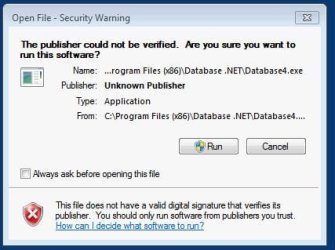
My toolbar contains an icon that links to a program in my "C:\Program Files (x86)\" folder. Every single time I click on the icon I get the attached pop-up window. The window keeps appearing even if I uncheck "Always ask before opening this file" and click "Run" and enter in the admin username and password. Why does the message keep appearing and how do I disable it entirely?

Attached Thumbnails
How do I disable the "The publisher could not be verified..." warning?-warning-unverified-publisher.jpg  
My System SpecsSystem Spec

11 Mar 2012   #2

64-bit Windows 7 Ultimate SP1 & Windows 8 Enterprise
Texas


Hello MrSnrub, and welcome to Seven Forums.

You might see if option one in the tutorial below to unblock the .exe file of the program may help get trid of this message for you.

Open File - Security Warning : Unblock File

Hope this helps,
Shawn
My System SpecsSystem Spec
13 Mar 2012   #3

Windows 7 Professional x64


Thanks a lot! The link contained the solution. I had to move it to my Downloads folder and unmark it as a potential security threat.
My System SpecsSystem Spec
.


13 Mar 2012   #4

64-bit Windows 7 Ultimate SP1 & Windows 8 Enterprise
Texas


You're most welcome. I'm happy to hear that it worked for you.
My System SpecsSystem Spec
Reply

 How do I disable the "The publisher could not be verified..." warning? problems?


Thread Tools


Similar help and support threads for: How do I disable the "The publisher could not be verified..." warning?
Thread Forum
How do I disable the "This publisher could not be verified." warning?! General Discussion
"Unknown Publisher" Warning System Security
"unknown publisher" warning - how do I assign a publisher to my .exe ? System Security
setup.exe getting "Publisher: Unknown" when it has a valid certificate General Discussion
Paint, Publisher "fill" command doesn't work Software


All times are GMT -5. The time now is 07:24 AM.


Seven Forums Android App Seven Forums IOS App Follow us on Facebook

Windows 7 Forums is an independent web site and has not been authorized,
sponsored, or otherwise approved by Microsoft Corporation.
"Windows 7" and related materials are trademarks of Microsoft Corp.
© Designer Media Ltd
  

1 2 3 4 5 6 7 8 9 10 11 12 13 14 15 16 17 18 19 20 21 22 23 24 25 26 27 28 29 30 31 32