Windows 7 Forums Search
Welcome to Windows 7 Forums. Our forum is dedicated to helping you find solutions with any problems, errors or issues you are experiencing with Windows 7. The Windows 7 forum also covers news and updates and has an extensive Windows 7 tutorial section that covers a wide range of tips and tricks.


Windows 7 - Boot order issue.......

 
08-22-2009   #1


OS X


Boot order issue.......

When I originally installed 7 on my dad's PC, I disconnected the other 2 hard drives (I did not want the boot selection screen popping up all the time). Everything has been working fine (he uses XP, so I use the BIOS to select the hard drive boot order when I want to boot into 7). Yesterday I disconnected the Windows 7 hard drive, so that I could clone his XP installation over to the secondary hard drive in the machine (the primary & secondary drives are 80 GB SATA units, while the Windows 7 drive is a 30 GB IDE unit). When I was finished, I shut down the machine & hooked the Windows 7 hard drive back up. For some odd reason, the machine boots into 7 no matter which drive is selected first in the BIOS boot order. I cannot figure this one out. With the Windows 7 drive disconnected, the machine boots into XP just fine. Does anyone have any idea what could be causing this to happen?? I cloned the XP drive once before & did not have this problem(I do it every couple of months so that he has a complete image should the main hard drive fail). Any input will be greatly appreciated. Thanks in advance.

My System SpecsSystem Spec
08-22-2009   #2


Windows 7 Ultimate x64


Hi and welcome to windows 7 forums.
Looks like the BIOS is unable to hold the settings.
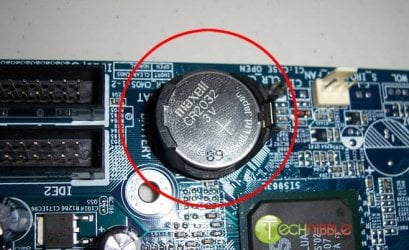
Open your computer and remove the CMOS battery and put it back in. This should fix it.
Boot order issue.......-remove-battery.jpg
My System SpecsSystem Spec
08-22-2009   #3


OS X


I decided to disconnect the secondary SATA drive (the one I cloned the OS to) & run it through a boot cycle with the primary SATA drive & the IDE drive hooked up (the one with 7 on it). It booted to XP just fine. So after I did a small update that Windows needed, I shut down, hooked up the secondary SATA drive again & it is booting like it should now.
My System SpecsSystem Spec
.


08-22-2009   #4


Windows 7 Ultimate x64


Oh that's great. Glad to hear that you got it sorted.
My System SpecsSystem Spec
Reply

 Boot order issue....... problems?


Thread Tools


Similar Threads for: Boot order issue.......
Thread Forum
boot order? Hardware & Devices
Boot order random issue. Hardware & Devices
HDD Boot Order Changes General Discussion
Windows 7 x64 dvd doesn't boot up -Not boot order issue Installation & Setup
Choosing which OS to boot by changing BIOS boot order Installation & Setup


All times are GMT -5. The time now is 02:50 AM.


Windows 7 Forums is an independent web site and has not been authorized,
sponsored, or otherwise approved by Microsoft Corporation.
"Windows 7" and related materials are trademarks of Microsoft Corp.
© Designer Media Ltd
  

1 2 3 4 5 6 7 8 9 10 11 12 13 14 15 16 17 18 19 20 21 22 23 24 25 26 27 28 29 30