| Windows 7: Purposely delaying PC OS startup question |
20 Mar 2012
|
#1 | | |
Purposely delaying PC OS startup question Hello everyone!
First post here, so please be patient. Here is the scenario I am dealing with: Windows 7 Pro 32bit running on a Syx mini PC
-set to Autologon (on a Domain)
-a web-based application is placed in Startup folder The desired effect is for the web application to load at the time of PC startup.
Unfortunately, what is happening is that I get the "Internet Explorer cannot display the webpage" error screen.
I've already tried MSCONFIG and increasing the boot timeout from 30 to 50 seconds. When I click on the web app (that is placed in the user's Startup folder), the web app displays correctly. However, I need the web app to load without any user intervention.
Any help would be appreciated. | My System Specs |
| |
20 Mar 2012
|
#2 | | |
Welcome to the Seven Forums.
It sounds like the webpage is attempting to load before access to the internet has been established. You should delay the launch of the web app - not the OS. You can use a scripting tool to check for connectivity, then have the same script launch the web app. AutoHotKey, AutoIt3 or other scripting tools can do what you need. | My System Specs | | System Manufacturer/Model Number Employer provided Dell E6430 OS W7 Pro SP1 64bit CPU i5 3320M @ 2.6GHz Motherboard 0CPWYR Memory 4GB Graphics Card Intel HD Graphics 4000 Screen Resolution 1600 x 900 Hard Drives 119GB LITEONIT SSD Antivirus Employer mandated Symantec Endpoint Protection Browser Firefox, IE9 & IE8 via VM |
20 Mar 2012
|
#3 | | |
Thanks for the response! I am completely unfamiliar with scripting, so is there either a way to delay the internet access without the use of a script or a pre-made script that I could essentially just copy and paste into a .vbs? | My System Specs | | |
20 Mar 2012
|
#4 | | Win 7 Pro x64 SP1, Win 7 Ult x86 SP1 NC, USA |
One thing you could try is to set this up in Task Scheduler.
It has a lot of options such as Delayed Start, Check for Network connection, Run at Logon, etc.
Here is a SF Tutorial you can look at: Task - Create to Run a Program at Startup and Log On | My System Specs | | Computer type PC/Desktop System Manufacturer/Model Number home built OS Win 7 Pro x64 SP1, Win 7 Ult x86 SP1 CPU AMD Athlon II x4 620 Motherboard Gigabyte GA-MA785G-UD3H Memory 6GB GSkill DDR2 800 Graphics Card AMD 4670 GPU + AMD 4200 IGP Sound Card on board Realtek ALC889A Monitor(s) Displays RCA 40" LCD TV, Insignia 32" LCD TV, HP 15" LCD monitor Screen Resolution 1680 x 1050... Keyboard Gyration wireless, Logitech wireless, Dell USB wired Mouse Gyration wireless, Logitech wireless, V7 USB wired PSU Corsair 500 W Case Rosewill mid tower Cooling CM 90mm Tower Hard Drives OCZ Vertex 3 120GB,
Samsung F3 1TB (3),
Several others - WD, Seagate, Hitachi, ... Internet Speed Uverse - 12Mbps D / 1.5Mbps U Antivirus Avast free OR MSE. (+ MBAM Pro). Browser 1-Firefox, 2-IE. (Chrome and Opera for testing) Other Info 2 PCs: Primary: dual-boot, Test: triple-boot.
Mainly HTPC/Gen purpose (no gaming).
Trendnet USB KVM.
LG DVD burner/Blue Ray Player.
Tray system for removable SATA backup drives.
Not currently OCd, under-volted.
I use Hybrid sleep, rarely re-boot or shutdown.
Hauppauge HD-PVR, Avermedia PCIe TV Tuner, Hauppauge PCI TV Tuner. |
20 Mar 2012
|
#5 | | |
Thanks much! I was not successful in configuring the delayed startup via Task Scheduler, but I need to run through the tutorial again to see if I was missing something. I am configuring for a Standard User, so that may be a slight issue. I will keep at it though. | My System Specs | | |
20 Mar 2012
|
#6 | | |
Edit: the info in this post might be a better solution for some people.
I searched for a VBScript that would be close to what you want - but real life got in the way.
Let's wait and see if David can help you with what he had in mind using task manager before we go down the road of batch files with a ping delay:
PING 1.1.1.1 -n 1 -w 60000 >NUL
"%ProgramFiles%\Internet Explorer\iexplore.exe" http://www.bbc.com/
Sadly, the batch file method will not work 100% of the time as the delay that you set by changing 60000 might not be enough. There will also be a command prompt window to deal with. You can put the batch file somewhere and put a shortcut to it in the startup folder - setting that shortcut to open the window minimized - but the command prompt window will still be in the task bar. The command prompt window can be hidden, but that gets a bit messier.
Edit: fixed URL
Last edited by UsernameIssues; 23 Mar 2012 at 02:58 AM..
| My System Specs | | System Manufacturer/Model Number Employer provided Dell E6430 OS W7 Pro SP1 64bit CPU i5 3320M @ 2.6GHz Motherboard 0CPWYR Memory 4GB Graphics Card Intel HD Graphics 4000 Screen Resolution 1600 x 900 Hard Drives 119GB LITEONIT SSD Antivirus Employer mandated Symantec Endpoint Protection Browser Firefox, IE9 & IE8 via VM |
21 Mar 2012
|
#7 | | Win 7 Pro x64 SP1, Win 7 Ult x86 SP1 NC, USA |
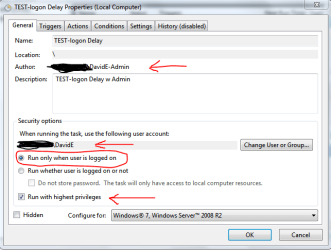
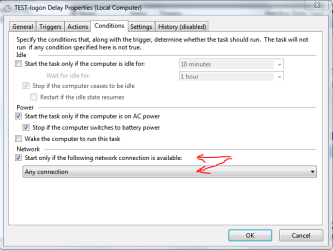
I did some testing for this and what i found is the scheduled task would run, and the delay worked.
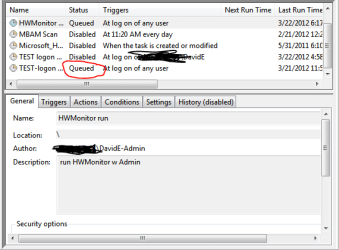
In Task Scheduler I could see it queued upon log on, and running a short time later.
I could see it running in process explorer.
The problem was the IE window was not visible.
This may be why it didn't work for you...
It seems "Run only when user is logged on" must be checked for the window to be visible. Why is a Windows 7 scheduled task running hidden? - Microsoft Answers
I logged in with my Admin account to set it up in task scheduler.
I set it up to only run when my STANDARD account is logged in.
So, I'm not sure if this approach is something you want to pursue, or it's too complicated.
It sounds like you are setting this up for a Business.
Does it need to run with ADMIN authority while logged in with a STANDARD account?
Will there only be ONE STD user account per PC that needs to run this?
If you don't need to run with ADMIN authority you could probably simplify this and just log in as the STD account and set up the scheduled task there.
I don't have access to a domain for my tests.
Also, it may be possible to set it up to run for a GROUP instead of a USER...i'm not sure
The screen prints highlight settings i used. | My System Specs | | Computer type PC/Desktop System Manufacturer/Model Number home built OS Win 7 Pro x64 SP1, Win 7 Ult x86 SP1 CPU AMD Athlon II x4 620 Motherboard Gigabyte GA-MA785G-UD3H Memory 6GB GSkill DDR2 800 Graphics Card AMD 4670 GPU + AMD 4200 IGP Sound Card on board Realtek ALC889A Monitor(s) Displays RCA 40" LCD TV, Insignia 32" LCD TV, HP 15" LCD monitor Screen Resolution 1680 x 1050... Keyboard Gyration wireless, Logitech wireless, Dell USB wired Mouse Gyration wireless, Logitech wireless, V7 USB wired PSU Corsair 500 W Case Rosewill mid tower Cooling CM 90mm Tower Hard Drives OCZ Vertex 3 120GB,
Samsung F3 1TB (3),
Several others - WD, Seagate, Hitachi, ... Internet Speed Uverse - 12Mbps D / 1.5Mbps U Antivirus Avast free OR MSE. (+ MBAM Pro). Browser 1-Firefox, 2-IE. (Chrome and Opera for testing) Other Info 2 PCs: Primary: dual-boot, Test: triple-boot.
Mainly HTPC/Gen purpose (no gaming).
Trendnet USB KVM.
LG DVD burner/Blue Ray Player.
Tray system for removable SATA backup drives.
Not currently OCd, under-volted.
I use Hybrid sleep, rarely re-boot or shutdown.
Hauppauge HD-PVR, Avermedia PCIe TV Tuner, Hauppauge PCI TV Tuner. |
22 Mar 2012
|
#8 | | |
Go to Start > Run.
Type msconfig and press Enter.
The General tab helps diagnose if the problems encountered are with drivers, services, or startup items by unchecking the appropriate boxes and restarting. The Startup tab allows you to individual disable or re-enable startup items.
Also scan PC for virus and registry errors. | My System Specs | | OS Windows 7 Ultimate x64 |
22 Mar 2012
|
#9 | | |
Thanks David. To answer your questions: Does it need to run with ADMIN authority while logged in with a STANDARD account? Yes...the task would have to be run with ADMIN authority on a STANDARD account Will there only be ONE STD user account per PC that needs to run this?
Yes...there is just 1 STD user account per PC
It is indeed a Domain PC for a business. Also, I mispoke when I referred to it as a "web application". It is a webpage, hosted on an internal server, in which the shortcut is placed in the Startup folder of the STANDARD user's account.
The PC is set to "autologon". The desired result is for the PC to be powered-up and the webpage to display after the STANDARD user account is fully booted-up (basically, the user does not need to intervene at all in the case of an unexpected loss of power; the webpage is displayed automatically).
Currently, once the PC powers-up and the OS is loaded, the user is having to click on the shortcut in the Startup folder. I want to eliminate that step completely if possible.
Thanks again for all the assistance. | My System Specs | | |
22 Mar 2012
|
#10 | | Win 7 Pro x64 SP1, Win 7 Ult x86 SP1 NC, USA |
Hi jrockelecko,
Did you get this to work with the example i gave you?
I would NOT set this up with a shortcut in the Startup folder and a "Startup" entry in Task Scheduler.
That would cause two startup items...
You could move your shortcut to some other folder for testing this. Quote: the user does not need to intervene at all in the case of an unexpected loss of power; the webpage is displayed automatically With that, I'm not sure what the best approach would be.
How many users need this? 10, 100, 1000+, etc.
It sounds like a small company if you are trying to handle power outages this way, as most businesses have a UPS... | My System Specs | | Computer type PC/Desktop System Manufacturer/Model Number home built OS Win 7 Pro x64 SP1, Win 7 Ult x86 SP1 CPU AMD Athlon II x4 620 Motherboard Gigabyte GA-MA785G-UD3H Memory 6GB GSkill DDR2 800 Graphics Card AMD 4670 GPU + AMD 4200 IGP Sound Card on board Realtek ALC889A Monitor(s) Displays RCA 40" LCD TV, Insignia 32" LCD TV, HP 15" LCD monitor Screen Resolution 1680 x 1050... Keyboard Gyration wireless, Logitech wireless, Dell USB wired Mouse Gyration wireless, Logitech wireless, V7 USB wired PSU Corsair 500 W Case Rosewill mid tower Cooling CM 90mm Tower Hard Drives OCZ Vertex 3 120GB,
Samsung F3 1TB (3),
Several others - WD, Seagate, Hitachi, ... Internet Speed Uverse - 12Mbps D / 1.5Mbps U Antivirus Avast free OR MSE. (+ MBAM Pro). Browser 1-Firefox, 2-IE. (Chrome and Opera for testing) Other Info 2 PCs: Primary: dual-boot, Test: triple-boot.
Mainly HTPC/Gen purpose (no gaming).
Trendnet USB KVM.
LG DVD burner/Blue Ray Player.
Tray system for removable SATA backup drives.
Not currently OCd, under-volted.
I use Hybrid sleep, rarely re-boot or shutdown.
Hauppauge HD-PVR, Avermedia PCIe TV Tuner, Hauppauge PCI TV Tuner. Purposely delaying PC OS startup question problems? All times are GMT -5. The time now is 02:34 AM. | |