Windows 7 Forums


Windows 7: Disabling Library Access from Start menu

23 Aug 2009   #1
SevenUser09

 
Disabling Library Access from Start menu

I do not want to use the libraries if I go to start and click documents,pictures, etc to go to my user folder quivalent of them. is there a way to change it? I don't care if they are in explorer I just don't want them when I click my user folder links. This really makes me want to go back to vista and is the one feature that is really causing me to not give 7 a chance. all the other little stuff i don't like i can get used to but not this.
My System SpecsSystem Spec

23 Aug 2009   #2


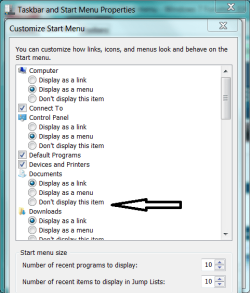
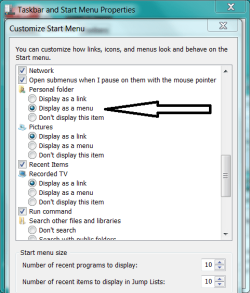
Start Menu Properties
Do not show Pix, Docs, Music etc.

User folders
Show as menu

A possible alternative.
Attached Thumbnails
Disabling Library Access from Start menu-capture.png   Disabling Library Access from Start menu-capture2.png  
My System SpecsSystem Spec
23 Aug 2009   #3
SevenUser09


But is it possible to have documents and such listed but have it to go to the folder? Wouldn't displayign as a menu still use the library?
My System SpecsSystem Spec
.


23 Aug 2009   #4


Quote   Quote: Originally Posted by SevenUser09 View Post
But is it possible to have documents and such listed but have it to go to the folder? Wouldn't displayign as a menu still use the library?
But is it possible to have documents and such listed but have it to go to the folder?

Development is underway.

Wouldn't displayign as a menu still use the library?
Is your hand or mouse broken? Try it.
My System SpecsSystem Spec
23 Aug 2009   #5
SevenUser09


Just tried and it still keeps the library behavior. Ijust want the links to function as they did in Vista.
My System SpecsSystem Spec
23 Aug 2009   #6


Confirming - you cascaded User folder to reveal Docs, Pix, etc and when you click one the library opens?

Not here. This is worth exploring (pun).

I will not assist you further unless you fill out your system specs.
Attached Thumbnails
Disabling Library Access from Start menu-0-usercp2.png   Disabling Library Access from Start menu-0-usercp1.png  
My System SpecsSystem Spec
23 Aug 2009   #7
SevenUser09


Alright I have noticed that if you add Downloads to the start menu it goes right to the folder. This would imply there being a registry entry somewhere that controls the link. Any idea where I might start searching for it?
My System SpecsSystem Spec
23 Aug 2009   #8


What build of 7 are you on?

I am buying time. Checking reg. -

Also, the kids want to go swimming. I might be gone shorlty. Because you filled out your specs, now many knowledgeable SF members can help.
My System SpecsSystem Spec
23 Aug 2009   #9
SevenUser09


I am running Windows 7 Professional x86.
My System SpecsSystem Spec
23 Aug 2009   #10


Start
Run
winver

lists build number
My System SpecsSystem Spec
Reply

 Disabling Library Access from Start menu problems?


Thread Tools


Similar help and support threads for: Disabling Library Access from Start menu
Thread Forum
Add Custom Folder/Library to the Start Menu Customization
Have new library on right side of the start menu? Customization
Library links in Start menu do not work General Discussion
Start Menu Library Links Customization
Custom Library in Start Menu Customization


All times are GMT -5. The time now is 01:40 AM.


Seven Forums Android App Seven Forums IOS App Follow us on Facebook

Windows 7 Forums is an independent web site and has not been authorized,
sponsored, or otherwise approved by Microsoft Corporation.
"Windows 7" and related materials are trademarks of Microsoft Corp.
© Designer Media Ltd
  

1 2 3 4 5 6 7 8 9 10 11 12 13 14 15 16 17 18 19 20 21 22 23 24 25 26 27 28 29 30 31 32