| Windows 7: Removing a USB memory stick |
27 Mar 2012
|
#1 | | |
Removing a USB memory stick Hi guys
In older versions of Windows one had to ask nicely before unplugging a memory stick.
This doesn't seem to be the case with Windows 7 - or has the function moved? Currently I'm simply unplugging it when I've finished but I thought I'd best find out if I'm not doing it properly! | My System Specs |
| |
27 Mar 2012
|
#2 | | Windows 7, 64 bit Home SP1, Win 8 Pro 64 bit Citrus Co, FL |
I still have the "safely remove hardware and eject media" icon and use it when I remove USB memory sticks.
You may just be lucky. At some point there can be a corruption in the Windows status for the drive and at that point you will have uninstall it in the Device manager, restart Windows and start over to get it working. | My System Specs | | Computer type PC/Desktop System Manufacturer/Model Number My Own Build OS Windows 7, 64 bit Home SP1, Win 8 Pro 64 bit CPU Intel i7 3770 Motherboard Gigabyte GA-Z77X-UD5H Memory 16GB GSkill Ripsaw F3-14900CL9Q-16GBXL Graphics Card Sapphire HD7770 Sound Card RealTek Monitor(s) Displays Viewsonic VA2448 Series 24" LED Screen Resolution 1920X1080 Keyboard Kensington wired Mouse Logitech Wireless PSU Antec High Current Gamer HCG-620M Modular Case Coolermaster HAF XM Cooling Corsair H80 Liquid cooling with aftermarket Nexus quiet fans Hard Drives 240GB Intel 520 SSD for Win 7
128GB OCZ Vertex 4 SSD for Win 8
1 TB Seagate drive for backup Internet Speed 40 MB/sec (Cable) Antivirus Microsoft Security Essentials and Malwarebytes Browser I.E9/Firefox Other Info Sonar X2 Professional 64 bit Recording Software with Roland Octa-Capture and MAudio Fast Track Ultra 8R recording interfaces, Frontier Tranzport wireless control unit, Behringer BCF2000 Control Surface.
Five USB connected optical drives for CD Audio production using Nero 11
Other systems: Desktop with i5 3550 CPU, LenovoZ560 Laptop with Win 7 64 bit HP, SP1, new iPad |
27 Mar 2012
|
#3 | | Windows 7 Pro with SP1 32bit Gurgaon, India |
The function is very much there. Look into the hidden Icons if you don't see it in the visible ones. | My System Specs | | System Manufacturer/Model Number Custom Built OS Windows 7 Pro with SP1 32bit Motherboard Intel D845GVS1 X86-based PC Memory 2 gigs of RAM Graphics Card Intel(R) 82845G/GL/GE/PE/GV Graphics Controller Sound Card Realtek AC'97 Audio Monitor(s) Displays Samsung SyncMaster 931BF Black 19" LCD Monitor Screen Resolution 1280X960 Keyboard COMPAQ Standard PS/2 Keyboard Mouse iBall Laser Precise Speedster Hard Drives 1. SAMSUNG SP0822N ATA Device ~ 80 GigaBytes
2. Seagate FreeAgent Go USB Device ~ 500 GigaBytes Internet Speed 4 mb/sec |
27 Mar 2012
|
#4 | | Windows 7 Home Premium 64-bit Canberra, Australia |
Never use it. Never had a problem.
Just make sure the device isn't being written-to when you remove it. | My System Specs | | System Manufacturer/Model Number Acer Aspire Ethos 8951G OS Windows 7 Home Premium 64-bit CPU i7-2670QM @ 2.2/3.2 Ghz Motherboard Acer Memory 8 Gb DDR3 Graphics Card Ge-Force GT555M 2 Gb Sound Card Onboard w/Dolby 5/1 Hard Drives 2x750GB onboard. 640GB pocket drive, 1x2TB Seagate external, 1x500GB Seagate external. |
27 Mar 2012
|
#5 | | Windows 7 Ultimate x64 SP1 Philadelphia, PA |
I use the remove function all the time. I've had corrupt USB drives in the past due to simply removing them, so why take a chance when it is a simple mouse click? | My System Specs | | OS Windows 7 Ultimate x64 SP1 CPU Intel Core i7-2600 Motherboard Gigabyte GA-P67A-UD3P-B3 Memory 12 GB Patriot Extreme DDR3-1333 Graphics Card Nvidia GTX 470 Monitor(s) Displays Dell UltraSharp 2209WA PSU OCZ ModStream 700W Case CoolerMaster HAF 912 Advanced Cooling CoolerMaster Hyper 212 Plus Hard Drives OCZ Agility3 240 GB, WD5001AALS, WD7501AALS |
27 Mar 2012
|
#6 | | Windows 7 Ultimate SP1 (64 bit), Windows XP SP3, Linux Mint 14 MATE (64 bit) Adelaide |
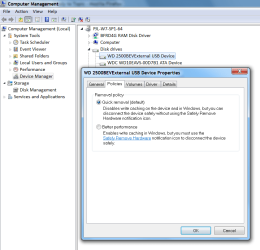
Drive Policies Check your drive policies in " Device Manager". 
The default policy is "Quick removal".
You should see this icon somewhere. 
Last edited by lehnerus2000; 27 Mar 2012 at 08:50 AM..
Reason: Picture Added
| My System Specs | | System Manufacturer/Model Number n/a OS Windows 7 Ultimate SP1 (64 bit), Windows XP SP3, Linux Mint 14 MATE (64 bit) CPU AMD Phenom II x6 1055T, 2.8 GHz Motherboard ASRock 880GMH-LE/USB3 Memory 8GB DDR3 1333 G-Skill Ares F3-1333C9D-8GAO (4GB x 2) Graphics Card ATI Radeon HD6450 Sound Card Realtek? Monitor(s) Displays Samsung S23B350 Screen Resolution 1920x1080 Mouse Wired Optical Case Tower Hard Drives Western Digital 1 TB (SATA), Western Digital 1.5 TB (SATA), Western Digital 2 TB (SATA) Internet Speed DSL Other Info Ubuntu 10.04 (64 bit) replaced with Linux Mint 14 MATE (64 bit) - 2013-01-14
RAM & Graphics Card Upgraded - 2013-01-13
Monitor Upgraded - 2012-04-20
System Upgraded - 2011-05-21, 2010-07-14
HDD Upgraded - 2010-08-11, 2011-08-24 |
27 Mar 2012
|
#7 | | Windows 7 HP / Ultimate x64 USA |
Quote: I still have the "safely remove hardware and eject media" icon and use it when I remove USB memory sticks. Same here. You just need to locate the icon in the Notifications Area.
Few clicks away to Safe Removal. | My System Specs | | System Manufacturer/Model Number Dell / Custom OS Windows 7 HP / Ultimate x64 CPU Core i5 / X4 955 BE Motherboard OEM / Gigabyte 880GM-USB3 Memory 4GB DDR3 1333Mhz / 8GB DDR3 1600Mhz Graphics Card HD5470 / HD5670 Sound Card Onboard Monitor(s) Displays FullHD 15" / Dell 22" WS Screen Resolution 1920x1080 / 1680x1050 Keyboard Logitech Mouse Logitech PSU CM Case CM Cooling CM, Antec Hard Drives 320GB / 1.5TB |
27 Mar 2012
|
#8 | | Windows 7 x64 Ultimate San Diego |
I always set the Safely Remove Hardware notification icon to "Always Show" to make the process a lot faster. You can also right click it in explorer and select "Eject" if you happen to have explorer open. | My System Specs | | System Manufacturer/Model Number Scratch built OS Windows 7 x64 Ultimate CPU i7 960 Motherboard Asus P6X58D Memory 12 Gig Corsair Dominator Graphics Card Nvidia 480 Sound Card Maudio Delta 44 + breakout box Monitor(s) Displays Dell UltraSharp U2410 24in and Samsung 21 dual monitors Screen Resolution 1920x1200 and 1280x1024 Keyboard Logitech G15 + N52 game pad Mouse Logitech MX518 PSU Corasair TX850 Case Cooler Master HAF Cooling Corsair H50 Hard Drives Primary: Intel X-25M G2 160G SSD
Secondary: Segate baracuda 1.0 TB
HDs in AHCI mode. Internet Speed 15kbs down 4.5kbps up Other Info WEI 7.6
CPU & RAM 7.6
Graphics 7.9
Hard disk 7.7 |
27 Mar 2012
|
#9 | | |
I always choose to Safely Remove my removable drives. It's mostly old habit as Windows is now more keen to people's tendencies of just removing drives without doing this so they account for it. | My System Specs | | OS XP / Win7 x64 Pro CPU Intel Quad-Core Q9450 @ 3.2GHz Motherboard Asus P5-E Memory 2x2GB GSkill DDR2 Graphics Card NVIDIA GeForce 8600 GTS (EVGA) Monitor(s) Displays Dell 2408WFP Screen Resolution 1920x1200 |
27 Mar 2012
|
#10 | | |
Its safer to look before you take another step in what ever you do while working on ur PC / Lappy ... | My System Specs | | Removing a USB memory stick problems? All times are GMT -5. The time now is 01:50 PM. | |