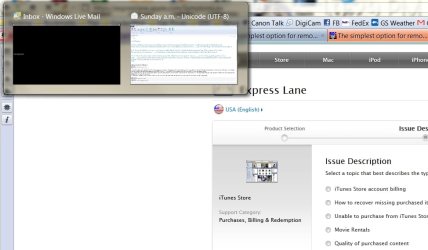
I will often drag and drop a photo into an email window by dragging the photo onto the WLM icon on the taskbar, waiting for it to show the email windows that are running and then dropping the photo into the email. Most of the time, the preview thumbnail windows are BLACK. When I put the photo on top of the thumbnail and it opens, it appears as it should...as luck would have it, it's not doing it right now so I can't include a screenshot.
Computer is a 64-bit Dell XPS 8300, i7 2600, 3.40 GHz, 12MB RAM. Video card is a 1GB AMD Radeon 6870
Mouse is a Logitech 705M. It's wireless. I was getting the black thumbnail ALL the time till a few days ago I decided to connect a wired mouse to see if the wireless mouse might be the problem. Drivers loaded for the wired mouse. The problem went away. Used it a few hours, removed the wired mouse and went back to the wireless mouse. Still, no more black thumbnail screens. Today, the black thumbnails came back
Tonight I ran CCleaner. Thumbnail screens are appearing as they should. Not confident this has solved the problem tho.
I haven't found anyone with this problem. Thought I did and the link led me here but it was a different issue. Any ideas?
Thanks,
Monica
Computer is a 64-bit Dell XPS 8300, i7 2600, 3.40 GHz, 12MB RAM. Video card is a 1GB AMD Radeon 6870
Mouse is a Logitech 705M. It's wireless. I was getting the black thumbnail ALL the time till a few days ago I decided to connect a wired mouse to see if the wireless mouse might be the problem. Drivers loaded for the wired mouse. The problem went away. Used it a few hours, removed the wired mouse and went back to the wireless mouse. Still, no more black thumbnail screens. Today, the black thumbnails came back
Tonight I ran CCleaner. Thumbnail screens are appearing as they should. Not confident this has solved the problem tho.
I haven't found anyone with this problem. Thought I did and the link led me here but it was a different issue. Any ideas?
Thanks,
Monica
My Computer
At a glance
Windows 7 Home Premium 64 bit
- OS
- Windows 7 Home Premium 64 bit