
Windows 7 Forums


Windows 7: For what is this empty place?

04 Apr 2012  
AlexRussel

Windows 7 Ultimate x86
48 posts
 
 
For what is this empty place?

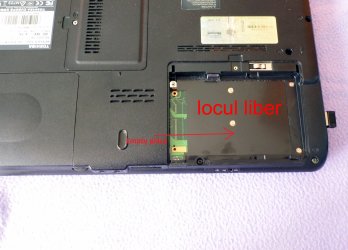
So for what is this empty place, if you open the cover of the laptop you will see this empty zone.
For what is this empty place?-loc_liber.jpg

My System SpecsSystem Spec

04 Apr 2012  
logicearth

Windows 7 x64 (SP1)
5,253 posts


OEM expansion slot....aka, useless to you.
My System SpecsSystem Spec
04 Apr 2012  
AlexRussel

Windows 7 Ultimate x86
48 posts


I asked this because I would like to add a SSD and I don't want to remove the HDD. I'd like to use them both.
My System SpecsSystem Spec
.


04 Apr 2012  
Dwarf

Windows 7 Ultimate x64 Service Pack 1
10,506 posts
Doncaster, UK


What is the make and model number of the laptop? Some laptops have the capability of having 2 HDDs installed, although they ship with only 1 actually installed. The empty space might be for a second optional drive.
My System SpecsSystem Spec
04 Apr 2012  
DeaconFrost

Windows 7 Ultimate x64 SP1
5,854 posts
Philadelphia, PA


Quote   Quote: Originally Posted by AlexRussel View Post
I asked this because I would like to add a SSD and I don't want to remove the HDD. I'd like to use them both.
You should be able to tell if that's possible by looking in the slot. If you SATA and power connectors, then you may be able to use two drives. If not, you are stuck with one slot, as with the vast majority of laptops.
My System SpecsSystem Spec
04 Apr 2012  
Dwarf

Windows 7 Ultimate x64 Service Pack 1
10,506 posts
Doncaster, UK


Taking a close look at that image, I would say that this is for an optional SDD/HDD drive. The 2 rows of pads number 7 and 15 connectors respectively, which ties in with the power and data connectors of SATA drives. Unfortunately, the laptop manufacturer has not included the connectors on that particular laptop model (although others in the same range might have them).
My System SpecsSystem Spec
04 Apr 2012  
Fantail

7 x64 | 7 x64
552 posts
Syracuse NY, USA


Quote   Quote: Originally Posted by AlexRussel View Post
I asked this because I would like to add a SSD and I don't want to remove the HDD. I'd like to use them both.
Consider saving yourself some time. As the ssd will genealy smoke the hdd. Roll with an ssd if you want and get a usb case for the hdd/storage.
My System SpecsSystem Spec
Reply

 For what is this empty place? problems?


Thread Tools


Similar help and support threads for: For what is this empty place?
Thread Forum
Windows 7 Startup Folder Empty (visible, but empty) General Discussion
Where is the best place to get a replacement LCD Chillout Room
In Place Upgrade Windows Updates & Activation
32 bit to 64 Bit in place upgrade ? Installation & Setup
Where is the first place you go? Chillout Room


All times are GMT -5. The time now is 02:49 PM.


Windows 7 Forums is an independent web site and has not been authorized,
sponsored, or otherwise approved by Microsoft Corporation.
"Windows 7" and related materials are trademarks of Microsoft Corp.
© Designer Media Ltd