| Windows 7: Unintended Creation of Files |
14 Apr 2012
|
#1 | | |
Unintended Creation of Files Hey guys, I frequently like to pull Notepad up, jot down my thoughts kind of like a journal thing, and then store them in a special folder. There's no special organization yet, they literally are just kind of my random thoughts that I'd like to come back to without forgetting about them, and if they merit further attention, I come back to them. With that said, I noticed a peculiar bug that I think is part of the operating systems fault, not Notepad's.
The bug happened when I opened one of my thoughts I had written down, realized I needed to give the file a better name than just "thought" as well as correct a typo. First thing I did was fix the typo, did not save the file yet, right clicked on the file icon to rename it, changed the name, and once the file's name had been changed, I hit the exit button with my mouse. It prompted me to save changes, and so I clicked yes, even though it still had the old name as the file to save it as. Sure enough, Windows 7 decided that I needed a file with that name and created a new one for me, effectively give me the same file twice, one with the old name which had newly been created, and one with the name I changed it to.
While I'm guessing this could be an application error in how the programmer is making API calls to the underlying system, I think this is simply the operating system behaving in an unintended way and it should update any application running with the correct name because while my simple little case required duplication generated only a few bytes, imagine the same thing happening for massive files. I am assuming that Windows 7 allocated separate memory for this, which if it isn't, then my bad, but I would still call it a minor bug, even in that case. What do you guys think? | My System Specs |
| |
15 Apr 2012
|
#2 | | Windows 7 Home Premium 64-bit Canberra, Australia |
When saving, use 'Save As' instead of 'Save'.
Lets you rename the file, change the save location etc.
There's no need to right-click on icons to change names.
As you have done it, the file with the NEW name will be the OLD file, and vice-versa. | My System Specs | | System Manufacturer/Model Number Acer Aspire Ethos 8951G OS Windows 7 Home Premium 64-bit CPU i7-2670QM @ 2.2/3.2 Ghz Motherboard Acer Memory 8 Gb DDR3 Graphics Card Ge-Force GT555M 2 Gb Sound Card Onboard w/Dolby 5/1 Hard Drives 2x750GB onboard. 640GB pocket drive, 1x2TB Seagate external, 1x500GB Seagate external. |
15 Apr 2012
|
#3 | | Windows 7 Home Premium x64 SP1 Bay Area Peninsula |
You did create a new file  If you had right clicked the unopened files icon , and choosen rename. Then it would rename the file. But the method you used will indeed create a new file, and save it with the new name and changes. the original file will remain, without any changes. As Katanyavich mentioned, using his method would actually make the changes to the original file. A Guy | My System Specs | | OS Windows 7 Home Premium x64 SP1 CPU INTEL Core i5-750 Quad-Core 3.37GHz Motherboard ASUS P7P55D Memory KINGSTON 4GB (2 x 2GB) HyperX PC3-12800 DDR3 1600MHz CL8 Graphics Card MSI N240GT-MD1G/D5 GeForce GT 240 1GB 128-bit GDDR5 Monitor(s) Displays Samsung SyncMaster B2430H 24" Screen Resolution 1920 x 1080 PSU ANTEC TruePower New TP-550, 80 PLUS, 550W Case ANTEC Three Hundred Illusion Cooling COOLER MASTER Hyper 212 Plus, 4 x 120mm 1 x 140mm Noctua's Hard Drives Intel X25M Gen2 80GB, SEAGATE 500GB Barracuda® 7200.12, SATA 3 Gb/s, 7200 RPM, 16MB cache Internet Speed 20 + Mbps Antivirus Avast Browser Opera |
15 Apr 2012
|
#4 | | |
I don't know how long you have been doing this or using a computer. However, I have never seen what you are describing as the file system should work on any OS that I have used. Editing a file in some program, then go though Explore to rename it...does not ever effect the program. It either uses the old name on save, creates a new file with the old name on save, or errors out when it cannot find the file with the old name. I have never seen it work in the way you thought it did.
Even if Windows was to tell an application whether a file has changed its name or location would still be at the discretion of the application to make that happen. The application would have to be programmed to monitor the file in question for any changes. Windows itself, won't because that is not its job nor should it make assumptions of how an application is going to use a file.
tl;dr, Not a bug in Windows, not a bug in the application. By design...in every OS I have ever used. | My System Specs | | Computer type PC/Desktop System Manufacturer/Model Number Alienware Aurora ALX R4 OS Windows 7 x64 (SP1) CPU Intel Core i7-3930K (3.2GHz, Turbo 4GHz) Motherboard Alienware Aurora-R4 x79 Memory 4x Samsung 4GB PC3-12800 DDR3 (16GB 1600MHz) Graphics Card Nvidia Geforce GTX 690 (Stock) Sound Card RealTek Integrated Audio Monitor(s) Displays Dell UltraSharp U3011 Screen Resolution 2560x1600 PSU 875W Some Dell PSU <.< Hard Drives Samsung P830 256 GB, WD Raptor 150GB, 2x 1TB HDDs Other Info Dell Inspiron Mini 10v (Intel Atom N270 1.6 GHz; 1GB; Windows 7 Ultimate) |
15 Apr 2012
|
#5 | | Win 7 Pro x64 SP1, Win 7 Ult x86 SP1 NC, USA |
Hello Layke1123 and welcome to Seven Forums.
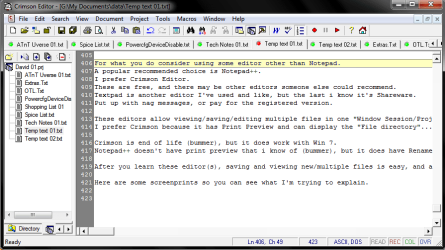
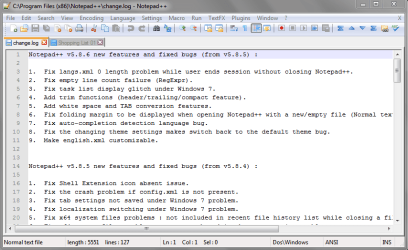
For what you do, have you considered using some editor other than Notepad?
A popular recommended choice is Notepad++.
I prefer Crimson Editor.
These are free, and there may be other editors someone else could recommend.
Textpad is another editor I've used and like, but the last i know it's Shareware.
Put up with nag messages, or pay for the registered version.
These editors allow viewing/saving/editing multiple files in one Window.
You could have Thought1, Thought2, etc. files open in one Window at the same time, and easily switch between files.
I prefer Crimson because it has Print Preview.
Crimson is end of life (bummer), but it does work with Win 7.
Notepad++ does NOT have print preview that i know of (bummer), but it does have Rename.
You would have a bit of a learning curve, but it might well be worth it.
After you learn these editor(s) copying, editing, saving, viewing new/multiple files is easy, and a nice improvement over Notepad.
Below are some screen prints so you can see what I'm trying to explain.
Hope this helps,
David | My System Specs | | Computer type PC/Desktop System Manufacturer/Model Number home built OS Win 7 Pro x64 SP1, Win 7 Ult x86 SP1 CPU AMD Athlon II x4 620 Motherboard Gigabyte GA-MA785G-UD3H Memory 6GB GSkill DDR2 800 Graphics Card AMD 4670 GPU + AMD 4200 IGP Sound Card on board Realtek ALC889A Monitor(s) Displays RCA 40" LCD TV, Insignia 32" LCD TV, HP 15" LCD monitor Screen Resolution 1680 x 1050... Keyboard Gyration wireless, Logitech wireless, Dell USB wired Mouse Gyration wireless, Logitech wireless, V7 USB wired PSU Corsair 500 W Case Rosewill mid tower Cooling CM 90mm Tower Hard Drives OCZ Vertex 3 120GB,
Samsung F3 1TB (3),
Several others - WD, Seagate, Hitachi, ... Internet Speed Uverse - 12Mbps D / 1.5Mbps U Antivirus Avast free OR MSE. (+ MBAM Pro). Browser 1-Firefox, 2-IE. (Chrome and Opera for testing) Other Info 2 PCs: Primary: dual-boot, Test: triple-boot.
Mainly HTPC/Gen purpose (no gaming).
Trendnet USB KVM.
LG DVD burner/Blue Ray Player.
Tray system for removable SATA backup drives.
Not currently OCd, under-volted.
I use Hybrid sleep, rarely re-boot or shutdown.
Hauppauge HD-PVR, Avermedia PCIe TV Tuner, Hauppauge PCI TV Tuner. |
15 Apr 2012
|
#6 | | MS Windows 7 Ultimate 64-bit SP1 Somewhere in the middle of Desert :-) |
Windows was behaving normally and did what it was supposed to do when you did the above procedure.
When you open a text file in notepad, the file is loaded in to RAM and the notepad program also load the file name in RAM while you are editing it. Then you went back to windows explorer and changed the original name of the opened file on the hard disk.
Normally when a file is opened in an application, the application will lock the file to prevent such untoward changes while it is opened. But it seems that notepad does not do this and you were successful in changing the file name.
Afterwards, when you tried to save the file in notepad (not Save As), it will look in the folder for the same file and if found will overwrite it. But in this case the file name has been changed by you. So the notepad program does not find the file in the original location. Hence it will create a new file with the same old name upon save command.
That is how you end up with two different files.
This normally happens when you try to do more than one thing on a single file. Hence take care not to change the name of the file while it is opened in another application. | My System Specs | | System Manufacturer/Model Number Toshiba Satellite P775-S7232 OS MS Windows 7 Ultimate 64-bit SP1 CPU i5-2410M 2.3GHz (2.9GHz Turbo-Boost) Sandy Bridge 32nm Motherboard Toshiba PHRAA ver. PSBY1U-00F003 Memory 4GB+4GB Samsung DDR3 PC3-10700 (1333 MHz) Graphics Card Video Intel(R) HD Graphics Family, 1696MB available memory Sound Card Realtek High Definition Audio version=6.0.1.6323 Monitor(s) Displays 17.3 " Trubrite TFT LCD, LED Backlit Screen Resolution 1600x900 32 bit, Native support for 720P content Keyboard Premium Raised Tile keyboard Mouse Logitech M215 wireless mouse PSU Toshiba AC/DC Adapter Case Notebook Cooling Built-in Fan Hard Drives TOSHIBA MK6476GSXN
580.614 [GB] partitioned C: 80GB and D: 500GB with hidden recovery partitons.
Spare bay for 2nd HDD but no SATA connector :-( Internet Speed Not fast enough Other Info Built-in Harman Kardon speakers with Dolby Advanced Audio, Waves MaxxAudio® 3. HDMI, 1xUSB3+3xUSB2 ports, WebCam, Battery life 4hrs 11mins, 4GB Readyboost SDHC card, WD My Book Essential Ext HDDs 2 TB, 2x1TB, My Passport SE 1TB and WDTV 1st Gen for Multimedia playing on a Sony Wega 32" LCD.
Recent addition to my toys are Asus Transformer Pad TF300T with 32GB onboard sd card + 32GB microsd card. |
16 Apr 2012
|
#7 | | |
Have you scanned your PC with Antivirus program it seems to be a case of virus program. | My System Specs | | |
16 Apr 2012
|
#8 | | |

Quote: Originally Posted by henrywilliams Have you scanned your PC with Antivirus program it seems to be a case of virus program. What?! Where did you get that foolish idea?
There is nothin about this case that says virus. | My System Specs | | Computer type PC/Desktop System Manufacturer/Model Number Alienware Aurora ALX R4 OS Windows 7 x64 (SP1) CPU Intel Core i7-3930K (3.2GHz, Turbo 4GHz) Motherboard Alienware Aurora-R4 x79 Memory 4x Samsung 4GB PC3-12800 DDR3 (16GB 1600MHz) Graphics Card Nvidia Geforce GTX 690 (Stock) Sound Card RealTek Integrated Audio Monitor(s) Displays Dell UltraSharp U3011 Screen Resolution 2560x1600 PSU 875W Some Dell PSU <.< Hard Drives Samsung P830 256 GB, WD Raptor 150GB, 2x 1TB HDDs Other Info Dell Inspiron Mini 10v (Intel Atom N270 1.6 GHz; 1GB; Windows 7 Ultimate) Unintended Creation of Files problems? All times are GMT -5. The time now is 09:20 AM. | |