Windows 7 Forums


Windows 7: edit autoplay windows 7

18 Apr 2012   #1

Windows 7 Enterprise x64
 
 
edit autoplay windows 7

Hi,
I'd like to add foobar2000 in autoplay menu


How could I get it?

I forgot How I did it before format my PC.

Thanks
My System SpecsSystem Spec

18 Apr 2012   #2

Windows 7 home premium x64


I feel this will remind you

Welcome to SevenForums.

Here is a good page from Microsoft themselves.
My System SpecsSystem Spec
18 Apr 2012   #3

Windows 7 Ultimate x64


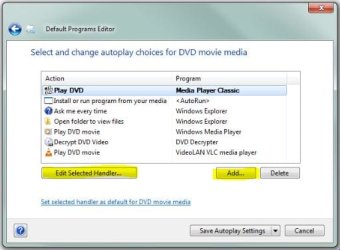
Did you use a program? Just found this - Default Programs Editor. Did not test.
My System SpecsSystem Spec
.


18 Apr 2012   #4

Windows 7 Enterprise x64


Thanks Dizzy, but I need a program to edit Autorun.
When I insert an audio CD, I want to see the icon of Foobar2000 in Autorun.

Do you understand me?
My System SpecsSystem Spec
19 Apr 2012   #5

Windows 7 Ultimate x64


Scroll down to the features
Quote:
add, edit, and remove autoplay handler programs
Investigate these options.
edit autoplay windows 7-defaultprogramseditor.jpg
My System SpecsSystem Spec
19 Apr 2012   #6

Windows 7 Enterprise x64


Thanks! is great.
I added foobar2000 to autorun menu, but i need to order the applications list.
I'd like that foobar200 will be the first o second in the list.
How could I move up or down the applications in the menu?

Thanks.
My System SpecsSystem Spec
Reply

 edit autoplay windows 7 problems?


Thread Tools


Similar help and support threads for: edit autoplay windows 7
Thread Forum
Solved autoplay not working in windows 7 64 bit General Discussion
Autoplay Does Not Work Windows 7 Hardware & Devices
Portable devices not listed in Autoplay option . Won't pop autoplay. Hardware & Devices
how to open any USB flash with AUTOPLAY in WINDOWS 7? Hardware & Devices
Microsoft to switch off AutoPlay in Windows 7 News


All times are GMT -5. The time now is 01:06 AM.


Windows 7 Forums is an independent web site and has not been authorized,
sponsored, or otherwise approved by Microsoft Corporation.
"Windows 7" and related materials are trademarks of Microsoft Corp.
© Designer Media Ltd