
Windows 7 Forums


Windows 7: Shortcut knows new location of target file - is this a new feature?

19 Apr 2012   #1

Windows 7 Ultimate x32, Windows 7 Pro x64
 
 
Shortcut knows new location of target file - is this a new feature?

Actually it's on Server 2008R but it has the same underlying code as Windows 7.

I'm embarrased It's probably been there forever.

I have never noticed before that when a 'Target:' of a shortcut is moved the shortcut knows about the new location.

Is this a new feature OR...

My System SpecsSystem Spec

19 Apr 2012   #2

Windows 7 Ultimate x64
Central Arizona


Was this a Shortcut to shop at Target....Need more info
My System SpecsSystem Spec
20 Apr 2012   #3

W7 Pro SP1 64bit


Quote   Quote: Originally Posted by ThomasAJ View Post
Actually it's on Server 2008R but it has the same underlying code as Windows 7.

I'm embarrased It's probably been there forever.

I have never noticed before that when a 'Target:' of a shortcut is moved the shortcut knows about the new location.

Is this a new feature OR...
Welcome to the Seven Forums!

Don't feel bad, but that feature has been around for a while.

I fired up a Windows 98 Virtual Machine and made these videos for you:


Since I'm still learning about features here and there - I'll have to guess that there are lots of features that I still don't know about. Now off to play some Asteroids on that old VM :-)
My System SpecsSystem Spec
.


20 Apr 2012   #4

W7 Pro SP1 64bit


Quote   Quote: Originally Posted by papagym View Post
Was this a Shortcut to shop at Target....Need more info
"Target:" is the label on the field in most shortcuts' properties.
My System SpecsSystem Spec
20 Apr 2012   #5

Windows 7 Ultimate x32, Windows 7 Pro x64


Wow thanks for the videos UsernameIssues
Unfortunately on my 1920x1080 monitor the videos are useless (writing is tiny and blurred).
OR is there a workaround because I have this same problem with other instructional videos.
Thanks again.
My System SpecsSystem Spec
20 Apr 2012   #6

W7 Pro SP1 64bit


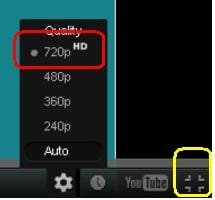
Did you click on the square in the lower right corner - that should make YouTube videos go into the full screened mode. While it is playing, click on the gear where you can select 720p. Oddly enough, on some videos, I find that 480p is clearer.

Let me know if that works for you.

Name:  vid.JPG
Views: 178
Size:  7.0 KB
My System SpecsSystem Spec
20 Apr 2012   #7

Windows 7 Ultimate x32, Windows 7 Pro x64


Wow again. Thank you very very much. Works great!
My System SpecsSystem Spec
20 Apr 2012   #8

W7 Pro SP1 64bit


You are welcome.

Enjoy the Seven Forums and check out the tutorials. :-)
My System SpecsSystem Spec
20 Apr 2012   #9

Windows 7 Ultimate x32, Windows 7 Pro x64


Sorry last Q.

What tool/s did you use to create the videos?

Many thanks
My System SpecsSystem Spec
20 Apr 2012   #10

W7 Pro SP1 64bit


I use CamStudio version 2.00. There are other versions. I've just never had a reason to change from what I'm using.

The thing that I was taking a video of was a Virtual Machine. There is a whole Seven Forums sub forum for those... in case you want to make one. Since you have Windows 7 Pro, you can install and use a free Windows XP mode.
My System SpecsSystem Spec
Reply

 Shortcut knows new location of target file - is this a new feature? problems?


Thread Tools


Similar help and support threads for: Shortcut knows new location of target file - is this a new feature?
Thread Forum
Solved How do I properly change my file target path/Location? Customization
Solved Network Location Shortcuts open a 'Target' folder Network & Sharing
Shortcut to non-existing target General Discussion
editing Target in shortcut properties box General Discussion
Moving Location of Shell Target Folder Uneditable Installation & Setup


All times are GMT -5. The time now is 07:13 PM.


Seven Forums Android App Seven Forums IOS App Follow us on Facebook

Windows 7 Forums is an independent web site and has not been authorized,
sponsored, or otherwise approved by Microsoft Corporation.
"Windows 7" and related materials are trademarks of Microsoft Corp.
© Designer Media Ltd
  

1 2 3 4 5 6 7 8 9 10 11 12 13 14 15 16 17 18 19 20 21 22 23 24 25 26 27 28 29 30 31 32