Help where is the Remove Hardware Safely button gone
Ive a new laptop Windows 7 and I cannot even after going through all the helps on this forum get the shortcut back, Ive tried 5 or 6 ways - are the links on this site safe to download? is there a simple way to restore the button so I can eject my kindle and usb Ive created a new shortcut to no avail please help a novice to get some sleep Steph
System Manufacturer/Model Number Bruce ... somewhere in his 40's OS Windows 7 Ultimate 32bit SP1 CPU Intel(R) Core(TM)2 Quad CPU @ 2.40GHz, 2400 MHz Motherboard INTEL/D975XBX2 Memory 4 GB Graphics Card ATI Radeon HD 2600 Pro Monitor(s) Displays Samsung SyncMaster 914v Screen Resolution 1280 x 1024
Keyboard Standard PS/2 Keyboard Mouse Microsoft PS/2 Mouse PSU Rocketfish 700 W Case G.Skill Gigabyte Chassis Hard Drives 2/500GB each ... ST3500630AS ATA Device.
One is not connected Internet Speed DSL Antivirus Avira Internet Security Browser IE 9 Other Info ATI HDMI Audio
The device doesnt show there! my ipod does but my kindle doesnt register. Thats brilliant finding it that way - can I get it on the shortcut menu bottom right as it was when I bought it, when I switched on this morning it had vanished.
Thaks Shawn Ive done all that and it doesnt work, on step 4 the hardware properties screen thats in the screen shot doesnt appear, so Ive done all the downloading and nothings happened - dont know where to fine Hardware Properties Tab! S OS
You can right click on the shortcut, and click on Pin to taskbar to do so. Afterwards, you can delete the shortcut on the desktop, or move it to where you like for safe keeping.
Hmm, how odd. I don't know why it's doing this, but it seems to only work if you do this below first to have the name with only a few letters instead of the full name.
Rename the shortcut on the desktop to SR
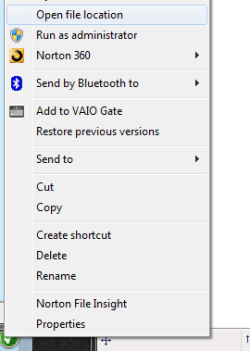
Right click on shortcut, and there should be a "Pin to Taskbar" option to click on now. Do so.
Right click on the taskbar icon, right click on SR in the jump list, and click on Properties.
Click on the General tab, then type in Safely Remove Hardware in the top field box just to the right of the icon in the properties page.
If you like, you might consider this option below instead.
Oh help - as I said there is no 'Pin to Taskbar' option - not even when shortening the name to 2 letters n then right clicking- which I did. If I cant get the option - cant do the process. and its not in the jumplist! any other suggestions Stephanie