JavaScript is disabled. For a better experience, please enable JavaScript in your browser before proceeding.
You are using an out of date browser. It may not display this or other websites correctly.
You should upgrade or use an
alternative browser .
Windows 7 thinks there are 3 monitors when only 2 are connected
Heya
Windows 7 Proffesional x64 Xeon E 5530 48 GB Kingston 480 GTX Asus Custom Windows 7 Proffesional x64 Xeon E 5530 EVGA SR 2 48 GB Kingston 480 GTX Asus 1x SSD 250GB Crucial M4 1050 Revolution Xigmatec Evolution
Helping Hand
Guru
Gold Member
VIP
Is this an SLI or Crossfire setup?
Windows 7 x64 Intel i7 2600k G.skill Ripjaw 16gigs @ 1866 Nvidia gtx580 (evga) Insane hobo technologies. ;-) Windows 7 x64 Intel i7 2600k Asrock z68 extreme 4 gen 3 G.skill Ripjaw 16gigs @ 1866 Nvidia gtx580 (evga) Integrated HD audio + hdmi 24" ASUS widescreen + 42" insignia 1080p (1920x1080) 128 Samsung 830 1 kilowatt SLI/Crossfire rated Silverstone modular NZXT Phantom + additional 220 fan Zalmann Microsoft wireless 3000 (v2) MS - wireless 5000 (bluetrack) depends on if you ask me or my provider. The above information is provided as is, and the author assumes no responsibility for issues it may cause with your sanity or fanboyism.
New member
Member
Thread Starter
Its neither
Windows 7 Proffesional x64 Xeon E 5530 48 GB Kingston 480 GTX Asus Custom Windows 7 Proffesional x64 Xeon E 5530 EVGA SR 2 48 GB Kingston 480 GTX Asus 1x SSD 250GB Crucial M4 1050 Revolution Xigmatec Evolution
Helping Hand
Guru
Gold Member
VIP
So you have one monitor plugged into each? you are using one for physx?
Windows 7 x64 Intel i7 2600k G.skill Ripjaw 16gigs @ 1866 Nvidia gtx580 (evga) Insane hobo technologies. ;-) Windows 7 x64 Intel i7 2600k Asrock z68 extreme 4 gen 3 G.skill Ripjaw 16gigs @ 1866 Nvidia gtx580 (evga) Integrated HD audio + hdmi 24" ASUS widescreen + 42" insignia 1080p (1920x1080) 128 Samsung 830 1 kilowatt SLI/Crossfire rated Silverstone modular NZXT Phantom + additional 220 fan Zalmann Microsoft wireless 3000 (v2) MS - wireless 5000 (bluetrack) depends on if you ask me or my provider. The above information is provided as is, and the author assumes no responsibility for issues it may cause with your sanity or fanboyism.
New member
Member
Thread Starter
Heya
Windows 7 Proffesional x64 Xeon E 5530 48 GB Kingston 480 GTX Asus Custom Windows 7 Proffesional x64 Xeon E 5530 EVGA SR 2 48 GB Kingston 480 GTX Asus 1x SSD 250GB Crucial M4 1050 Revolution Xigmatec Evolution
slightly off center
Guru
Gold Member
VIP
If you are not using the second graphics card for anything then just remove it.
Windows 10 Education 64 bit AMD Phenom II X4 980 Black Edition Deneb 3.7GHz 8GB 4GBx2 Kingston PC10600 DDR3 1333 Memory Zotac NVIDIA Geforce GT640 2 Gig DDR3 PCIe PC/Desktop Home Built Windows 10 Education 64 bit AMD Phenom II X4 980 Black Edition Deneb 3.7GHz Asus M4N68T-M V2 µATX Motherboard 8GB 4GBx2 Kingston PC10600 DDR3 1333 Memory Zotac NVIDIA Geforce GT640 2 Gig DDR3 PCIe VIA VT1708s High Definition Audio 8-channel Onboard 22" LG E2242 1080p and 2 19" I-INC AG191D 1280x1024 - 1920x1080 - 1280x1024 Crucial M100 256 GB SSD and 500 GB WD Blue SATA Thermaltake TR 620 Power Up Black ATX Mid-Tower Case Stock heatsink and fan Logitech Wireless K350 Wave Logitech Wireless M570 Trackman Wheel 80 Mbps Down 30 Mbps Up Windows Defender Internet Explorer 11 HP DVD1040e Lightscribe - External USB2
New member
Member
Thread Starter
Im using it for GPU computing. But even if I do remove it the 3rd display still remain...
Windows 7 Proffesional x64 Xeon E 5530 48 GB Kingston 480 GTX Asus Custom Windows 7 Proffesional x64 Xeon E 5530 EVGA SR 2 48 GB Kingston 480 GTX Asus 1x SSD 250GB Crucial M4 1050 Revolution Xigmatec Evolution
New member
Member
Thread Starter
Heya
Windows 7 Proffesional x64 Xeon E 5530 48 GB Kingston 480 GTX Asus Custom Windows 7 Proffesional x64 Xeon E 5530 EVGA SR 2 48 GB Kingston 480 GTX Asus 1x SSD 250GB Crucial M4 1050 Revolution Xigmatec Evolution
slightly off center
Guru
Gold Member
VIP
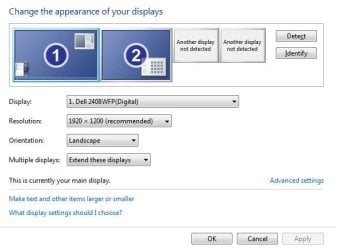
Screen shots may help because I'm confused by what you posted?
Windows 10 Education 64 bit AMD Phenom II X4 980 Black Edition Deneb 3.7GHz 8GB 4GBx2 Kingston PC10600 DDR3 1333 Memory Zotac NVIDIA Geforce GT640 2 Gig DDR3 PCIe PC/Desktop Home Built Windows 10 Education 64 bit AMD Phenom II X4 980 Black Edition Deneb 3.7GHz Asus M4N68T-M V2 µATX Motherboard 8GB 4GBx2 Kingston PC10600 DDR3 1333 Memory Zotac NVIDIA Geforce GT640 2 Gig DDR3 PCIe VIA VT1708s High Definition Audio 8-channel Onboard 22" LG E2242 1080p and 2 19" I-INC AG191D 1280x1024 - 1920x1080 - 1280x1024 Crucial M100 256 GB SSD and 500 GB WD Blue SATA Thermaltake TR 620 Power Up Black ATX Mid-Tower Case Stock heatsink and fan Logitech Wireless K350 Wave Logitech Wireless M570 Trackman Wheel 80 Mbps Down 30 Mbps Up Windows Defender Internet Explorer 11 HP DVD1040e Lightscribe - External USB2
New member
Member
Thread Starter
Heya
Sure here u go
displaybug.JPG
36.2 KB
· Views: 22
Windows 7 Proffesional x64 Xeon E 5530 48 GB Kingston 480 GTX Asus Custom Windows 7 Proffesional x64 Xeon E 5530 EVGA SR 2 48 GB Kingston 480 GTX Asus 1x SSD 250GB Crucial M4 1050 Revolution Xigmatec Evolution
slightly off center
Guru
Gold Member
VIP
OK, so does your mouse still drift off screen to a phantom monitor?
Windows 10 Education 64 bit AMD Phenom II X4 980 Black Edition Deneb 3.7GHz 8GB 4GBx2 Kingston PC10600 DDR3 1333 Memory Zotac NVIDIA Geforce GT640 2 Gig DDR3 PCIe PC/Desktop Home Built Windows 10 Education 64 bit AMD Phenom II X4 980 Black Edition Deneb 3.7GHz Asus M4N68T-M V2 µATX Motherboard 8GB 4GBx2 Kingston PC10600 DDR3 1333 Memory Zotac NVIDIA Geforce GT640 2 Gig DDR3 PCIe VIA VT1708s High Definition Audio 8-channel Onboard 22" LG E2242 1080p and 2 19" I-INC AG191D 1280x1024 - 1920x1080 - 1280x1024 Crucial M100 256 GB SSD and 500 GB WD Blue SATA Thermaltake TR 620 Power Up Black ATX Mid-Tower Case Stock heatsink and fan Logitech Wireless K350 Wave Logitech Wireless M570 Trackman Wheel 80 Mbps Down 30 Mbps Up Windows Defender Internet Explorer 11 HP DVD1040e Lightscribe - External USB2
New member
Member
Thread Starter
Yup she still does, and the 2 screens dont show up unless I click on detect...
Windows 7 Proffesional x64 Xeon E 5530 48 GB Kingston 480 GTX Asus Custom Windows 7 Proffesional x64 Xeon E 5530 EVGA SR 2 48 GB Kingston 480 GTX Asus 1x SSD 250GB Crucial M4 1050 Revolution Xigmatec Evolution
slightly off center
Guru
Gold Member
VIP
Well I wish I had a suggestion for you but I'm baffled by this one.
Windows 10 Education 64 bit AMD Phenom II X4 980 Black Edition Deneb 3.7GHz 8GB 4GBx2 Kingston PC10600 DDR3 1333 Memory Zotac NVIDIA Geforce GT640 2 Gig DDR3 PCIe PC/Desktop Home Built Windows 10 Education 64 bit AMD Phenom II X4 980 Black Edition Deneb 3.7GHz Asus M4N68T-M V2 µATX Motherboard 8GB 4GBx2 Kingston PC10600 DDR3 1333 Memory Zotac NVIDIA Geforce GT640 2 Gig DDR3 PCIe VIA VT1708s High Definition Audio 8-channel Onboard 22" LG E2242 1080p and 2 19" I-INC AG191D 1280x1024 - 1920x1080 - 1280x1024 Crucial M100 256 GB SSD and 500 GB WD Blue SATA Thermaltake TR 620 Power Up Black ATX Mid-Tower Case Stock heatsink and fan Logitech Wireless K350 Wave Logitech Wireless M570 Trackman Wheel 80 Mbps Down 30 Mbps Up Windows Defender Internet Explorer 11 HP DVD1040e Lightscribe - External USB2