Computer type PC/Desktop OS Windows 7 64-bit Ultimate & Windows 8 CP 64-bit CPU i5-650 Motherboard MSI H67 Memory 16 GB DDR3 Graphics Card HD 7950 OC 3 gb Monitor(s) Displays AOC I2757HF 27 Inch IPS monitors Screen Resolution 3x eyefinity at 5760*1080
Keyboard Roccat ISKU Gaming LED keyboard Mouse Logitech G700 PSU Corsair Enthuist 650 Watt Case Antec Dark-Fleet D-85 Cooling DeeapCool Assassin Pro Hard Drives 1 TB Seaget internal with Crucial Adrinaline SSD Cache 50 GB
3 TB + 3 TB + 750 GB Seaget HDD
2 TB Seaget Portable HDD Internet Speed 512 Kb/sec Antivirus Norton 360 V6 Browser Google Chrome latest and Google Canary Fav Other Info I am Unleashed Gamer with My Eyefinity setup
Overclocking is in my Blood
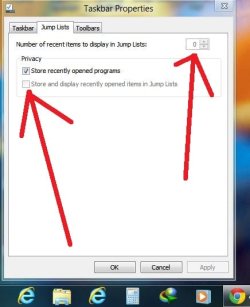
Since you are using CCleaner, double check that you have the Taskbar Jump Lists item under Windows Explorer unchecked. This will delete your current Jump Lists when used, and may be why you do not see any available.
Computer type PC/Desktop OS Windows 7 64-bit Ultimate & Windows 8 CP 64-bit CPU i5-650 Motherboard MSI H67 Memory 16 GB DDR3 Graphics Card HD 7950 OC 3 gb Monitor(s) Displays AOC I2757HF 27 Inch IPS monitors Screen Resolution 3x eyefinity at 5760*1080
Keyboard Roccat ISKU Gaming LED keyboard Mouse Logitech G700 PSU Corsair Enthuist 650 Watt Case Antec Dark-Fleet D-85 Cooling DeeapCool Assassin Pro Hard Drives 1 TB Seaget internal with Crucial Adrinaline SSD Cache 50 GB
3 TB + 3 TB + 750 GB Seaget HDD
2 TB Seaget Portable HDD Internet Speed 512 Kb/sec Antivirus Norton 360 V6 Browser Google Chrome latest and Google Canary Fav Other Info I am Unleashed Gamer with My Eyefinity setup
Overclocking is in my Blood
For Windows 8 issues, you should them at our sister sight Eight Forums for more specific help instead. Please post back with a link to your post as Eight Forums, and I'll be happy to help further there.
In the mean time, you might see if enabling recent items using the tutorial below may help.
Solid copy Brink , next time I will
reg. merge dint work / indexing and group policy setting helps and parallel to this we need to check the option in windows 8 manager beta yamisofts
check here https://www.dropbox.com/s/ifsqa44dsz...20solution.JPG save change
then restart explore.exe via taskmanager
and type "" gpupdate " words only in CMD to update group policy
now we solved the problem
Computer type PC/Desktop OS Windows 7 64-bit Ultimate & Windows 8 CP 64-bit CPU i5-650 Motherboard MSI H67 Memory 16 GB DDR3 Graphics Card HD 7950 OC 3 gb Monitor(s) Displays AOC I2757HF 27 Inch IPS monitors Screen Resolution 3x eyefinity at 5760*1080
Keyboard Roccat ISKU Gaming LED keyboard Mouse Logitech G700 PSU Corsair Enthuist 650 Watt Case Antec Dark-Fleet D-85 Cooling DeeapCool Assassin Pro Hard Drives 1 TB Seaget internal with Crucial Adrinaline SSD Cache 50 GB
3 TB + 3 TB + 750 GB Seaget HDD
2 TB Seaget Portable HDD Internet Speed 512 Kb/sec Antivirus Norton 360 V6 Browser Google Chrome latest and Google Canary Fav Other Info I am Unleashed Gamer with My Eyefinity setup
Overclocking is in my Blood