Welcome to the Seven Forums!
I'll assume when you say
move you mean that you moved shortcuts or folders from your desktop to another folder and not that you just moved them to new screen coordinates (location) on your desktop.
There are two desktop folders that are merged together to form the desktop that the user sees:
C:\Users\Public\Desktop
(anything in that folder, everyone sees)
C:\Users\
username\Desktop
(anything in that folder,
username sees)
The stuff that you are changing/moving is most likely in the public desktop folder... so you are impacting every user of that computer.
Sometimes, during the installation of a program, you will see a question like, "Do you want to make this program available to all users?" If you answer yes, then a shortcut to that program might be placed in the public folder for all to see and the start menu for all users... answering no might place them in the desktop and start menu folder locations for the user that is currently logged on.
The start menu is also a "merged view" of two folders:
C:\ProgramData\Microsoft\Windows\Start Menu\
(anything in that folder, everyone sees)
C:\Users\
username\AppData\Roaming\Microsoft\Windows\Start Menu
(anything in that folder,
username sees)
One last thing (that you did not ask about) is the startup folder. There is one for all users and one for each individual user. You can see where this is going

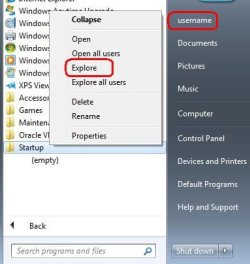
Right clicking on the startup folder and then selecting "Explore" from the context menu - as shown above - will let you see the startup folder for the person currently logged on. Selecting "Explore all users" is pretty much self explanatory. Items placed in the startup folder for all users - impact all users
BTW, you might need to tell Windows 7 to show hidden folders if you want to navigate to these folders via Windows Explorer.



 ) that got moved when I did some rearranging under my user profile. One thing that I didn't mention before and I'm not sure it's relevant but I recently installed a program called Rocket Dock. A cool prog but since my ultimate goal was as clean a desktop as possible, I had to shove everything on my desktop into a single folder before adding shortcuts to Rocket Dock. You don't suppose this program might have tinkered with something and ended up with an unintentional side effect?