
Windows 7 Forums


Windows 7: Icon thumbnail problem & can't change desktop solid color background

17 May 2012   #1

Windows 7 Home Premium 32bit
 
 
Icon thumbnail problem & can't change desktop solid color background

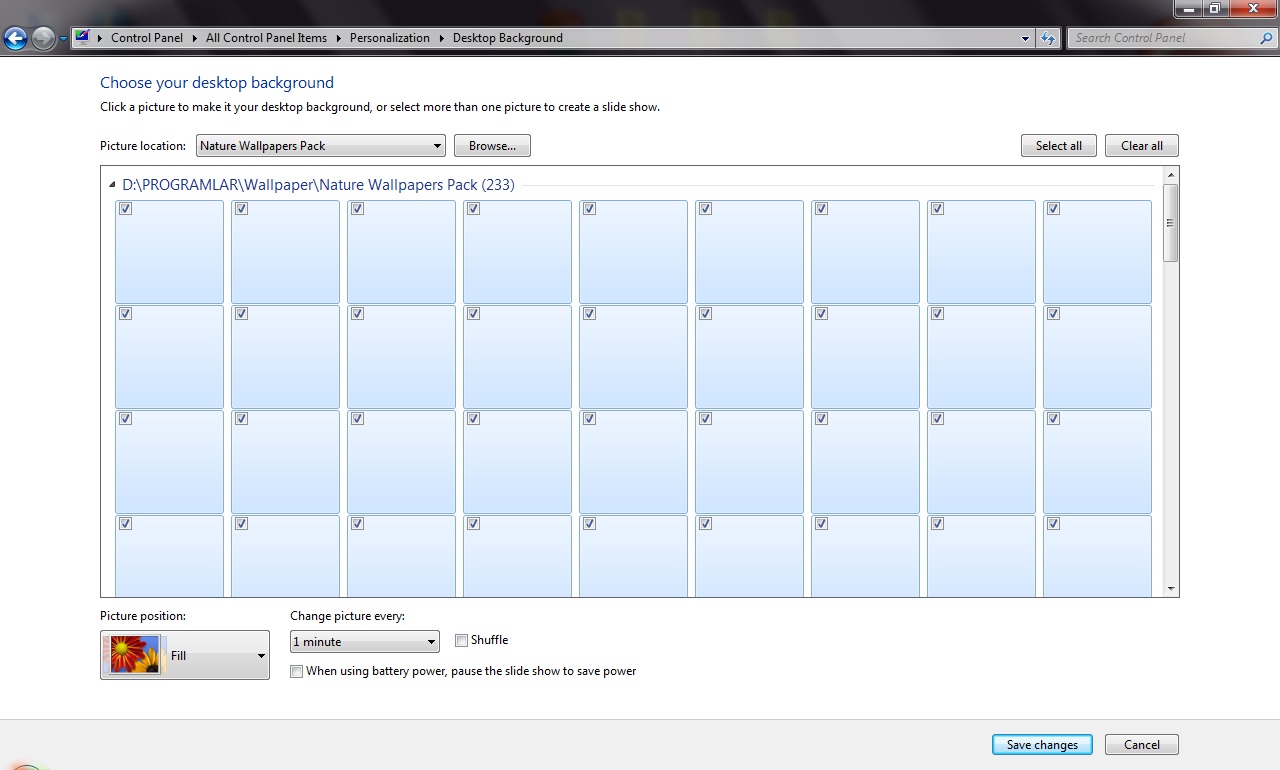
My desktop background became solid black colors and can only select from solid colors.
Even if I select image it still shows solid color and thumbnail of image in
Windows 7/personalization does not work. (look at image 1 below)

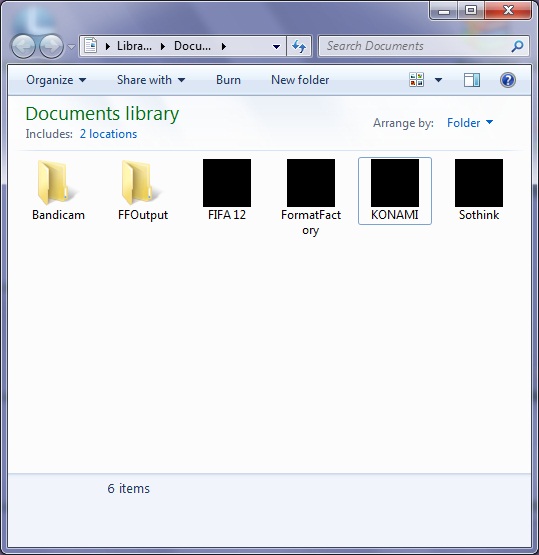
another problem all folder, video and image thumbnails dont work (look at image 2 below)

and some of folder sometimes shows black square on it (look at image 3 below)


All these happened after taking word document from usb my flash drive.
Because those word documents are distorted in another computer
and their extension was .scr and i assume this may cause all these.
but I use Eset Smart Security 5 and no warning and after I scanned pc in
safe mode with Kaspersky 2012 and they found nothing.
I tried Malwarebytes and Spybot - Search & Destroy.
I also tried Combofix 4-5 times and it deleted some file but
problems are still present please help me I want to solve problems
without formatting..


My system:
Windows 7 Home Premium (Activated, not a copy license)
Nvidia Geforce 9600 GS driver is updated.



[img]http://s16.**************/efkzsac2t/capture_20120517_153435.jpg[/img]

[img]http://s16.**************/etmbrvw6d/capture_20120517_153753.jpg[/img]

[img]http://s16.**************/npx3vtmsl/capture_20120517_154117.jpg[/img]

Last edited by semih7106; 17 May 2012 at 10:22 AM..
My System SpecsSystem Spec

17 May 2012   #2

Windows 7 Ultimate SP1 (64 bit), Windows XP SP3, Linux Mint 14 MATE (64 bit)
Adelaide
 
 
sfc /scannow

You may need to open the "Command Prompt" and execute:
sfc /scannow
Tutorial:
SFC /SCANNOW Command - System File Checker

Make sure those Word docs have doc or docx as their extensions.
My System SpecsSystem Spec
17 May 2012   #3

Windows 7 Home Premium 32bit


Quote   Quote: Originally Posted by lehnerus2000 View Post
You may need to open the "Command Prompt" and execute:
sfc /scannow
Tutorial:
SFC /SCANNOW Command - System File Checker

Make sure those Word docs have doc or docx as their extensions.

Thanks for reply,
I also tried sfc/scannow but it didn't solve problem
and after suspicon I deleted those word docs.


Any other idea ?
My System SpecsSystem Spec
.


17 May 2012   #4

Windows 7 Home Premium 64 Bit SP 1


Welcome aboard, semih7106

If you disable thumbnail preview , what is the situation ? Can you see the generic filetypes icons, and access the wallpapers ?
My System SpecsSystem Spec
17 May 2012   #5

Windows 7 Home Premium 32bit


Quote   Quote: Originally Posted by Arc View Post
Welcome aboard, semih7106

If you disable thumbnail preview , what is the situation ? Can you see the generic filetypes icons, and access the wallpapers ?
Thanks for reply

I found this tutorials before and checked options
and enable, disable option is like showed in tutorials.

If i disable thumbnail option, generic icons are showed
and yes I can access wallpapers, folders with no problems.

In problems i mentioned in first post, background problem really disturbs me
I can change background with an image by click right mouse/set as background
but after restart of windows it becomes solid colors again.
In personalize section image are showed like below image and
selecting image no affect on changing background.


[IMG]http://s16.**************/efkzsac2t/capture_20120517_153435.jpg[/IMG]
My System SpecsSystem Spec
17 May 2012   #6

Windows 7 Home Premium 64 Bit SP 1


Sorry for it, but I have no other suggestion for you other than Clean Install Windows 7 . As I have experienced earlier, even a repair install also fails to resolve this issue.
My System SpecsSystem Spec
17 May 2012   #7

Windows 7 Home Premium 32bit


Quote   Quote: Originally Posted by Arc View Post
Sorry for it, but I have no other suggestion for you other than Clean Install Windows 7 . As I have experienced earlier, even a repair install also fails to resolve this issue.
Thanks for your suggestions anyway.For now I dont want to format
therefore i try to find solution and found solution for background problem here

Cannot change background from solid colour

I install Irfanview and change background and after restart it didnt change to solid colors.
My System SpecsSystem Spec
17 May 2012   #8

Windows 7 Ultimate SP1 (64 bit), Windows XP SP3, Linux Mint 14 MATE (64 bit)
Adelaide
 
 
File Associations

Quote   Quote: Originally Posted by semih7106 View Post
Thanks for your suggestions anyway.For now I dont want to format
therefore i try to find solution and found solution for background problem here

Cannot change background from solid colour

I install Irfanview and change background and after restart it didnt change to solid colors.
I assume that you set picture file types to be associated with IrfanView?
Perhaps your file associations got screwed up.

Tutorial
Default File Type Associations - Restore

You could try resetting the scr file association.

Last edited by lehnerus2000; 17 May 2012 at 09:06 PM.. Reason: Additional
My System SpecsSystem Spec
18 May 2012   #9

Windows 7 Home Premium 32bit


Quote   Quote: Originally Posted by lehnerus2000 View Post
I assume that you set picture file types to be associated with IrfanView?
Perhaps your file associations got screwed up.

Tutorial
Default File Type Associations - Restore

You could try resetting the scr file association.
Thanks for reply,

I tried it but it didnt work
I am very curious now what is the damn problem
My System SpecsSystem Spec
18 May 2012   #10

Windows 7 Ultimate SP1 (64 bit), Windows XP SP3, Linux Mint 14 MATE (64 bit)
Adelaide
 
 
Weird Indeed

That is really strange.
My System SpecsSystem Spec
Reply

 Icon thumbnail problem & can't change desktop solid color background problems?


Thread Tools


Similar help and support threads for: Icon thumbnail problem & can't change desktop solid color background
Thread Forum
Solved Background locked to solid color Customization
Desktop Background is stuck on a solid color Customization
Solved Cannot change background from solid colour Customization
Solid Desktop Color Killing SSD Performance Performance & Maintenance
Help change background color Customization


All times are GMT -5. The time now is 11:46 AM.


Windows 7 Forums is an independent web site and has not been authorized,
sponsored, or otherwise approved by Microsoft Corporation.
"Windows 7" and related materials are trademarks of Microsoft Corp.
© Designer Media Ltd