Windows 7 Forums


Windows 7: Display resoution at Max and it's not covering my full screen

23 May 2012  
Alex05

Windows 7 64bit
10 posts
 
 
Display resoution at Max and it's not covering my full screen

I recently did some ATI raedon update that my update manager thing said was ready, after it was done my computer restarted, and when i got back to my desktop and set my resolution back to max, i got this black.. frame pretty much around my dispaly.. i dont know how to get it to cover my full monitor again at max settings, without getting everything all stretchy, can anyone help?


Pic as to what it looks like


Last edited by Brink; 23 May 2012 at 07:08 PM.. Reason: embedded image
My System SpecsSystem Spec

23 May 2012  
stormy13

Win 7 Ultimate x64
6,700 posts
Etobicoke, Ontario


Alex welcome to the Seven Forums.

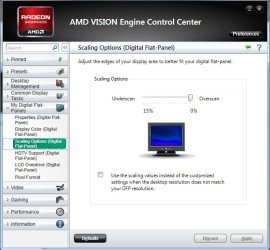
Open the Catalyst or Vision Control Center (name depends on the rest of the computer, not just the video card) by right clicking on the desktop and selecting it from the context menu. Once open this is what to look for,

Display resoution at Max and it's not covering my full screen-scaling.jpg

then adjust the slider till the border disappears.
My System SpecsSystem Spec
23 May 2012  
CreepinJesus

Windows 7 Ultimate x64
371 posts


Note, if this is already set to 0%, check the settings on the monitor itself, too. You're looking for Over/Underscan or Screen Size, something like that.
My System SpecsSystem Spec
.


23 May 2012  
Alex05

Windows 7 64bit
10 posts


My Catalyst control manager isnt opening.. i keep trying to but after i click nothing happens.. ugh =/
My System SpecsSystem Spec
23 May 2012  
Alex05

Windows 7 64bit
10 posts


bump
My System SpecsSystem Spec
24 May 2012  
Alex05

Windows 7 64bit
10 posts


bump
My System SpecsSystem Spec
24 May 2012  
rraod

MS Windows 7 Ultimate 64-bit SP1
747 posts
Somewhere in the middle of Desert :-)


Your monitor's menu (buttons on the monitor) will have the horizontal and vertical adjustment options. Adjust the horizontal and vertical sizes of the display separately till the display fills the complete screen to your satisfaction.

Or the monotor's menu will have a Auto Adjust button/option. While the windows is up and running, press this button or select this option and the display will be adjusted automatically filling the LCD screen.
My System SpecsSystem Spec
24 May 2012  
Alex05

Windows 7 64bit
10 posts


i tried looking for that =/ doesnt give me an option to.. its all greyed out and wont let me get to those options, some of the other options that it would give it just says "Please install or check easy set package" in which i assume is the disk this monitor came with.. turns out that disk isnt for my monde.. this monitor model is LG E2350V i was able to turn on overscan.. it covers more of my screen but not completely if there's no more ideas i guess i could settle for this =/ it would really bother me though
My System SpecsSystem Spec
24 May 2012  
stormy13

Win 7 Ultimate x64
6,700 posts
Etobicoke, Ontario


Driver for the monitor installed?

LG Product Support for E2350V-PN

Listing your monitor as "generic plug and play" in your specs would lead to believe no.
My System SpecsSystem Spec
24 May 2012  
Alex05

Windows 7 64bit
10 posts


Tried it earlier but it just gives me these weird files that dont install/execute anything..
Attached Thumbnails
Display resoution at Max and it's not covering my full screen-arararararr.jpg  
My System SpecsSystem Spec
Reply

 Display resoution at Max and it's not covering my full screen problems?


Thread Tools


Similar help and support threads for: Display resoution at Max and it's not covering my full screen
Thread Forum
Win 7 ultimate display fluctuates in full screen software Graphic Cards
Solved W7 WMP 12 visualization full screen on extended display issue Media Center
Cant get games to display full screen, even with 'maintain ratio' Graphic Cards
Full screen video on windows 7 keeps switching out of full screen Music, Pictures & Video
ASUS 24" LED display + MSI HD4830 + ATI driver v10.8 = not full screen Graphic Cards


All times are GMT -5. The time now is 03:31 AM.


Windows 7 Forums is an independent web site and has not been authorized,
sponsored, or otherwise approved by Microsoft Corporation.
"Windows 7" and related materials are trademarks of Microsoft Corp.
© Designer Media Ltd