Windows 7 Forums


Windows 7: How to re-enable shortcuts to Windows Explorer history in Start Menu?

30 May 2012   #1

Windows 7 (64)
 
 
How to re-enable shortcuts to Windows Explorer history in Start Menu?

I used to be able to right click my Windows Explorer shortcut (which I have customized to open My Computer instead of "Documents") to pick from a list of recent (and favorite) destinations. Now, I only get the three options you see here:


How do I re-enable that awesome feature?


Last edited by Brink; 30 May 2012 at 12:36 PM.. Reason: embedded image
My System SpecsSystem Spec

30 May 2012   #2

64-bit Windows 7 Ultimate SP1 & Windows 8 Enterprise
Texas


Hello ACAX, and welcome to Seven Forums.

Double check to make sure that you have Recent Items turned on.

If you do, then that means that you may have cleared the Jump lists or recent items history. If so, it should repopulate after a bit as you open items.

Hope this helps,
Shawn
My System SpecsSystem Spec
30 May 2012   #3

Windows 7 (64)


Quote   Quote: Originally Posted by Brink View Post
Hello ACAX, and welcome to Seven Forums.

Double check to make sure that you have Recent Items turned on.

If you do, then that means that you may have cleared the Jump lists or recent items history. If so, it should repopulate after a bit as you open items.

Hope this helps,
Shawn
Hi,

Thanks for the response. Unfortunately, "Recent Items" are on and being displayed in the Start Menu->Recent Items, as well as for other applications (such as Paint). It appears the Windows Explorer shortcut is the only one not working.

Any ideas?

Thanks!
My System SpecsSystem Spec
.


30 May 2012   #4

64-bit Windows 7 Ultimate SP1 & Windows 8 Enterprise
Texas


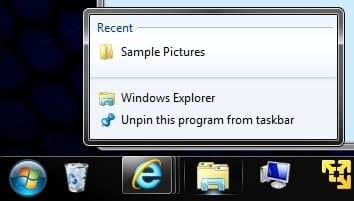
As a test, click on the Windows Explorer icon to open it, then navigate to and open any image, then close the image and Windows Explorer. Does anything show up under Recent in Windows Explorer Jump List afterwards like below?

How to re-enable shortcuts to Windows Explorer history in Start Menu?-recent.jpg
My System SpecsSystem Spec
30 May 2012   #5

Windows 7 (64)


Quote   Quote: Originally Posted by Brink View Post
As a test, click on the Windows Explorer icon to open it, then navigate to and open any image, then close the image and Windows Explorer. Does anything show up under Recent in Windows Explorer Jump List afterwards like below?

Attachment 214361
No, nothing shows up in the jump list. I performed your actions exactly as described.

The image does show up in Start-Recent, though.
My System SpecsSystem Spec
30 May 2012   #6

64-bit Windows 7 Ultimate SP1 & Windows 8 Enterprise
Texas


Could you post a screenshot showing all items you have pinned on the taskbar to see if it may reveal a cause?

In addition, go ahead and turn recent items off and on to toggle it, then reset jump lists and try the above again to see if it anything shows up afterwards. It may take a bit longer for them to show up again after a reset though.
My System SpecsSystem Spec
30 May 2012   #7

Windows 7 (64)


Quote   Quote: Originally Posted by Brink View Post
Could you post a screenshot showing all items you have pinned on the taskbar to see if it may reveal a cause?

In addition, go ahead and turn recent items off and on to toggle it, then reset jump lists and try the above again to see if it anything shows up afterwards. It may take a bit longer for them to show up again after a reset though.


I don't think there are conflicts?

I used the Windows point/click options to take the options you recommended above. I will run the bat/reg files next to see if they clean/reset anything.
My System SpecsSystem Spec
31 May 2012   #8

Windows 7 (64)


No luck.
My System SpecsSystem Spec
31 May 2012   #9

64-bit Windows 7 Ultimate SP1 & Windows 8 Enterprise
Texas


Hmm, ok. As a test, create a new user account and see how it works while logged in it.
My System SpecsSystem Spec
Reply

 How to re-enable shortcuts to Windows Explorer history in Start Menu? problems?


Thread Tools


Similar help and support threads for: How to re-enable shortcuts to Windows Explorer history in Start Menu?
Thread Forum
Internet Explorer Delete Browsing History - Enable or Disable Access Tutorials
Start Menu All Programs in Windows 7 - Restore Default Shortcuts Tutorials
Solved Vital shortcuts in the Start menu are gone Customization
History of the Start Menu - perhaps some comments? General Discussion
Windows Explorer Context Menu - Enable or Disable Tutorials


All times are GMT -5. The time now is 08:09 PM.


Windows 7 Forums is an independent web site and has not been authorized,
sponsored, or otherwise approved by Microsoft Corporation.
"Windows 7" and related materials are trademarks of Microsoft Corp.
© Designer Media Ltd