
| Windows 7: Missing total space from hard drive. |
01 Jun 2012
|
#1 | | |
Missing total space from hard drive. I have two partitions in my computer, which is C: (34.9GB) and D: (263.1GB) It makes a total of 298GB. I thought that I will make another partition out of D: which I did, and came out with H: (28.1GB), and again made another partition out of H: and came out with I: (13GB).
Now I have four partitions C: (34.9GB) D: (235GB) H: (15.10GB) and I: (13GB).
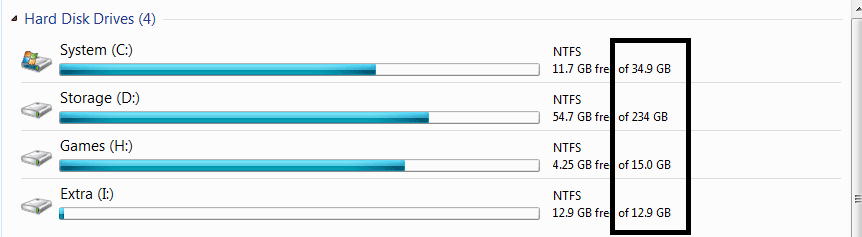
I was happy at first, then suddenly when I opened My Computer, drive D: now only has 234GB, H: with 15GB flat and I: has 12.9GB! (I clicked on properties and those are the total amounts of space that came out)
I lost a total of 1.2GB, and now I only have a total of 296.8GB!
I know it's not that big, but it still gives me headache when I see that I have a missing hard drive total space.
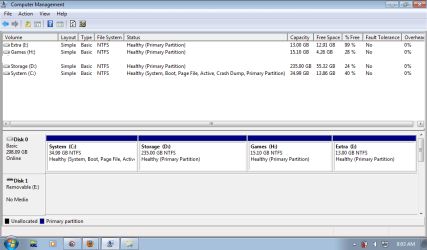
I opened Disk Management and I saw no "unallocated space." But, when I looked at drive D: H: and I: the Disk Management shows the amount it should be (235, 15.10, and 13 GB) Why is it like that? And why does My Computer shows different total space? And if there is really something wrong, how could I recover the missing space? Please help. Thank you in advance.
Last edited by there; 01 Jun 2012 at 08:27 PM..
| My System Specs |
| System Manufacturer/Model Number Clevo M815P OS Windows 7 Starter 32bit CPU Intel Atom CPU N450 1.6GHz (2 CPUs), ~ 1.7Ghz Memory 2048 MB ~ 2GB Graphics Card Sherry 1.3 for Intel GMA 3150 Sound Card Realtek High Definition Audio Monitor(s) Displays Generic PnP Monitor Screen Resolution 1024x600 Hard Drives Hitachi HTS545032B9A300 ATA Device @ 320GB |
01 Jun 2012
|
#2 | | Win 7 Pro 64-bit South Central Texas |
Hello there! Something's not adding up. You say you have four partitions C: (34.9GB) D: (235GB) H: (15.10GB) and I: (13GB). They add up to 298GB. Then you say drive D: now only has 234GB, H: with 15GB flat and I: has 12.9GB! (I clicked on properties and those are the total amounts of space that came out) I lost a total of 1.2GB, and now I only have a total of 297.8GB! 297.8GB + 1.2GB = 299GB. Are you sure you didn't lose just .2GB (about 200MB)? That could easily be explained if you're rounding off to tenths of a gigabyte (eg: 297.8GB whereas computer might be rounding off to hundreths of a gigabyte - 297.82GB). It would help to clear up the mystery if you could post a screenshot of your expanded disk manangement. Screenshots and Files - Upload and Post in Seven Forums | My System Specs | | Computer type Laptop System Manufacturer/Model Number Sony Vaio VPCEB47GM Laptop OS Win 7 Pro 64-bit CPU Intel i5 2.4 Ghz Memory 8GB DDR3 Graphics Card Intel HD 3000 Sound Card IDT High Definition Monitor(s) Displays 15.6 WGXA Anti-Glare LED Screen Resolution 1280x800 Hard Drives 640Gb 7200rpm Antivirus MSE Browser Opera (primary) with IE9 backup |
01 Jun 2012
|
#3 | | |
Oh, sorry about that. It should be 296.8GB, and I'm pretty sure I lost 1.2GB. And is this the screenshot you're looking for? | My System Specs | | System Manufacturer/Model Number Clevo M815P OS Windows 7 Starter 32bit CPU Intel Atom CPU N450 1.6GHz (2 CPUs), ~ 1.7Ghz Memory 2048 MB ~ 2GB Graphics Card Sherry 1.3 for Intel GMA 3150 Sound Card Realtek High Definition Audio Monitor(s) Displays Generic PnP Monitor Screen Resolution 1024x600 Hard Drives Hitachi HTS545032B9A300 ATA Device @ 320GB |
01 Jun 2012
|
#4 | | Windows 7 SP1, Home Premium, 64-bit |
34.99 plus 235.00 plus 15.10 plus 13.00 is 298.09.
What's wrong with that? | My System Specs | | System Manufacturer/Model Number Ignatz Special; 4 speed manual gearbox; factory air conditioning; one of one OS Windows 7 SP1, Home Premium, 64-bit CPU Intel Sandy Bridge i5-2500, not overclocked Motherboard Gigabyte H67A-UD3H-B3, full ATX Memory 4 GB Crucial DDR3-1333 Graphics Card none; graphics are integrated on CPU Sound Card onboard: Realtek ALC892; external: USB Behringer UF0-202 Monitor(s) Displays NEC 90GX2-BK 19" LCD Screen Resolution 800 x 640 Keyboard Leopold Tenkeyless with Cherry Blue switches, USB Mouse Logitech or Microsoft optical wired; either USB or PS 2 PSU Seasonic SS-560KM, modular Case Antec Solo II Cooling CPU: Scythe Big Shuriken; Case: Scythe Slipstream 800 & 500 Hard Drives System: Intel 320 Series SSD, 80 GB;
Data: Samsung Spinpoint 103SJ, 1 TB;
Backup: WD Caviar Green WD15EADS-00P8B0, 1.5TB Other Info Power consumption of this system, including monitor: 68 watts at idle; 144 watts at full load |
01 Jun 2012
|
#5 | | |
Because when I open My Computer it shows less total space. | My System Specs | | System Manufacturer/Model Number Clevo M815P OS Windows 7 Starter 32bit CPU Intel Atom CPU N450 1.6GHz (2 CPUs), ~ 1.7Ghz Memory 2048 MB ~ 2GB Graphics Card Sherry 1.3 for Intel GMA 3150 Sound Card Realtek High Definition Audio Monitor(s) Displays Generic PnP Monitor Screen Resolution 1024x600 Hard Drives Hitachi HTS545032B9A300 ATA Device @ 320GB |
01 Jun 2012
|
#6 | | Windows 7 SP1, Home Premium, 64-bit |
And if you use some other program such as Partition Magic, it might show another set of slightly different numbers.
I'd forget about it--that's better than laying awake at night wondering about it. | My System Specs | | System Manufacturer/Model Number Ignatz Special; 4 speed manual gearbox; factory air conditioning; one of one OS Windows 7 SP1, Home Premium, 64-bit CPU Intel Sandy Bridge i5-2500, not overclocked Motherboard Gigabyte H67A-UD3H-B3, full ATX Memory 4 GB Crucial DDR3-1333 Graphics Card none; graphics are integrated on CPU Sound Card onboard: Realtek ALC892; external: USB Behringer UF0-202 Monitor(s) Displays NEC 90GX2-BK 19" LCD Screen Resolution 800 x 640 Keyboard Leopold Tenkeyless with Cherry Blue switches, USB Mouse Logitech or Microsoft optical wired; either USB or PS 2 PSU Seasonic SS-560KM, modular Case Antec Solo II Cooling CPU: Scythe Big Shuriken; Case: Scythe Slipstream 800 & 500 Hard Drives System: Intel 320 Series SSD, 80 GB;
Data: Samsung Spinpoint 103SJ, 1 TB;
Backup: WD Caviar Green WD15EADS-00P8B0, 1.5TB Other Info Power consumption of this system, including monitor: 68 watts at idle; 144 watts at full load |
01 Jun 2012
|
#7 | | |
It shows the same as Disk Management shows. I just want to know what happened to the missing space. | My System Specs | | System Manufacturer/Model Number Clevo M815P OS Windows 7 Starter 32bit CPU Intel Atom CPU N450 1.6GHz (2 CPUs), ~ 1.7Ghz Memory 2048 MB ~ 2GB Graphics Card Sherry 1.3 for Intel GMA 3150 Sound Card Realtek High Definition Audio Monitor(s) Displays Generic PnP Monitor Screen Resolution 1024x600 Hard Drives Hitachi HTS545032B9A300 ATA Device @ 320GB |
01 Jun 2012
|
#8 | | Windows 7 SP1, Home Premium, 64-bit |
I wouldn't suppose anything is "missing".
Who's to say the larger number is correct? Maybe it is "wrong". Then you could wonder about why you have "extra" space..
Different programs measure different things. I've seen instances in which certain programs don't even show small "unallocated" spaces at the beginning and end of drives. That doesn't mean something is "wrong".
It's the instrument used to measure the disk. They aren't created equally. They see different things. | My System Specs | | System Manufacturer/Model Number Ignatz Special; 4 speed manual gearbox; factory air conditioning; one of one OS Windows 7 SP1, Home Premium, 64-bit CPU Intel Sandy Bridge i5-2500, not overclocked Motherboard Gigabyte H67A-UD3H-B3, full ATX Memory 4 GB Crucial DDR3-1333 Graphics Card none; graphics are integrated on CPU Sound Card onboard: Realtek ALC892; external: USB Behringer UF0-202 Monitor(s) Displays NEC 90GX2-BK 19" LCD Screen Resolution 800 x 640 Keyboard Leopold Tenkeyless with Cherry Blue switches, USB Mouse Logitech or Microsoft optical wired; either USB or PS 2 PSU Seasonic SS-560KM, modular Case Antec Solo II Cooling CPU: Scythe Big Shuriken; Case: Scythe Slipstream 800 & 500 Hard Drives System: Intel 320 Series SSD, 80 GB;
Data: Samsung Spinpoint 103SJ, 1 TB;
Backup: WD Caviar Green WD15EADS-00P8B0, 1.5TB Other Info Power consumption of this system, including monitor: 68 watts at idle; 144 watts at full load |
01 Jun 2012
|
#9 | | |
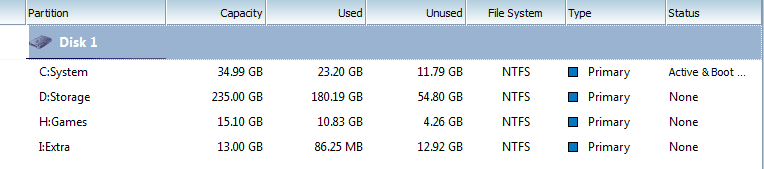
So, it means I may still have that 298GB and it just don't show up as a total of 298GB? | My System Specs | | System Manufacturer/Model Number Clevo M815P OS Windows 7 Starter 32bit CPU Intel Atom CPU N450 1.6GHz (2 CPUs), ~ 1.7Ghz Memory 2048 MB ~ 2GB Graphics Card Sherry 1.3 for Intel GMA 3150 Sound Card Realtek High Definition Audio Monitor(s) Displays Generic PnP Monitor Screen Resolution 1024x600 Hard Drives Hitachi HTS545032B9A300 ATA Device @ 320GB |
01 Jun 2012
|
#10 | | XP sp3 Pro / Win7 sp1 Pro 64bit / XP sp2 Pro (games only) Somewhere in the Rockies |
Doesn't windows reserve a percentage at the beginning of each partition?
Art. | My System Specs | | System Manufacturer/Model Number Home built OS XP sp3 Pro / Win7 sp1 Pro 64bit / XP sp2 Pro (games only) CPU Intel Core 2 Duo E8400 @ 3.00GHz Motherboard Intel Corporation DP35DP (CPU1) Memory 8.00 GB Dual-Channel DDR2 @ 400MHz (5-5-5-18) Graphics Card 1024MB GeForce GTX 560 Sound Card NVIDIA High Definition Audio Monitor(s) Displays SyncMaster (2048x1152@60Hz) Keyboard HID Keyboard Device Logitech Mouse HID-compliant mouse Microsoft PSU Corsair 720 Case ATX Hard Drives 244GB Seagate ST3250410AS (SATA)
488GB Seagate ST500DM002-1BD142 (SATA)
244GB Seagate ST3250410AS (SATA) Other Info TSSTcorp CDDVDW SH-S223L
HL-DT-ST BD-RE BH12LS35 Missing total space from hard drive. problems? All times are GMT -5. The time now is 01:21 PM. | |