| Windows 7: Hard Drive showing as full mysteriously |
11 Jun 2012
|
#21 | | Windows 7 Home Premium 64 bit |

Quote: Originally Posted by DavidW7ncus In Explorer Folder Options do you have "Hide protected operating system files" unchecked?
If it is checked, uncheck it and see if it makes a difference in what files/sizes you see.
In post #5 the Disk Management screen shows a "Disk 1" as Unknown/Not initialized.
How many Hard Drives do you have installed in this PC, and what is "Disk 1"?
In Post #18 you said you uninstalled Advanced System Care.
When it was installed did you ever run it and do any registry cleaning / optimization?
In Post #13 you said you don't think you can run as Admin.
Why can't you run as Admin?
Do you have an Administrator account you can log in with?
An Administrator account may show different results due to security/permissions. Re Post 5: Yes I have that unchecked, so there should be no hidden files. I have seen other blogs mention the 'System Volume Information' folder but I have looked at that and it isn't even 3gb.
Re post 18: Yes, but I've had it for years and never had a problem. But you never know.
Re post 13: Because it is just a patch, so doesn't it just add to the bf3 folders? I can run bf3 as admin.
Thanks for your help man. I'm still looking around on the net, nobody on bf3 forums have got back to me with similar issues. | My System Specs |
| System Manufacturer/Model Number Lenovo y570 OS Windows 7 Home Premium 64 bit Graphics Card Nvidia 555m |
11 Jun 2012
|
#22 | | Mac OS X 10.8/Windows 7 Pro 64-bit SP 1 |
Number 18 is a two part question. What we need to know is if you used that program to clean or optimize the registry. I am not sure how this happened but registry cleaning/optimizing/defragging became a big selling point for Windows maintenance programs bought by people wishing to speed up their computer. Granted Windows does need some maintenance however not in the registry. In reality registry cleaners don't really help a lot and quite frequently cause more problems than they solve. That's why David asked that question. IMO stay away from registry cleaners. I have seen thread after thread where people run a registry cleaner and it broke something. Granted for me a false report on space consumption would be a first, if that truly is the root cause. | My System Specs | | System Manufacturer/Model Number Apple iMac OS Mac OS X 10.8/Windows 7 Pro 64-bit SP 1 CPU Intel Core i3 550 Memory 8 gb Graphics Card ATI Radeon HD 5670 Sound Card Cirrus Logic CS4206A (AB 18) Screen Resolution 1920x1080 Hard Drives WDC WD1001FALS-40Y6A0 ATA Device 1 TB |
11 Jun 2012
|
#23 | | Windows 7 Home Premium 64 bit |
[QUOTE=lazyislander;1960401] 
Quote: Originally Posted by DavidW7ncus In Explorer Folder Options do you have "Hide protected operating system files" unchecked?
If it is checked, uncheck it and see if it makes a difference in what files/sizes you see.
In post #5 the Disk Management screen shows a "Disk 1" as Unknown/Not initialized.
How many Hard Drives do you have installed in this PC, and what is "Disk 1"? Forgot to mention this may be the ssd drive. I'm not sure what else it could be. But i have a ~64gb ssd that comes with lenovo y570. | My System Specs | | System Manufacturer/Model Number Lenovo y570 OS Windows 7 Home Premium 64 bit Graphics Card Nvidia 555m |
11 Jun 2012
|
#24 | | Windows 7 Home Premium 64 bit |

Quote: Originally Posted by townsbg Number 18 is a two part question. What we need to know is if you used that program to clean or optimize the registry. I am not sure how this happened but registry cleaning/optimizing/defragging became a big selling point for Windows maintenance programs bought by people wishing to speed up their computer. Granted Windows does need some maintenance however not in the registry. In reality registry cleaners don't really help a lot and quite frequently cause more problems than they solve. That's why David asked that question. IMO stay away from registry cleaners. I have seen thread after thread where people run a registry cleaner and it broke something. Granted for me a false report on space consumption would be a first, if that truly is the root cause.  Yeah, that would be interesting indeed. I primarily used the defrag function. It worked wonders on my old computer, but as you say I don't know why it had the registry fix function, but you couldn't skip it. So not sure if it actually did anything. It usually went through that step in about 1 second. Thanks for your input and advice. | My System Specs | | System Manufacturer/Model Number Lenovo y570 OS Windows 7 Home Premium 64 bit Graphics Card Nvidia 555m |
12 Jun 2012
|
#25 | | Win 7 Pro x64 SP1, Win 7 Ult x86 SP1 NC, USA |
When you ran WirDirStat (post #6), did you start it with "Run as administrator"?
If not, can you start it with "Run as administrator", and see if the space used is different?
For me, "Run as administrator" makes a difference in how much is displayed for space used...
I'm wondering if this might not explain the difference in WirDirStat vs. Windows Disk Management. Quote: Forgot to mention this may be the ssd drive. I'm not sure what else it could be. But i have a ~64gb ssd that comes with lenovo y570. It sounds like you also have an SSD as Disk 1 that is now "Unknown/Not Initialized" and came with the Laptop.
Did the laptop come with the OS installed on this SSD, and you "re-installed" the OS on the HD?
If so, how did you "re-install" to the HD?
Why do you have an SSD that came with the Laptop and is Unknown (not used)? | My System Specs | | Computer type PC/Desktop System Manufacturer/Model Number home built OS Win 7 Pro x64 SP1, Win 7 Ult x86 SP1 CPU AMD Athlon II x4 620 Motherboard Gigabyte GA-MA785G-UD3H Memory 6GB GSkill DDR2 800 Graphics Card AMD 4670 GPU + AMD 4200 IGP Sound Card on board Realtek ALC889A Monitor(s) Displays RCA 40" LCD TV, Insignia 32" LCD TV, HP 15" LCD monitor Screen Resolution 1680 x 1050... Keyboard Gyration wireless, Logitech wireless, Dell USB wired Mouse Gyration wireless, Logitech wireless, V7 USB wired PSU Corsair 500 W Case Rosewill mid tower Cooling CM 90mm Tower Hard Drives OCZ Vertex 3 120GB,
Samsung F3 1TB (3),
Several others - WD, Seagate, Hitachi, ... Internet Speed Uverse - 12Mbps D / 1.5Mbps U Antivirus Avast free OR MSE. (+ MBAM Pro). Browser 1-Firefox, 2-IE. (Chrome and Opera for testing) Other Info 2 PCs: Primary: dual-boot, Test: triple-boot.
Mainly HTPC/Gen purpose (no gaming).
Trendnet USB KVM.
LG DVD burner/Blue Ray Player.
Tray system for removable SATA backup drives.
Not currently OCd, under-volted.
I use Hybrid sleep, rarely re-boot or shutdown.
Hauppauge HD-PVR, Avermedia PCIe TV Tuner, Hauppauge PCI TV Tuner. |
13 Jun 2012
|
#26 | | |
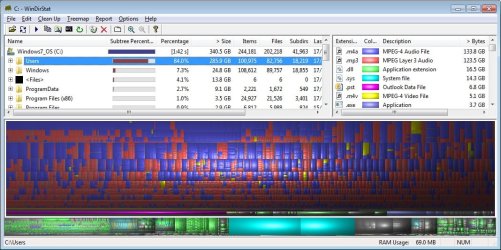
WinDirStat is only recognizing C drive as 132GB. Select the Options menu dropdown and select "show unkown". | My System Specs | | OS Windows 7 Ultimate x64 |
15 Jun 2012
|
#27 | | Windows 7 Home Premium 64 bit |

Quote: Originally Posted by F5ing WinDirStat is only recognizing C drive as 132GB. Select the Options menu dropdown and select "show unkown". Thanks man, didn't see that option. But it doesn't exactly show you where the fat is so I can go and delete it. New pic below | My System Specs | | System Manufacturer/Model Number Lenovo y570 OS Windows 7 Home Premium 64 bit Graphics Card Nvidia 555m |
15 Jun 2012
|
#28 | | |
Hard to imagine that they would be that large, but I'd check the size allocations for System Restore and Recycle Bin first. WinDirStat does not always properly report the size for those folders as Windows likes to "hide" that data, so it just reports it as "unknown".
But at least we now see that drive C is properly reporting it's full size. | My System Specs | | OS Windows 7 Ultimate x64 |
15 Jun 2012
|
#29 | | Windows 7 Ultimate x64, BackTrack Linux 5 R2, Windows XP |
I breezed through this thread a little bit, but just to be clear--drive C: (your SSD) is now reporting OK, but the problem remains with your storage drive?
Few questions I haven't seen, what is the make, model and speed of your drives? Also, in your BIOS, is the hard drive set for AHCI or Compatibility?
And also, you may consider checking your event logs. Type "event viewer" and hit enter in the Start search. Read through the Application and System logs to find any errors pertaining to the file system. Additionally, the logs themselves could take up a surprising amount of space. (right click the logs, and click Clear Log) | My System Specs | | System Manufacturer/Model Number Custom Build OS Windows 7 Ultimate x64, BackTrack Linux 5 R2, Windows XP CPU Intel Core i7 920 OC to 3.6GHz Motherboard ASUS P6T Deluxe V2 Memory Corsair 6GB DDR3 Graphics Card ATI Radeon 4890 Monitor(s) Displays ASUS 23" Screen Resolution 1920x1080 PSU Corsair 850w Case CoolerMaster HAF932 Cooling CoolerMaster V8 Hard Drives 150GB Velociraptor
640GB Internet Speed 30Mbps |
15 Jun 2012
|
#30 | | Windows 7 Home Premium 64 bit |

Quote: Originally Posted by doubled822 I breezed through this thread a little bit, but just to be clear--drive C: (your SSD) is now reporting OK, but the problem remains with your storage drive?
Few questions I haven't seen, what is the make, model and speed of your drives? Also, in your BIOS, is the hard drive set for AHCI or Compatibility?
And also, you may consider checking your event logs. Type "event viewer" and hit enter in the Start search. Read through the Application and System logs to find any errors pertaining to the file system. Additionally, the logs themselves could take up a surprising amount of space. (right click the logs, and click Clear Log) Thanks for the info, I did have tonnes of logs, I didn't really see anything that would tell em what happened, but there were thousands and thousands. I deleted them and probably got a GB free space after,maybe.
I am running a Lenovo which has been great for everything except gaming, the graphics card has given me hell and I haven't figured out what to do, but that is a different story!
ahci/compatibility how do you check that, noobish when it comes to bios and those sort of things, afraid of mashing up something. | My System Specs | | System Manufacturer/Model Number Lenovo y570 OS Windows 7 Home Premium 64 bit Graphics Card Nvidia 555m Hard Drive showing as full mysteriously problems? All times are GMT -5. The time now is 11:51 PM. | |