Windows 7 Forums Search
Welcome to Windows 7 Forums. Our forum is dedicated to helping you find solutions with any problems, errors or issues you are experiencing with Windows 7. The Windows 7 forum also covers news and updates and has an extensive Windows 7 tutorial section that covers a wide range of tips and tricks.


Windows 7 - sleep shortcut


01-17-2009   #1


windos7


sleep shortcut

Hi

I was wandering if anyone knows how to make the sleep shortcut work in windows 7 I tried

Sleep Shortcut - Vista Forums

and

How to create a shortcut to put Windows into sleep mode - Notebook Forums and Laptop Discussion

But nether worked. The first tutorial dose work but only if you use shortcut keys and it still sets off uac every time even if I unticked the box to tell it not too. The second tut made my computer hibernate.
My computer will go to sleep when I do it manually but the auto sleep after x min doesn't work. It just makes the screen black unfortunately. Would this cause problems?

My System SpecsSystem Spec
01-17-2009   #2


Windows 7 Ultimate x64 SP1


Hi Nikost, and welcome to Seven Forums.

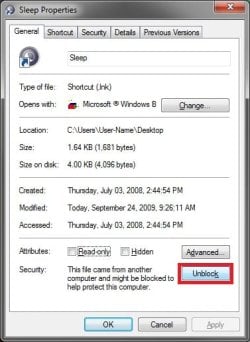
On the first tutorial, right click on the shortcut and click on Properties. Under the General tab, click on the Unblock button if there. This may be the cause of UAC popping up on you for it. If it's not there, then it is already unblocked.

If you disable hibernation, then the other one should work as well.

Hope this helps,
Shawn
My System SpecsSystem Spec
01-17-2009   #3


windos7


Theres no unblock button their.
My System SpecsSystem Spec
.


01-17-2009   #4


windos7


Sorry there was an unblock button. I was looking at the shortcut rather than the script. But the popups keep coming even once its unblocked
My System SpecsSystem Spec
01-18-2009   #5


Windows 7 Ultimate x64 SP1


The best thing to use though is the Sleep power button in the Start Menu in Windows 7.

Power Button - Start Menu


You might also double check your Power Plan settings to see if they are the same for the recommended settings.

Hope this helps,
Shawn
My System SpecsSystem Spec
09-24-2009   #6


Win 7 Ultimate x64


I followed the Vista instructions, I have UAC disabled, but the shortcut actually shuts down my computer instead of sleep.

Any idea why?
My System SpecsSystem Spec
09-24-2009   #7


Windows 7 Ultimate x64 SP1


Hello A320,

If you mean the sleep shortcut, then it may be going into hibernation instead of shutting down. If you press a key afterwards, does your computer resume from hibernation?

If so, then make sure that you disable hibernation for it to put your computer to sleep instead of hibernate.

Hope this helps for now,
Shawn

Last edited by Brink; 07-27-2011 at 12:24 PM.. Reason: updated link
My System SpecsSystem Spec
09-24-2009   #8


Win 7 Ultimate x64


Hi thanks but I already have hibernation disabled. It just does a complete shut down.
My System SpecsSystem Spec
09-24-2009   #9


Windows 7 Ultimate x64 SP1


I just tested it on my Windows 7 and it put it to sleep.

When you download the files, be sure to unblock the shortcut and VBS file in the Sleep Shortcut folder, then copy the Sleep Shortcut folder into the C:\Program Files folder.

sleep shortcut-unblock.jpg


UPDATE:
It appears that in Windows 7, you will need to make sure that the Start Menu power button is set to Sleep for the shortcut to work as well.
My System SpecsSystem Spec
09-24-2009   #10


Win 7 Ultimate x64


Quote   Quote: Originally Posted by Brink View Post

UPDATE:
It appears that in Windows 7, you will need to make sure that the Start Menu power button is set to Sleep for the shortcut to work as well.

Yup, that did it! Nice find, thanks a lot.

Last edited by Brink; 07-27-2011 at 12:24 PM.. Reason: removed broken image link
My System SpecsSystem Spec
Reply

sleep shortcut problems?


Thread Tools


Similar Threads for: sleep shortcut
Thread Forum
Solved Creating Sleep Shortcut General Discussion
Timed Shortcut for sleep/hibernation? General Discussion
Sleep Shortcut - Create Tutorials
Can't change icon for Sleep shortcut? General Discussion
Sleep problem; Goes into deeper sleep w/shortcut General Discussion


All times are GMT -5. The time now is 07:14 PM.


Windows 7 Forums is an independent web site and has not been authorized,
sponsored, or otherwise approved by Microsoft Corporation.
"Windows 7" and related materials are trademarks of Microsoft Corp.
© Designer Media Ltd
  

1 2 3 4 5 6 7 8 9 10 11 12 13 14 15 16 17 18 19 20 21 22 23 24 25 26 27 28 29 30