Windows 7 Forums


Windows 7: Disk partion help with sisters laptop

05 Jul 2012   #1

windows 7 home premium x 64
 
 
Disk partion help with sisters laptop

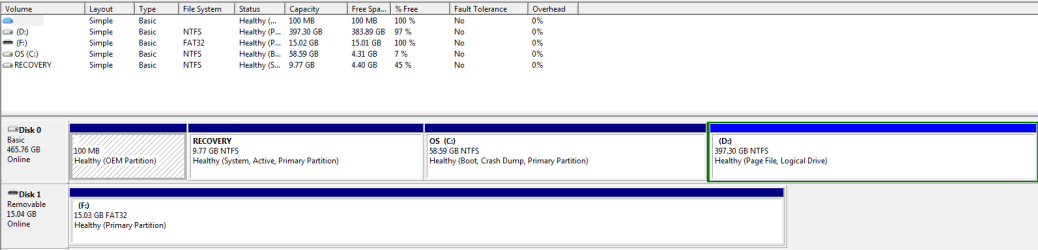
Hello hoping you could help im having a similar problem...It's to do with the disk partitions ill post a snip see if you guys can advise what i need to be doing thanks in advance.


Disk partion help with sisters laptop-capture.png
My System SpecsSystem Spec

05 Jul 2012   #2

Windows 8 64 bit PRO
Somewhere in California


I really do not see this as a bad thing but something more positive.
Think of it this way, C is a partition for the OS alone. Only windows and windows updates should go here from now on. Treat D as the storage partition, make a new folder and call it Software or Program files. It will look like this D:\Program Files\_______
and save all the programs in this location. I would then uninstall the programs and reinstall them on this new partition. That way you can clear up some room for C drive.
The advantages of this is in case you need to format, any documents, pictures, songs store on D partition would remain safe. Since you would just format and reinstall windows on C partition.
The downfalls come when you are doing system image backups and it now has to do both partitions.
Another downfall would the need to change the installation location manually every time or you could edit the registry and change to the new location. I would advise against this since editing the registry can lead to catastrophic episodes later on.
I do not think you can merge C and D, unless you delete both volumes (partitions) and then they can join together.

My System SpecsSystem Spec
05 Jul 2012   #3

Windows 7 Home Premium 32-Bit - Build 7600 SP1
Houston, Texas


Quote   Quote: Originally Posted by channa View Post
Hello hoping you could help im having a similar problem...It's to do with the disk partitions ill post a snip see if you guys can advise what i need to be doing thanks in advance.

Attachment 219935
When you start a thread, it would help everyone trying to assist you if you state the problem you are having rather than saying "you have a similar problem". I have no idea what your problem is. Thanks,
My System SpecsSystem Spec
.


05 Jul 2012   #4

Vista x64 / 7 X64


I will take a wild guess he wants to extend the windows partition.

There is an extended partition to the right of it.

If you don't want anything on that D part, delete it and extend windows part.
My System SpecsSystem Spec
05 Jul 2012   #5

Windows 7 Home Premium 64 bit. SP-1
Northern Ohio


Should the recovery partition be active like in the op post.

Last edited by Layback Bear; 05 Jul 2012 at 11:09 PM..
My System SpecsSystem Spec
05 Jul 2012   #6

Win7 x 6 PC's
California, Florida, Boston


That's a good question Layback since it has the 100mb OEM partition which should likely be the System Reserved partition marked System and Active. However some OEM's also make Recovery System Active so it will boot easier. It might have changed if OP ran Recovery or repairs.

As to the mystery question, to delete D if you don't want it and have everything moved off of it use these two procedures:
Partition or Volume - Delete D,
then rightclick on C Partition or Volume - Extend
My System SpecsSystem Spec
06 Jul 2012   #7

Windows 7 Ultimate x64


As we're commenting/questioning on the picture in the hit & run OP, I'll add one: How did the page file get put on D:?

The OP's got some 'splainin' to do! If they ever return...

Last edited by F5ing; 06 Jul 2012 at 05:15 PM.. Reason: spelling.
My System SpecsSystem Spec
06 Jul 2012   #8

Windows 7 Pro 64 SP1
East Bay Area, CA


It's also a possibility that the OP had posted that in another thread and it was moved to it's own thread, leaving most of us wondering who's problem it is similar to.
My System SpecsSystem Spec
06 Jul 2012   #9

windows 7
bangalore,india


say what is your problem clearly then only it can be resolved
My System SpecsSystem Spec
06 Jul 2012   #10

Windows 7 Home Premium 64 bit. SP-1
Northern Ohio


Seem like we have more questions than the OP.
My System SpecsSystem Spec
Reply

 Disk partion help with sisters laptop problems?


Thread Tools


Similar help and support threads for: Disk partion help with sisters laptop
Thread Forum
Solved Convert dynamic disk of a laptop to basic disk w/o reinstalling win General Discussion
Solved win 7 install windows cant install on disk 0 partion 1 pls help Installation & Setup
My sisters Laptop - Bluescreen BSOD Help and Support
Unable to boot my laptop from DISK, USB, ANYTHING but Hard Disk!!@#% Backup and Restore
Windows 7 on Partion C and XP on Partion D Performance & Maintenance


All times are GMT -5. The time now is 11:39 PM.


Seven Forums Android App Seven Forums IOS App Follow us on Facebook

Windows 7 Forums is an independent web site and has not been authorized,
sponsored, or otherwise approved by Microsoft Corporation.
"Windows 7" and related materials are trademarks of Microsoft Corp.
© Designer Media Ltd
  

1 2 3 4 5 6 7 8 9 10 11 12 13 14 15 16 17 18 19 20 21 22 23 24 25 26 27 28 29 30 31 32