Windows 7 Forums


Windows 7: My Monitor is only using the very middle of my screen how do I fix?

06 Jul 2012   #1

Windows 7 home 64 bit
 
 
My Monitor is only using the very middle of my screen how do I fix?

I pretty much said it in the title. However my screen is not full only the middle part has picture the rest is black. I have been in the control panel played with some stuff there, I do find it wierd that it looks as though the laptop thinks I have multiple screens but I do not. Please help this is really irritating.

My System SpecsSystem Spec

06 Jul 2012   #2

Windows 7 x64 Professional SP1
Geordieland, Tyne and Wear


Can you please fill up your system specs in your user profile by following this tutorial so we can help you better?

System Info - See Your System Specs
My System SpecsSystem Spec
06 Jul 2012   #3

Windows 7 home 64 bit


I do not know much lol I will try my best
My System SpecsSystem Spec
.


06 Jul 2012   #4

Windows 7 home 64 bit
 
 
I updated

Hi I put in what know on my profile. Thanks for being so quick I would like it fixed for tmw tried googling and I am getting no where
My System SpecsSystem Spec
06 Jul 2012   #5

Windows 7 x64 Professional SP1
Geordieland, Tyne and Wear


Okay, did you follow the tutorial that I linked to exactly in my previous post? It offers a step by step guide on how to fill up your specifications.

Anyway, based on the preliminary data you've filled up and your Laptop model, it seems like it's using an AMD Graphics Chipset...and it has a native screen resolution of 1366x768

Have you tried checking whether your Desktop Resolution matches the native resolution of your screen?

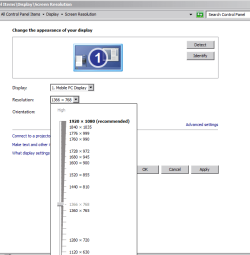
1. Right click on your Desktop

2. Click on Screen Resolution

3. In the next panel, select the dropdown box next to Resolution and select 1366 x 768

My Monitor is only using the very middle of my screen how do I fix?-capture3.png

4. Click Apply, then OK.
My System SpecsSystem Spec
06 Jul 2012   #6

8 Pro x64


Quote   Quote: Originally Posted by shelley999 View Post
I do find it wierd that it looks as though the laptop thinks I have multiple screens but I do not.
Did you ever plug in an external monitor, projector etc?

Adjusting your resolution like SM has outlined should return your screen to 'full size'
My System SpecsSystem Spec
06 Jul 2012   #7

Windows 7 home 64 bit


Thank you for your help with my limited knowledge of what I am doing. I was looking for the screen shot button on the keyboard to show you what it said and I touched a button on the keyboard that filled the screen lol you inadverdantly helped me! Thank you
My System SpecsSystem Spec
06 Jul 2012   #8

Windows 7 home 64 bit


smarteyeball...I literally just took this thing out of the box I had never attached anything to it, super wierd but it is fixed so it's all good thank you all
My System SpecsSystem Spec
06 Jul 2012   #9

Windows 7 x64 Professional SP1
Geordieland, Tyne and Wear


Quote   Quote: Originally Posted by shelley999 View Post
Thank you for your help with my limited knowledge of what I am doing. I was looking for the screen shot button on the keyboard to show you what it said and I touched a button on the keyboard that filled the screen lol you inadverdantly helped me! Thank you
That's rather serendipitous to say the least! Which button was it, was it a button with a picture of laptop|monitor side by side on it next to the insert button on your keyboard?
My System SpecsSystem Spec
06 Jul 2012   #10

Windows 7 home 64 bit


It is a button of laptop and monitor.. closer to esc though on mine then insert lol
My System SpecsSystem Spec
Reply

 My Monitor is only using the very middle of my screen how do I fix? problems?


Thread Tools


Similar help and support threads for: My Monitor is only using the very middle of my screen how do I fix?
Thread Forum
Screen goes black in the middle of gaming. Graphic Cards
Volume control in middle of screen. Sound & Audio
BSOD occurs when computer on, monitor sleeping - middle of the night3b BSOD Help and Support
speaker symbol appear in middle of monitor Sound & Audio
Monitor minimizes in middle of video stream Media Center


All times are GMT -5. The time now is 04:11 AM.


Seven Forums Android App Seven Forums IOS App Follow us on Facebook

Windows 7 Forums is an independent web site and has not been authorized,
sponsored, or otherwise approved by Microsoft Corporation.
"Windows 7" and related materials are trademarks of Microsoft Corp.
© Designer Media Ltd
  

1 2 3 4 5 6 7 8 9 10 11 12 13 14 15 16 17 18 19 20 21 22 23 24 25 26 27 28 29 30 31 32