
I have a folder full of jpg files that I want to all have the exact date and time (as indicated by the explorer view 'List' date column). Is this possible?
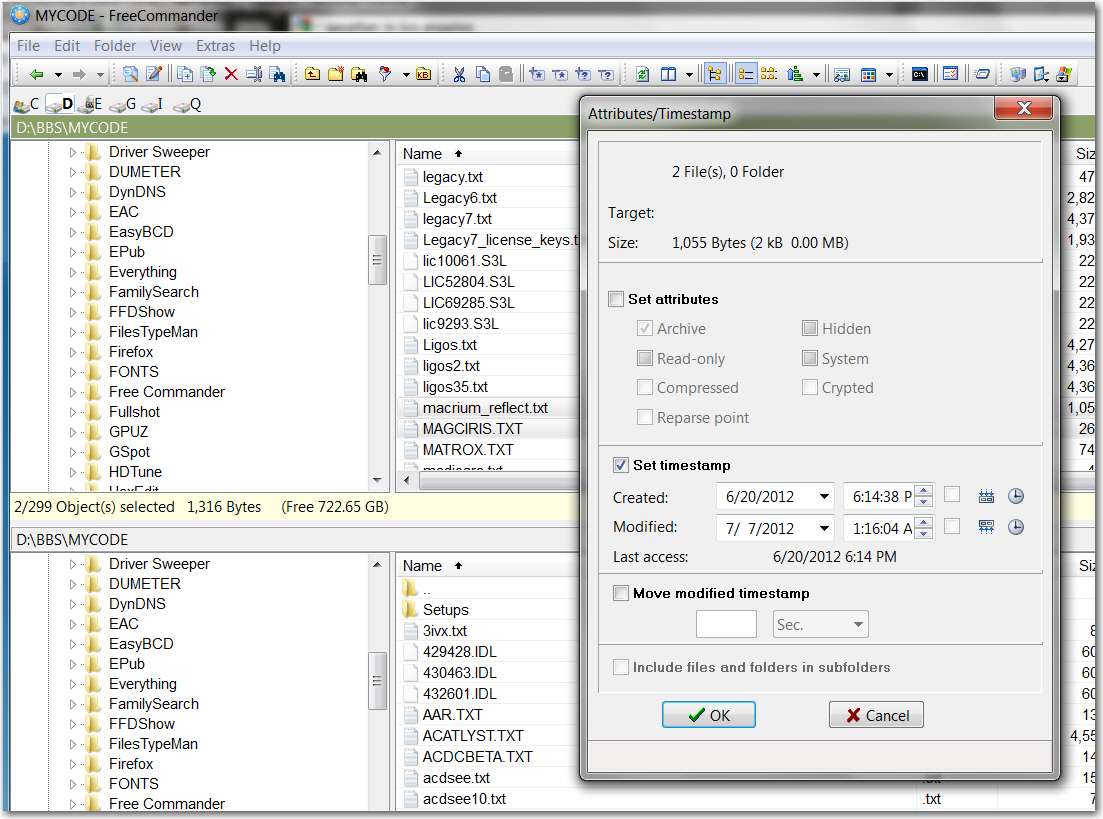
Install Free Commander, which is a terrific 1/2-pane Windows Explorer substitute.
Then, you can select one or more files and then File-> Attributes/timestamp and you can change anything you want in the directory information for the file(s).
System Manufacturer/Model Number Home-built, two systems (1) and (2) OS Windows 7 Pro x64 (1), Win7 Pro X64 / WinXP Pro x86 on (2) CPU i5-3350p 3.1Ghz/6MB-cache (1); E8400 3.0Ghz/6MB-cache (2) Motherboard ASUS P8Z77-V Pro (1); ASUS P5Q3 (2) Memory 8GB PC3-12800 DDR3 (1); 4GB PC3-10600 DDR3 (2) Graphics Card ATI HD5770 dual-DVI (1), (see TV cards); ATI HD4850 (2) Sound Card Realtek ALC892 HD Audio (1); Realtek ALC1200 HD Audio (2) Monitor(s) Displays Eizo HD2441W LCD, Eizo S2433W (1); Eizo 24" S2433W (2) Screen Resolution 1920x1200, 1920x1200 (1); 1920x1200 (2)
Keyboard IBM PS/2 (1) and (2) Mouse Logitech MX Revolution wireless (1); Microsoft wired (2) PSU Nesteq ECS-6001 600W (1); Nesteq ECS-5001 500W (2) Case Acousti-Case 360 (1) and (2) Cooling Noctua NH-U12P SE2 for CPU, 2x120mm case fans (1) and (2) Hard Drives (1) 1TB SATA-II (7200RPM), 2TB SATA-II (7200RPM), 2TB SATA-III (7200RPM), 250GB SATA-III (10000RPM) for OS;
(2) 320GB SATA-II (7200RPM), 750GB SATA-II (7200RPM), 150GB SATA-II (10000RPM) for OS Internet Speed 15mbps down / 2mbps up Other Info Ceton InfiniTV 4-tuner cablecard-enabled TV card as well as Hauppauge HVR-2250 OTA/ATSC 2-tuner TV card in (1), running under Win7 WMC
"(still, if there is a way to do this w/o outside s/w let me know)"
Stefan Kueng's SKTimeStamps(x64) is an .msi installer that integrates into the explorer.exe right-click context menu/properties panel. One can set single or multiple files' time stamps.
"(still, if there is a way to do this w/o outside s/w let me know)"
Stefan Kueng's SKTimeStamps(x64) is an .msi installer that integrates into the explorer.exe right-click context menu/properties panel. One can set single or multiple files' time stamps.
interesting, thnx - where can I locate that script?
"(still, if there is a way to do this w/o outside s/w let me know)"
Stefan Kueng's SKTimeStamps(x64) is an .msi installer that integrates into the explorer.exe right-click context menu/properties panel. One can set single or multiple files' time stamps.
interesting, thnx - where can I locate that script?