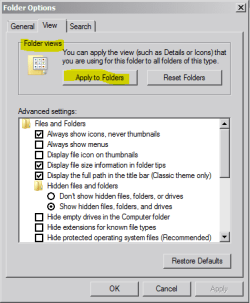
For numerous folders I have of things I've downloaded, I have the Window Pane at the top right set to 'List', as that's how I like numerous folders to appear as.
When I go back, it unfortunately keeps usually changing to 'Medium Icons', or to 'Details', neither of which I want or like. Is there anything I can do, to keep it permanently set to 'List' all the time.
When I go back, it unfortunately keeps usually changing to 'Medium Icons', or to 'Details', neither of which I want or like. Is there anything I can do, to keep it permanently set to 'List' all the time.
My Computer
At a glance
Windows 7
- OS
- Windows 7