| Windows 7: NIC probs after reassembling laptop |
11 Jul 2012
|
#1 | | Win7 x 6 PC's California, Florida, Boston |
NIC probs after reassembling laptop Compaq Presario CQ60 salvaged from trash to practice repasting the processor and try breaking down and reassembling laptop.
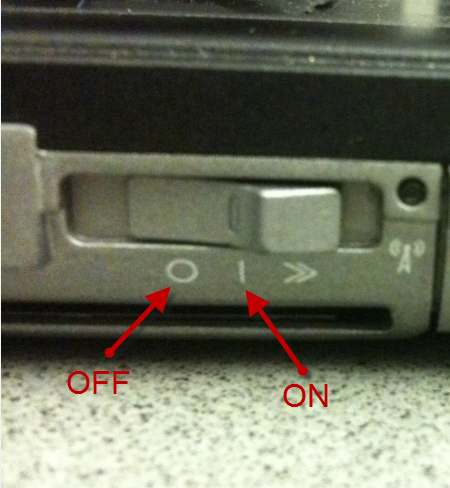
Works great at reboot except NIC card will not start itself but requires pressing the wireless button to start it manually every time.
Have switched leads, cleaned contacts, reseated several times. Network is set to start automatically but won't since no device is starting with computer to do so.
Reinstalled to a test partition to see if that would solve it but it appears its hardware prob. Anyone seen this before? | My System Specs |
| |
11 Jul 2012
|
#2 | | Win 7 Pro x64 SP1, Win 7 Ult x86 SP1 NC, USA |
Seems there are several models of the CQ60 such as CQ60-215DX, CQ60-417DX.
Do you know the full model #?
Did you look in bios for a setting to enable/disable this?
Did you reset bios to default after re-assembling the laptop?
I found this in a Wireless User Guide: Quote: A wireless device can be turned on or off using the Wireless Assistant software. If a wireless device is disabled by the Setup Utility, it must be reenabled by the Setup Utility before it can be turned on or off using Wireless Assistant. Source: http://h10032.www1.hp.com/ctg/Manual/c01487709.pdf | My System Specs | | Computer type PC/Desktop System Manufacturer/Model Number home built OS Win 7 Pro x64 SP1, Win 7 Ult x86 SP1 CPU AMD Athlon II x4 620 Motherboard Gigabyte GA-MA785G-UD3H Memory 6GB GSkill DDR2 800 Graphics Card AMD 4670 GPU + AMD 4200 IGP Sound Card on board Realtek ALC889A Monitor(s) Displays RCA 40" LCD TV, Insignia 32" LCD TV, HP 15" LCD monitor Screen Resolution 1680 x 1050... Keyboard Gyration wireless, Logitech wireless, Dell USB wired Mouse Gyration wireless, Logitech wireless, V7 USB wired PSU Corsair 500 W Case Rosewill mid tower Cooling CM 90mm Tower Hard Drives OCZ Vertex 3 120GB,
Samsung F3 1TB (3),
Several others - WD, Seagate, Hitachi, ... Internet Speed Uverse - 12Mbps D / 1.5Mbps U Antivirus Avast free OR MSE. (+ MBAM Pro). Browser 1-Firefox, 2-IE. (Chrome and Opera for testing) Other Info 2 PCs: Primary: dual-boot, Test: triple-boot.
Mainly HTPC/Gen purpose (no gaming).
Trendnet USB KVM.
LG DVD burner/Blue Ray Player.
Tray system for removable SATA backup drives.
Not currently OCd, under-volted.
I use Hybrid sleep, rarely re-boot or shutdown.
Hauppauge HD-PVR, Avermedia PCIe TV Tuner, Hauppauge PCI TV Tuner. |
11 Jul 2012
|
#3 | | Windows 7 Ultimate AMD64 Sydney, Nova Scotia |
Looking for BIOS setting for this sounds like a good idea to me too. I have very limited laptop experience, but I can say that my ACER laptop remembers what state the WIFI and Bluetooth are left in. I don't use the Bluetooth and turned it off with the keyboard button. It stays off on a reboot. Same deal with the WIFI adapter, if it was on when I turned the laptop off, its on when I power up again. I don't remember seeing a BIOS option for this, but that doesn't mean there isn't one or that you don't have one. The only other thing I can think of to check is the Windows Power options to see if its maybe being put in power saving mode. | My System Specs | | Computer type PC/Desktop System Manufacturer/Model Number Home Built OS Windows 7 Ultimate AMD64 CPU AMD Phenom II X4 980 Black Edition Deneb 3.7GHz Motherboard Asus M4N68T-M V2 µATX Motherboard Memory 8GB 4GBx2 Kingston PC10600 DDR3 1333 Memory Graphics Card BFG NVIDIA Geforce 220GT 1 Gig DDR2 PCIe Sound Card VIA VT1708s High Definition Audio 8-channel Onboard Monitor(s) Displays 2 x 19" I-INC AG191D TFT Flat Panel Screen Resolution 1280x1024 x 2 Keyboard Logitech Internet 600 Mouse Logitech Wireless Trackman Wheel PSU Retail Plus 465 Watt Case Power Up Black ATX Mid-Tower Case Cooling Stock heatsink and fan Hard Drives 500 Gig WesternDigital SATA-300 Drive Internet Speed 80 Mbps Down 30 Mbps Up Antivirus Microsoft Security Essentials Browser Internet Explorer 10 Other Info HP DVD1040e Lightscribe - External USB2 |
11 Jul 2012
|
#4 | | Windows 7 Professional x64 Service Pack 1 USA |
If the above doesn't work, try updating the BIOS. | My System Specs | | Computer type PC/Desktop System Manufacturer/Model Number HP Pavilion P7-1010 OS Windows 7 Professional x64 Service Pack 1 CPU AMD Athlon X4 645 Motherboard Foxxcon N-Alvorix RS880 Memory 6GB DDR3 1066 Graphics Card Sapphire Radeon HD 5670 512MB Sound Card Realtek Integrated Audio Monitor(s) Displays HP 2011x Screen Resolution 1600x900 Keyboard HP OEM- Made by Chicony Mouse HP OEM- Made by Logitech PSU Seasonic S12 II Bronze 380 Watt Case HP OEM Cooling Coolermaster Heatsink, AVC Case Fan Hard Drives 1. Crucial M4 128GB SSD
2. 1TB Seagate Barracuda 7200.12 RPM
3. 1TB Western Digital Caviar Green 5400RPM Internet Speed 20MBit Down/4 Up Antivirus Microsoft Security Essentials Browser Internet Explorer 9 |
11 Jul 2012
|
#5 | | Windows 7 Professional SP1 64-bit Virginia |
Seen it before on an Acer laptop a friend had. I never figured out exactly why it did it, but the BIOS would be the place to look. | My System Specs | | System Manufacturer/Model Number Toshiba P775-S7100 OS Windows 7 Professional SP1 64-bit CPU Intel Core i5-2450M @2.5 GHz Memory 6 GB DDR3 1333MHz Graphics Card Intel HD 3000 Monitor(s) Displays Built-in 17.3" LED; 22" Insignia NS-L22Q-10A Screen Resolution 1600x900; 1360x768 Hard Drives 750 GB Hitachi
1TB Seagate FreeAgent External Internet Speed Verizon DSL Speed(Down/Up): 3360 Kbps / 800 Kbps Antivirus MSE and MBAM Pro Browser IE10 RP |
11 Jul 2012
|
#6 | | Windows 7 Ultimate x64 Solo. |
Additionally, though this is our very basic knowledge, but need to check the BIOS RTC, just to make sure if your CMOS battery is still good to go. I can only guest like your BIOS setup revert to any default value (disabled).
If it is still good, then ignore me | My System Specs | | Computer type PC/Desktop System Manufacturer/Model Number Self built system OS Windows 7 Ultimate x64 CPU CORE i5 Motherboard Intel DH55PJ Memory 4GB Graphics Card ATI HD 4650 Sound Card Realtek HD Integrated Monitor(s) Displays LG Flatron L1742S; LG Flatron 19"; Toshiba 32" Screen Resolution 1280 x 1024; 1366 x 768 Keyboard Logitech Wireless Mouse Logitech Wireless PSU Power Case Simbadda Cooling Conventional Hard Drives Seagate Barracuda 500 GB
WDC 1 TB Internet Speed 256Kbps Other Info External HDD Transcend 500GB
Dial Up Modem Huawei
Home-made Home Theater
Laptop ASUS K42F, Core i3, 4GB memory, 320GB HDD.
LAptop Fujitsu LH531, Core i3, 4GB Memory, 500 GB HDD, Nvidia VGA |
11 Jul 2012
|
#7 | | Win7 x 6 PC's California, Florida, Boston |
Presario CQ60-215DX.
Reset BIOS several times. Updated to latest BIOS version. No LAN listings in BIOS at all except for Network Boot.
No Wireless Asst. installed. This is a Clean Reinstall of Vista, now Dual Booted with a test partition for Windows 7. | My System Specs | | |
11 Jul 2012
|
#8 | | Win 7 Pro x64 SP1, Win 7 Ult x86 SP1 NC, USA |
Is this setting in your setup, and did you try changing it? LAN Power Saving (select models only) Enable/disable LAN Power Saving. When enabled, saves power when the computer is in DC mode http://h10032.www1.hp.com/ctg/Manual/c01662442.pdf
Looks like you can download a "HP Wireless Assistant" utility...see if that might help.? Software & Driver Downloads Compaq Presario CQ60-215DX Notebook PC - HP Customer Care (United States - English) | My System Specs | | Computer type PC/Desktop System Manufacturer/Model Number home built OS Win 7 Pro x64 SP1, Win 7 Ult x86 SP1 CPU AMD Athlon II x4 620 Motherboard Gigabyte GA-MA785G-UD3H Memory 6GB GSkill DDR2 800 Graphics Card AMD 4670 GPU + AMD 4200 IGP Sound Card on board Realtek ALC889A Monitor(s) Displays RCA 40" LCD TV, Insignia 32" LCD TV, HP 15" LCD monitor Screen Resolution 1680 x 1050... Keyboard Gyration wireless, Logitech wireless, Dell USB wired Mouse Gyration wireless, Logitech wireless, V7 USB wired PSU Corsair 500 W Case Rosewill mid tower Cooling CM 90mm Tower Hard Drives OCZ Vertex 3 120GB,
Samsung F3 1TB (3),
Several others - WD, Seagate, Hitachi, ... Internet Speed Uverse - 12Mbps D / 1.5Mbps U Antivirus Avast free OR MSE. (+ MBAM Pro). Browser 1-Firefox, 2-IE. (Chrome and Opera for testing) Other Info 2 PCs: Primary: dual-boot, Test: triple-boot.
Mainly HTPC/Gen purpose (no gaming).
Trendnet USB KVM.
LG DVD burner/Blue Ray Player.
Tray system for removable SATA backup drives.
Not currently OCd, under-volted.
I use Hybrid sleep, rarely re-boot or shutdown.
Hauppauge HD-PVR, Avermedia PCIe TV Tuner, Hauppauge PCI TV Tuner. |
11 Jul 2012
|
#9 | | Win7 x 6 PC's California, Florida, Boston |
Hi David, and thanks -
No LAN power setting in BIOS.
I don't remember ever installing HP Wireless assistant, only uninstalling it. But I'll try it. | My System Specs | | |
11 Jul 2012
|
#10 | | Windows 7 Ultimate AMD64 Sydney, Nova Scotia |
Regular battery working OK? Power pack always plugged in? maybe its something that needs constant power to remember its state. If the laptop has no battery, or the battery is no good, and your unplugging the power pack when its off. The complete lose of power may make it toggle off. Grasping at straws a bit now. | My System Specs | | Computer type PC/Desktop System Manufacturer/Model Number Home Built OS Windows 7 Ultimate AMD64 CPU AMD Phenom II X4 980 Black Edition Deneb 3.7GHz Motherboard Asus M4N68T-M V2 µATX Motherboard Memory 8GB 4GBx2 Kingston PC10600 DDR3 1333 Memory Graphics Card BFG NVIDIA Geforce 220GT 1 Gig DDR2 PCIe Sound Card VIA VT1708s High Definition Audio 8-channel Onboard Monitor(s) Displays 2 x 19" I-INC AG191D TFT Flat Panel Screen Resolution 1280x1024 x 2 Keyboard Logitech Internet 600 Mouse Logitech Wireless Trackman Wheel PSU Retail Plus 465 Watt Case Power Up Black ATX Mid-Tower Case Cooling Stock heatsink and fan Hard Drives 500 Gig WesternDigital SATA-300 Drive Internet Speed 80 Mbps Down 30 Mbps Up Antivirus Microsoft Security Essentials Browser Internet Explorer 10 Other Info HP DVD1040e Lightscribe - External USB2 NIC probs after reassembling laptop problems? All times are GMT -5. The time now is 06:25 PM. | |