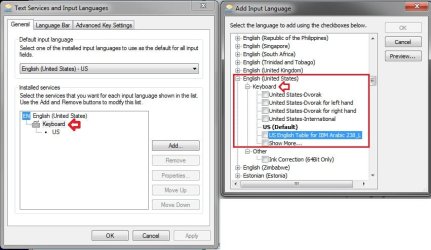
Using Windows 7,
I would like to add keyboard under English (United States).
Where is the registry key?
I know in Windows XP it's quite simple. It's by referring to .IME files. But there is no "IME File" key in Windows 7 Registry.
I would like to add keyboard under English (United States).
Where is the registry key?
I know in Windows XP it's quite simple. It's by referring to .IME files. But there is no "IME File" key in Windows 7 Registry.
My Computer
At a glance
Windows 7 Ultimate x64
- OS
- Windows 7 Ultimate x64