| Windows 7: Inspiron 1545- BS w/ dove/ olive branch & Startup Repair |
23 Jul 2012
|
#1 | | Windows 7 Home Premium 64 |
Inspiron 1545- BS w/ dove/ olive branch & Startup Repair DELL Inspiron 1545 running Windows 7
Purchased Aug 2009
I know there is spyware virus, when my wife logged on to pay bills some very suspicious pop-ups appeared asking for ss #, etc.
The real problems began when I tried to load Avast. Now when I turn it on it goes to a blue screen with the white bird and green olive branch. There is nothing to click on. I tried pressing F8 while turning on and I get to the black screen where I can choose safe mode, safe mode with networking, etc..It doesn't matter what I choose, it always ends up at the same blue screen with the bird.
I can't even see the system info to see if it's 32 or 64 bit. I know I need this to see which Windows Restore disk to create. I'm thinking it's 64 but not 100% sure.
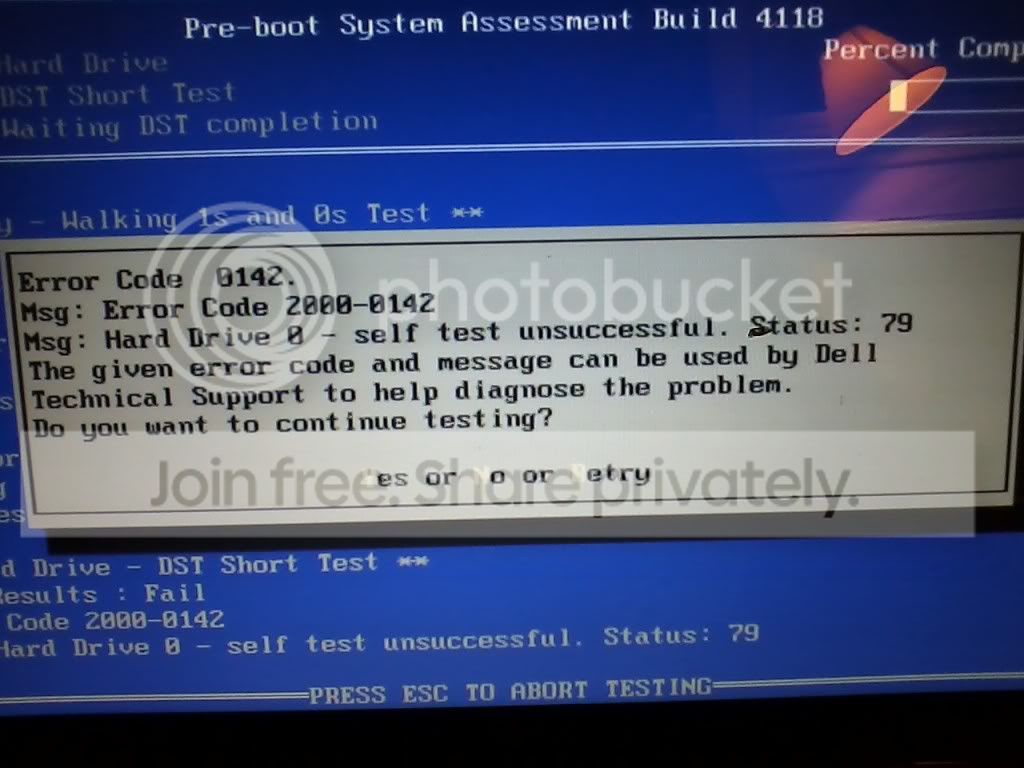
When it's been sitting awhile, a dialog box comes open. I took a pic of it: | My System Specs |
| System Manufacturer/Model Number DELL Inspiron 1545 OS Windows 7 Home Premium 64 Internet Speed 760 |
23 Jul 2012
|
#2 | | Windows 7 Ultimate - 64-bit | Windows 8 Pro - 64-bit |

Quote: Originally Posted by thomis DELL Inspiron 1545 running Windows 7
Purchased Aug 2009
I know there is spyware virus, when my wife logged on to pay bills some very suspicious pop-ups appeared asking for ss #, etc.
The real problems began when I tried to load Avast. Now when I turn it on it goes to a blue screen with the white bird and green olive branch. There is nothing to click on. I tried pressing F8 while turning on and I get to the black screen where I can choose safe mode, safe mode with networking, etc..It doesn't matter what I choose, it always ends up at the same blue screen with the bird.
I can't even see the system info to see if it's 32 or 64 bit. I know I need this to see which Windows Restore disk to create. I'm thinking it's 64 but not 100% sure.
When it's been sitting awhile, a dialog box comes open. I took a pic of it:  Hello there!
See if you can do a System Restore from System Recovery System Restore (Follow Option 2) | My System Specs | | System Manufacturer/Model Number Samsung NP550P5C-S02IN OS Windows 7 Ultimate - 64-bit | Windows 8 Pro - 64-bit CPU Intel® Core™ i7 Processor 3,610QM (2.30Hz, 6MB L3 Cach Memory 8 GB Graphics Card NVIDIA® GeForce® GT 650M 2GB Graphics, Optimus™ techno Sound Card SoundAlive™ JBL 3 Speakers (With sub-Woofer) Monitor(s) Displays 39.62cm (15.6) SuperBright 300nit HD+ LED Display Screen Resolution 1,600 x 900, Anti-Reflective Hard Drives 1TB S-ATA II Hard Drive (5,400RPM) |
23 Jul 2012
|
#3 | | Windows 7 Home Premium 64 Bit SP 1 |
At the same time alongwith what Captain suggested, you may also think for this :
Does it boot in Safe Mode ?
If so, follow the instructions of Troubleshooting Windows 7 Failure to Boot . | My System Specs | | Computer type PC/Desktop System Manufacturer/Model Number Self Assembled OS Windows 7 Home Premium 64 Bit SP 1 CPU Intel Core i3 2120 @ 3.30GHz Motherboard Gigabyte Technology Co., Ltd. H61M-DS2 DVI Memory Corsair 2GB x2 (Single-Channel DDR3 @ 665MHz) Graphics Card 2047MB GeForce GTS 450 (ZOTAC International) Sound Card Onboard (Realtek High Definition Audio) Monitor(s) Displays LG Flatron E2040T Screen Resolution 1600x900 Keyboard Logitech MK220 Mouse Logitech MK220 PSU uMAX 750 watt. Case iBall Cooling Air/ Fans Hard Drives Western Digital 1 TB
Seagate 500 GB Internet Speed BSNL Broadband Antivirus Microsoft Security Essentials Browser Waterfox Other Info Dell Studio 15" Laptop |
23 Jul 2012
|
#4 | | Windows 7 Home Premium 64 |
1. I can't get to the startup menu.
2. Its a laptop so I don't think it has a pause/ break key. | My System Specs | | System Manufacturer/Model Number DELL Inspiron 1545 OS Windows 7 Home Premium 64 Internet Speed 760 |
23 Jul 2012
|
#5 | | Windows 7 Home Premium 64 Bit SP 1 |
You are to press F8 to get into advanced boot options, to get into safe mode. | My System Specs | | Computer type PC/Desktop System Manufacturer/Model Number Self Assembled OS Windows 7 Home Premium 64 Bit SP 1 CPU Intel Core i3 2120 @ 3.30GHz Motherboard Gigabyte Technology Co., Ltd. H61M-DS2 DVI Memory Corsair 2GB x2 (Single-Channel DDR3 @ 665MHz) Graphics Card 2047MB GeForce GTS 450 (ZOTAC International) Sound Card Onboard (Realtek High Definition Audio) Monitor(s) Displays LG Flatron E2040T Screen Resolution 1600x900 Keyboard Logitech MK220 Mouse Logitech MK220 PSU uMAX 750 watt. Case iBall Cooling Air/ Fans Hard Drives Western Digital 1 TB
Seagate 500 GB Internet Speed BSNL Broadband Antivirus Microsoft Security Essentials Browser Waterfox Other Info Dell Studio 15" Laptop |
23 Jul 2012
|
#6 | | Windows 7 Home Premium 64 |
"I tried pressing F8 while turning on and I get to the black screen where I can choose safe mode, safe mode with networking, etc..It doesn't matter what I choose, it always ends up at the same blue screen with the bird." | My System Specs | | System Manufacturer/Model Number DELL Inspiron 1545 OS Windows 7 Home Premium 64 Internet Speed 760 |
23 Jul 2012
|
#7 | | Windows 7 Home Premium 64 Bit SP 1 |
is it the same computer listed in your system specs ? home premium 64 bit ? | My System Specs | | Computer type PC/Desktop System Manufacturer/Model Number Self Assembled OS Windows 7 Home Premium 64 Bit SP 1 CPU Intel Core i3 2120 @ 3.30GHz Motherboard Gigabyte Technology Co., Ltd. H61M-DS2 DVI Memory Corsair 2GB x2 (Single-Channel DDR3 @ 665MHz) Graphics Card 2047MB GeForce GTS 450 (ZOTAC International) Sound Card Onboard (Realtek High Definition Audio) Monitor(s) Displays LG Flatron E2040T Screen Resolution 1600x900 Keyboard Logitech MK220 Mouse Logitech MK220 PSU uMAX 750 watt. Case iBall Cooling Air/ Fans Hard Drives Western Digital 1 TB
Seagate 500 GB Internet Speed BSNL Broadband Antivirus Microsoft Security Essentials Browser Waterfox Other Info Dell Studio 15" Laptop |
23 Jul 2012
|
#8 | | Windows 7 Home Premium 64 |
No, Its a dell laptop windows 7 home premium, now I think it's a 32 bit since i've been reading a bunch of similar threads on this forum.
I need to create a system repair disk for a 32 bit | My System Specs | | System Manufacturer/Model Number DELL Inspiron 1545 OS Windows 7 Home Premium 64 Internet Speed 760 |
23 Jul 2012
|
#9 | | Windows 7, 64 bit Home SP1, Win 8 Pro 64 bit Citrus Co, FL |
Press F8 at power on (POST) and you should get the options for the Dell recovery partition (PC Restore) and that will allow you to restore the PC to the original factory condition (assuming the recovery partition is not corrupted or has been deleted).
If you can't restore with the Dell recovery partition, you will have to reinstall with a Win 7 disc (and drivers). If this is the case, you can download Windows 7 and create an iso DVD, the same version that you have (probably 64), and use the Dell supplied Win 7 Product Key (tag is usually in the battery compartment) to install. You can access needed driver downloads (and you need at least the Dell supplied sound driver, if not more) from www.support.dell.com using your service tag number. Windows 7 download
If you want Dell discs, you can request a set of discs (Windows 7 and the Dell drivers and utilities disc) from Dell HERE You will need to be the registered with Dell owner and have the service tag number. | My System Specs | | Computer type PC/Desktop System Manufacturer/Model Number My Own Build OS Windows 7, 64 bit Home SP1, Win 8 Pro 64 bit CPU Intel i7 3770 Motherboard Gigabyte GA-Z77X-UD5H Memory 16GB GSkill Ripsaw F3-14900CL9Q-16GBXL Graphics Card Sapphire HD7770 Sound Card RealTek Monitor(s) Displays Viewsonic VA2448 Series 24" LED Screen Resolution 1920X1080 Keyboard Kensington wired Mouse Logitech Wireless PSU Antec High Current Gamer HCG-620M Modular Case Coolermaster HAF XM Cooling Corsair H80 Liquid cooling with aftermarket Nexus quiet fans Hard Drives 240GB Intel 520 SSD for Win 7
128GB OCZ Vertex 4 SSD for Win 8
1 TB Seagate drive for backup Internet Speed 40 MB/sec (Cable) Antivirus Microsoft Security Essentials and Malwarebytes Browser I.E9/Firefox Other Info Sonar X2 Professional 64 bit Recording Software with Roland Octa-Capture and MAudio Fast Track Ultra 8R recording interfaces, Frontier Tranzport wireless control unit, Behringer BCF2000 Control Surface.
Five USB connected optical drives for CD Audio production using Nero 11
Other systems: Desktop with i5 3550 CPU, LenovoZ560 Laptop with Win 7 64 bit HP, SP1, new iPad |
23 Jul 2012
|
#10 | | Windows 7 Home Premium 64 Bit SP 1 |
Better you download windows 7 home premium iso from Official Windows 7 SP1 ISO from Digital River « My Digital Life .
If the system repair fails, you might have to go for a clean install, and in that case it will be necessary. | My System Specs | | Computer type PC/Desktop System Manufacturer/Model Number Self Assembled OS Windows 7 Home Premium 64 Bit SP 1 CPU Intel Core i3 2120 @ 3.30GHz Motherboard Gigabyte Technology Co., Ltd. H61M-DS2 DVI Memory Corsair 2GB x2 (Single-Channel DDR3 @ 665MHz) Graphics Card 2047MB GeForce GTS 450 (ZOTAC International) Sound Card Onboard (Realtek High Definition Audio) Monitor(s) Displays LG Flatron E2040T Screen Resolution 1600x900 Keyboard Logitech MK220 Mouse Logitech MK220 PSU uMAX 750 watt. Case iBall Cooling Air/ Fans Hard Drives Western Digital 1 TB
Seagate 500 GB Internet Speed BSNL Broadband Antivirus Microsoft Security Essentials Browser Waterfox Other Info Dell Studio 15" Laptop Inspiron 1545- BS w/ dove/ olive branch & Startup Repair problems? All times are GMT -5. The time now is 04:09 AM. | |