| Windows 7: no commands working on windows 7 pro 64 bit cmd |
24 Jul 2012
|
#1 | | |
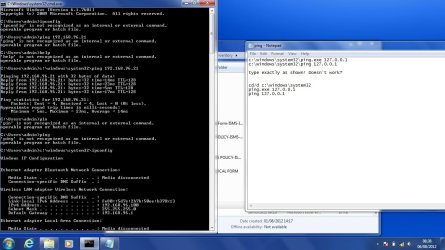
no commands working on windows 7 pro 64 bit cmd just purchased two laptop dell with windows 7 professional 64 bit, everything work perfect in the os, but when using cmd, every commands that is being used, getting "is not recognized as an internal or external command" for example in cmd you type "ping followed by the ip address" you get that its not recognised, even if type help, nothing happen, can someone help me how to make the cmd work again...thanks | My System Specs |
| |
24 Jul 2012
|
#2 | | Microsoft Windows 7 Home Premium 64-bits 7601 Multiprocessor Free Service Pack 1 SecretCity |
Just a simple command like DIR doesn't work? | My System Specs | | Computer type Laptop System Manufacturer/Model Number ACER ASPIRE 5742G OS Microsoft Windows 7 Home Premium 64-bits 7601 Multiprocessor Free Service Pack 1 CPU Intel(R) Core(TM) i3 CPU M 370 @ 2.40GHz Motherboard Acer Aspire 5742G Memory 4,00 GB Graphics Card ATI Mobility Radeon HD 5400 Series Sound Card (1) AMD High Definition Audio Device (2) Realtek High Defi Screen Resolution 1366 x 768 x 32 bits (4294967296 colors) @ 60 Hz Hard Drives WDC WD5000BEVT-22ZAT0 |
24 Jul 2012
|
#3 | | Microsoft Windows 7 Home Premium 64-bits 7601 Multiprocessor Free Service Pack 1 SecretCity |
What does work? Code:
c:\windows\system32\ping.exe 127.0.0.1
c:\windows\system32\ping 127.0.0.1
dir
path | My System Specs | | Computer type Laptop System Manufacturer/Model Number ACER ASPIRE 5742G OS Microsoft Windows 7 Home Premium 64-bits 7601 Multiprocessor Free Service Pack 1 CPU Intel(R) Core(TM) i3 CPU M 370 @ 2.40GHz Motherboard Acer Aspire 5742G Memory 4,00 GB Graphics Card ATI Mobility Radeon HD 5400 Series Sound Card (1) AMD High Definition Audio Device (2) Realtek High Defi Screen Resolution 1366 x 768 x 32 bits (4294967296 colors) @ 60 Hz Hard Drives WDC WD5000BEVT-22ZAT0 |
25 Jul 2012
|
#4 | | |
@Kaktussoft i've tried the simple command DIR, it works ... but, ping, ipconfig,help..etc..doesn't work | My System Specs | | |
25 Jul 2012
|
#5 | | Microsoft Windows 7 Home Premium 64-bits 7601 Multiprocessor Free Service Pack 1 SecretCity |
c:\windows\system32\ping.exe 127.0.0.1
c:\windows\system32\ping 127.0.0.1
type exactly as shown! Doesn't work? | My System Specs | | Computer type Laptop System Manufacturer/Model Number ACER ASPIRE 5742G OS Microsoft Windows 7 Home Premium 64-bits 7601 Multiprocessor Free Service Pack 1 CPU Intel(R) Core(TM) i3 CPU M 370 @ 2.40GHz Motherboard Acer Aspire 5742G Memory 4,00 GB Graphics Card ATI Mobility Radeon HD 5400 Series Sound Card (1) AMD High Definition Audio Device (2) Realtek High Defi Screen Resolution 1366 x 768 x 32 bits (4294967296 colors) @ 60 Hz Hard Drives WDC WD5000BEVT-22ZAT0 |
25 Jul 2012
|
#6 | | Microsoft Windows 7 Home Premium 64-bits 7601 Multiprocessor Free Service Pack 1 SecretCity |
cd/d c:\windows\system32
ping.exe 127.0.0.1
ping 127.0.0.1 | My System Specs | | Computer type Laptop System Manufacturer/Model Number ACER ASPIRE 5742G OS Microsoft Windows 7 Home Premium 64-bits 7601 Multiprocessor Free Service Pack 1 CPU Intel(R) Core(TM) i3 CPU M 370 @ 2.40GHz Motherboard Acer Aspire 5742G Memory 4,00 GB Graphics Card ATI Mobility Radeon HD 5400 Series Sound Card (1) AMD High Definition Audio Device (2) Realtek High Defi Screen Resolution 1366 x 768 x 32 bits (4294967296 colors) @ 60 Hz Hard Drives WDC WD5000BEVT-22ZAT0 |
01 Aug 2012
|
#7 | | |
i've just used the above command that you give to me in cmd,
(cd/d c:\windows\system32
ping.exe 127.0.0.1
ping 127.0.0.1)
it work perfectly, i can ping, use ipconfig, etc.., but when i again close the cmd prompt, and open it again, it doesn't work directly, i've to change again to"cd/d c:\windows\system32" and then use the cmd,
can't i put it default on the cmd to cd/d c:\windows\system32.... please reply back
thanks for | My System Specs | | |
01 Aug 2012
|
#8 | | Microsoft Windows 7 Home Premium 64-bits 7601 Multiprocessor Free Service Pack 1 SecretCity |
Simply a problem with your default search path!
In command prompt PATH
post output SET
post output
I'm interested if this is listed:
SystemDrive=C:
SystemRoot=C:\Windows | My System Specs | | Computer type Laptop System Manufacturer/Model Number ACER ASPIRE 5742G OS Microsoft Windows 7 Home Premium 64-bits 7601 Multiprocessor Free Service Pack 1 CPU Intel(R) Core(TM) i3 CPU M 370 @ 2.40GHz Motherboard Acer Aspire 5742G Memory 4,00 GB Graphics Card ATI Mobility Radeon HD 5400 Series Sound Card (1) AMD High Definition Audio Device (2) Realtek High Defi Screen Resolution 1366 x 768 x 32 bits (4294967296 colors) @ 60 Hz Hard Drives WDC WD5000BEVT-22ZAT0 |
01 Aug 2012
|
#9 | | |
there is C:\Users\name
that all..when i type ping (ip) it says is not recognized as an internal or external command
but when i type C:\cd/d c:\windows\system32\ ping (ip) it work well, all command that i enters..works perfect...
why?? is there something that should be done, or to change, please give me a possible solution why the cmd is behaving like that..
regards | My System Specs | | |
01 Aug 2012
|
#10 | | Win 7 Ultimate (64-bit), Win 7 Pro (32-bit) N. Calif |
You need to modify your PATH environment variable to at least include: %SystemRoot%\system32
To do that, right-click on My Computer, then select Properties, then Advanced system settings. On the Properties dialog select Environment Variables. In the System variables box, scroll until you find the PATH variable then select it and click on the Edit button. Add (don't replace) this to what exists there already: %SystemRoot%\system32 (if appending to the end of the existing PATH make sure you put a semicolon ; in to seperate the values). | My System Specs | | System Manufacturer/Model Number Home Built, Dell Inspiron 1520 Laptop OS Win 7 Ultimate (64-bit), Win 7 Pro (32-bit) CPU 3.4Ghz 3770K i7, 2.4Ghz Core 2 Duo Motherboard Gigabyte Z77X-UD3H, Dell Memory 8G, 3G Graphics Card ATI Radeon HD 5770, Mobile Intel 965 Sound Card High Definition Audio (Built-in to mobo) Monitor(s) Displays Dell 2409W 24" Screen Resolution 1920x1080 Keyboard IBM Model M - used continuously since 1986 Mouse Microsoft PSU Antec Case Antec 100 Cooling CM 212+ Hard Drives 128G SSD OS; 1.5T & 2T Data on Desktop, 320G for laptop Internet Speed 1.5M down 1.2M up :-( Other Info Also have an Acer Aspire netbook, a home-built AMD Dual core (Minecraft server) and home-built Pent 4 all running Win 7. Also have various machines running XP, Win Server 2K, Win Server 2003, Linux and DOS. I think I have a problem... no commands working on windows 7 pro 64 bit cmd problems? All times are GMT -5. The time now is 04:56 PM. | |