Windows 7 Forums


Windows 7: Copy and paste to folder

09 Sep 2009   #1

Windows 7 Ultimate
Stoughton, WI
 
 
Copy and paste to folder

One of the things that is bothering me, is the difficulty I have when I copy a file from another folder, and then try to past that file into another folder that is full of other folders.. etc.. It can be quite difficult to find a place on the screen in explorer, that I can paste to, that will actually put the file in same folder, and not one of the sub-folders.. This was easier to accomplish in prior versions of windows..


For the most part, I love this OS.. and would certainly say it trumps any prior version of windows.. Yes, there are some 3rd party apps that should be installed to make it even better, but this is the best Windows yet, and it has not even hit the market..
My System SpecsSystem Spec

09 Sep 2009   #2

Windows 7 Ultimate x64 + x86 + Windows 8 x64
Newport, South Wales, UK


Hi Musiclover,

I agree it can be difficult to get used to but there is a distinct area at the far left and right side of the detail pane that moves or copies to the actual folder
My System SpecsSystem Spec
09 Sep 2009   #3

Windows 7 x64 Ultimate
A Finnish immigrant in Leipzig, Germany


Quote   Quote: Originally Posted by musiclover7 View Post
One of the things that is bothering me, is the difficulty I have when I copy a file from another folder, and then try to past that file into another folder that is full of other folders.. etc.. It can be quite difficult to find a place on the screen in explorer, that I can paste to, that will actually put the file in same folder, and not one of the sub-folders.. This was easier to accomplish in prior versions of windows..

For the most part, I love this OS.. and would certainly say it trumps any prior version of windows.. Yes, there are some 3rd party apps that should be installed to make it even better, but this is the best Windows yet, and it has not even hit the market..
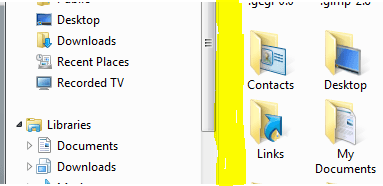
I use this area marked with yellow. It took a couple of days to get used to it, now it's no longer bothering me.

Copy and paste to folder-paste_area.png

Kari
My System SpecsSystem Spec
.


09 Sep 2009   #4


Quote   Quote: Originally Posted by musiclover7 View Post
One of the things that is bothering me, is the difficulty I have when I copy a file from another folder, and then try to past that file into another folder that is full of other folders.. etc.. It can be quite difficult to find a place on the screen in explorer, that I can paste to, that will actually put the file in same folder, and not one of the sub-folders....
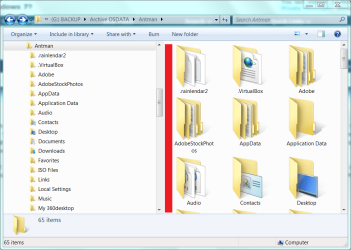
Yes, this is challenging with certain folder views. The area marked in red is always available, no matter the view.

Are you aware that you can enable Copy To/Move To in your right click context menu?
Attached Thumbnails
Copy and paste to folder-1.png  
My System SpecsSystem Spec
09 Sep 2009   #5


Rats.
My System SpecsSystem Spec
10 Sep 2009   #6

Windows 7 Ultimate
Stoughton, WI


Thanks for that all.. I figured out too that you can also paste to the address bar. It is a bit of an annoyance, but not a huge one.. For the most part, I am loving Windows 7 more and more each day.. The library concept, when put to good use, is brilliant...
My System SpecsSystem Spec
10 Sep 2009   #7

Windows 7 Ultimate x64 (Retail)
Honolulu, HI, USA


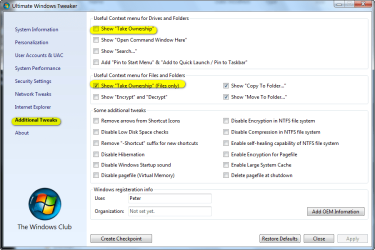
You can use a free app Ultimate Windows Tweaker v2, a Tweak UI for Windows 7 to add "move to folder" and "copy to folder" to the explorer right click context menu, in addition to other useful options (see screen shot below for some of the options you can easily add (or remove at any time & disregard the highlighted sections as they are not applicable to this discussion)). Very convenient.

Also, a superior free file transfer app that seamlessly integrates and works with win explorer is called "TeraCopy." It provides a much more informative display as files are being copied or moved than the native Windows fuction. The latest beta version of TeraCopy works great with 7. Once installed, everytime you use explorer to copy or move a file, TeraCopy actually makes the transfer with it's nice informative display that pops up while it's doing so. There is a paid pro version but the free version is very full featured (everything anyone would need) and absolutely no adware.
Attached Thumbnails
Copy and paste to folder-2009-08-10_015341.png  
My System SpecsSystem Spec
Reply

 Copy and paste to folder problems?


Thread Tools


Similar help and support threads for: Copy and paste to folder
Thread Forum
select/search multiple files, copy and paste to a new folder General Discussion
Solved Can't copy/paste USER folder Backup and Restore
'WindowsImageBackup' folder: can't copy & paste to external USB Backup and Restore
Folder Copy by Cut&Paste : extremely SLOW Performance & Maintenance
Copy, Paste, new folder creation time delays Performance & Maintenance


All times are GMT -5. The time now is 05:11 PM.


Seven Forums Android App Seven Forums IOS App Follow us on Facebook

Windows 7 Forums is an independent web site and has not been authorized,
sponsored, or otherwise approved by Microsoft Corporation.
"Windows 7" and related materials are trademarks of Microsoft Corp.
© Designer Media Ltd
  

1 2 3 4 5 6 7 8 9 10 11 12 13 14 15 16 17 18 19 20 21 22 23 24 25 26 27 28 29 30 31 32